ref must be one of: categoryID, siteSectionID, category, category/categoryID, category/name, category/description, category/url, category/allowedDiscussionTypes, locale, siteSection, siteSection/basePath, siteSection/contentLocale, siteSection/sectionGroup, siteSection/sectionID, siteSection/name, siteSection/description, siteSection/apps, siteSection/attributes, layoutViewType, discussionID, commentID, page, latest, sort, sortType, lookupSort, discussion, discussion/name, tags, breadcrumbs, discussionApiParams, serverDraftID, serverDraft.
A manufacturing company may be in need to track Capitalized Interest on each asset during the build of an asset and then once the asset is built and delivered to a customer the company can then accrue interest to the cost of the asset.
NetSuite does not have a process specific to a Construction in Progress as of now. We have created the following Enhancement requests:
However, there is a workaround that involves creating a new Asset Type and performing an Asset Transfer. Here are the steps:
Steps in NetSuite
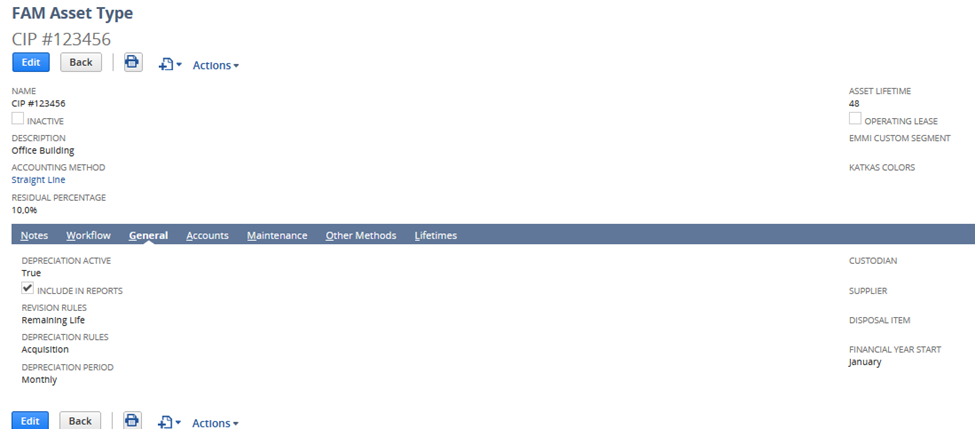
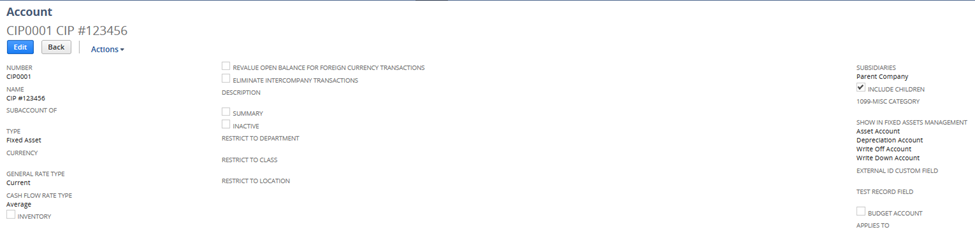
1. Create a new Asset Type and Asset Account with name Construction in Progress. For creating asset type, please visit SuiteAnswers: 105122 - Asset Types.
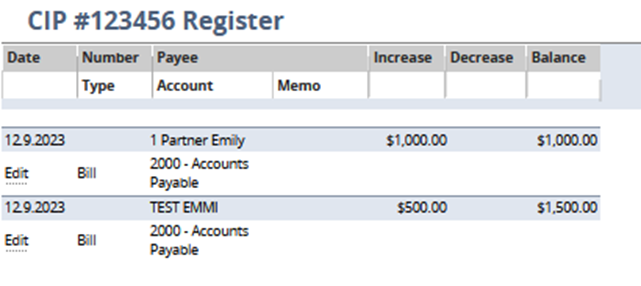
2. Record expenses related to the Asset being constructed to Construction in Progress Asset Account
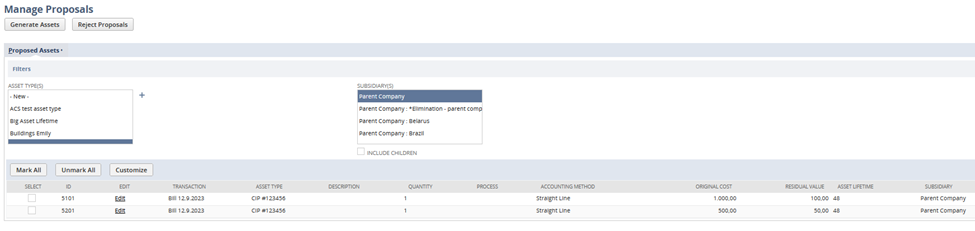
3. Once the Asset is completed, propose new asset for Construction in Progress Asset Type, select all transactions and Generate Asset. Please visit SuiteAnswers: 19273 - Asset Proposal and Generation for detailed process of Asset Proposal and Asset Generation.
Note:
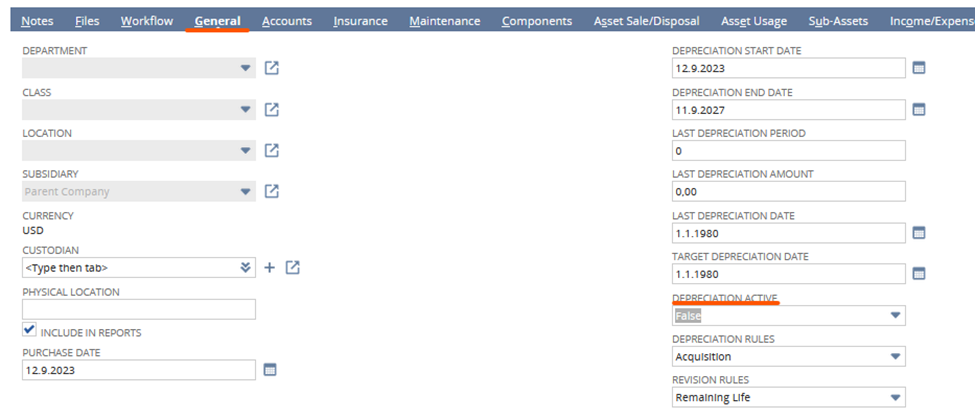
A. In case you don’t want to run depreciation for these CIP Assets, you may set the following:
B. For each Bill checked on the Manage Proposal page will be created separate Asset. In case you would like to have them linked together, you may use the FAM functionality of the Compound Assets (SA: 62835 - Build Compound Assets).
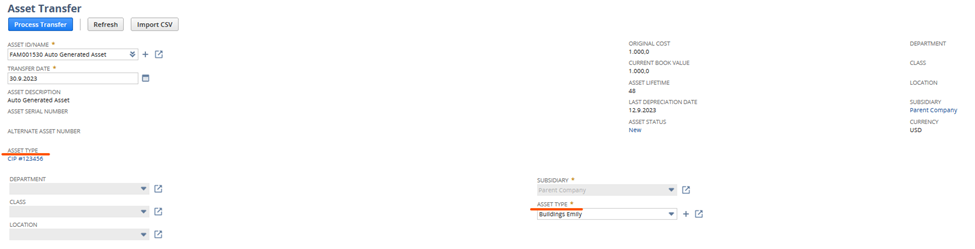
4. Once the asset is fully created, you may then perform Asset Transfer from Construction in Progress Asset Type to the correct Asset Type. For detailed Asset Transfer instruction, please visit SuiteAnswers: 27189 - Asset Transfer.
Note: All the accounting settings above are just illustrative and needs to be discussed with your inhouse accountant department.
Steps in NetSuite Next
Click Edit on your CIP Asset
Navigate to General tab
Set Depreciation Active: False:
Have some tips in Fixed Asset Management? Feel free to share your tips and ideas!
You are not allowed to view comments.
Big ideas. No travel required. SuiteWorld On Air brings the best of SuiteWorld directly to you. Stream keynotes live, access exclusive virtual content, and connect with the NetSuite community from wherever you are. Explore what's next for NetSuite, see AI innovation in action, and discover practical insights designed to…
Drive better outcomes with AI built into NetSuite Next Capital Hilton,1001 16th St NW, Washington, DC 20036 Join NetSuite experts for a free half-day event where you'll get a tour of NetSuite Next, explore AI-powered capabilities built into the platform, and learn practical ways to optimize NetSuite for your business. At…
Take NetSuite Next for a hands-on test drive Capital Hilton, 1001 16th St NW, Washington, DC 20036 What to expect: Inside the Suite is designed for companies exploring modern ERP solutions. This event gives you the opportunity to experience NetSuite Next - the next evolution of NetSuite that brings AI directly into how…
WEBINAR What's Next for Product Companies with NetSuite See how NetSuite Next uses AI to improve accuracy and protect margins Ask. Understand. Act. Use Ask Oracle to search, navigate, analyze business data, surface insights, get guidance, and take action using natural language—all through a single conversational…