Description
Hi,
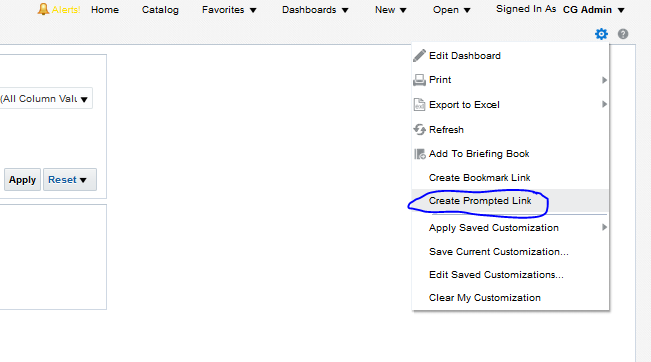
We have one option called "Create Prompted Link" if we run a dashboard from BI. Its give us the URL and url contains the BI+Prompt value url. which help us later using this url to run a report and by default all the required parameters selected.
ex: https://xxx-test.fa.em2.oraclecloud.com/analytics/saw.dll?Dashboard&PortalPath=/shared/Custom/_portal/Activity Report&Page=page 1&Action=Navigate&formulaUse1=code&col1="Activity Extension"."Extension Attribute LOV 020"&val1="01_Jupiter"&psa1="Sales - CRM Sales Activity"&var2=dashboard.variables['ActivityLocalAtt2']&formulaUse2=code&cov2="Activity Extension"."Extension Attribute LOV 020"&val2="01_Jupiter"&psa2="Sales - CRM Sales Activity"
Here if we run the above url my report runs with some parameter "val1=01_Jupiter"
Q) The same functionality required if we run the report SUI (opportunity subtab- OOTB analytic subtab) either it from standard/custom
I tried with some piece of custom code again it is working under BI page not from SUI pages
html Code:
<a id="idGetPURL" class="masterMenuItem NQWMenuItem NQWMenuItemWIconMixin NQWMenuItemOption" href="javascript:void(null)" onclick="SetHint(); return false;" role="menuitem" aria-label=" Create Prompted Link"><table class="MenuItemTable" cellspacing="0" cellpadding="0"><tbody><tr><td class="MenuItemIconCell"> </td><td class="MenuItemTextCell" colspan="2">Create Prompted Link</td></tr></tbody></table></a>
Regards,
Mohammed Hyder
Use Case and Business Need
1. Business user can bookmark their frequent applying filter
2. Report can run a click away with all required filters
3. Save time , users do not need repeatedly to select each filters every time
More details
User having SUI access only, and the required funtionality available only in BI side.
Original Idea Number: 48cef7741a