OS:WIN SERVER 2022
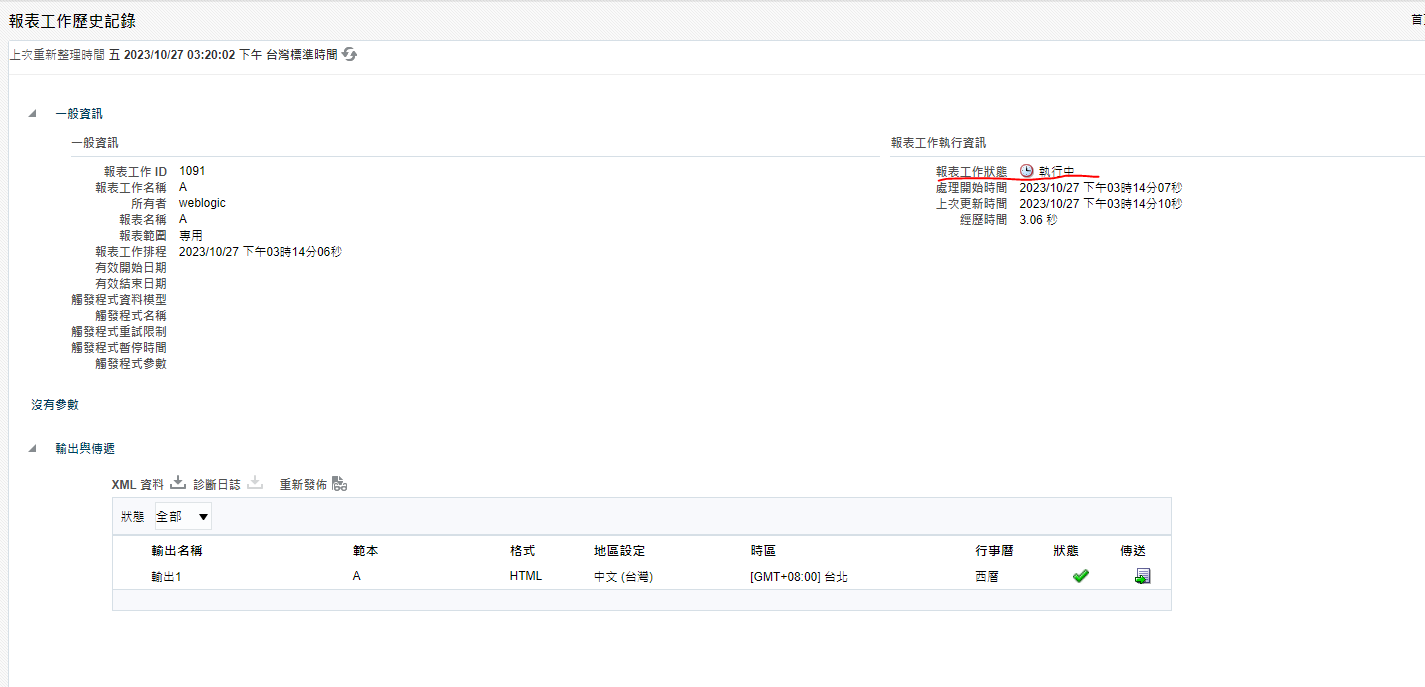
I INSTALL ORACLE BI Publisher(12.2.1.4) ,Scheduled Report Job Status Remains Running
Hi @Jelly ,
Is BI Publisher running in a cluster environment?
Hi Jelly ,
As per log file, Its failed to create an file during processing stage.
[APP: bipublisher] [partition-name: DOMAIN] [tenant-name: GLOBAL] [xdojobid: 1050] [essjobid: null] !!!!!!! ProcessorUtil.postDeliveryAction :: Exception happens[INSTANCE_JOB_ID=1050]::[JOB_ID=1050]::[OUTPUT_ID=1025]::[DELIVERY_ID=1022]::Exception when read/write counter file:C:\Oracle\Middleware\Oracle_BI\user_projects\domains\bi\servers\bi_server1\tmp\_WL_user\bipublisher_11.1.1\to5gma\public\xdo_sched\1050\bip.bi_server1\t1\bip4GxIEDIjQ55461148676675330090.tmpcounter file is not found or empty: C:\Oracle\Middleware\Oracle_BI\user_projects\domains\bi\servers\bi_server1\tmp\_WL_user\bipublisher_11.1.1\to5gma\public\xdo_sched\1050\bip.bi_server1\t1\bip4GxIEDIjQ55461148676675330090.tmpjava.lang.Exception: counter file is not found or empty: C:\Oracle\Middleware\Oracle_BI\user_projects\domains\bi\servers\bi_server1\tmp\_WL_user\bipublisher_11.1.1\to5gma\public\xdo_sched\1050\bip.bi_server1\t1\bip4GxIEDIjQ55461148676675330090.tmp
Are you able to see any other Error in our - bipublisher.log ?
Regards,
Arjun
Hi Jelly,
Seems like an Invalid character in the data.
2023-10-27T08:16:44.364+08:00] [bi_server1] [WARNING] [] [oracle.xdo] [tid: 345] [userId: weblogic] [ecid: 2b11dac0-e070-44fb-a975-730fbb7272e5-0000000a,0:2760:26:1] [APP: bipublisher] [partition-name: DOMAIN] [tenant-name: GLOBAL] [xdojobid: 1056] [essjobid: null] Read temp counter file failed: 程序無法存取檔案,因為另一個程序已鎖定檔案的一部分。
Its an Bug in the older version. Better to check the database table data.
Scheduled Reports Remain in Running Status On Report Job History (Doc ID 2557849.1)
I don't know where to start
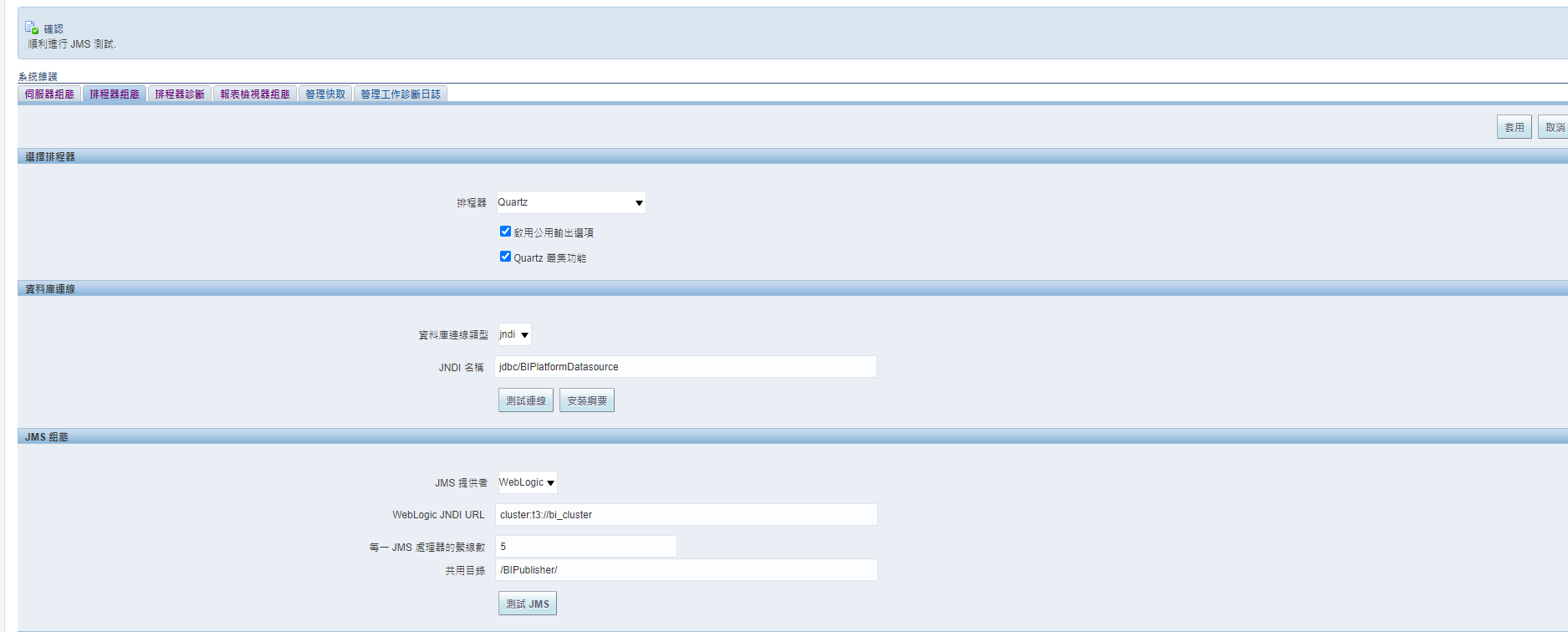
I'm going to ask one more time: is your BI Publisher running in a cluster environment?
This issue is quite common when BI Publisher is running in a cluster environment, but the "Shared Directory" setting is null (default). If this is the case, you can update the "Shared Directory" setting as follows:
You should use a UNC path since you are on Windows: https://learn.microsoft.com/en-us/dotnet/standard/io/file-path-formats#unc-paths
Please note that the path should be accessible from all bi publisher nodes.
As per log, there was no issue with Report running.Issue during moving file after processing .
My Suggestion is:
Try to bounce once the services after clearing the tmp and cache directories. Also make sure you have proper access to shared path.
Stop the services
Go to DOMAIN_HOME/servers/bi_server1
mv tmp/ tmp_old/
mv cache/ cache_old/
Restart the services and resubmit the job and validate the issue again?
Description: The Oracle Fusion Data Intelligence (FDI) Product Roadmap Update provides an overview of the latest developments and future plans for FDI. Oracle Product Management experts will share upcoming capabilities, key enhancements, and product direction, helping attendees understand what is changing and how these…
Hi,😊 I have a technical issue that I am struggling to resolve. I created an RTF layout, and the preview works correctly when using the BI Publisher Add-in tool. However, when I upload the layout in eText format, the generated report displays only question marks (???) instead of the expected data. I have not been able to…
hi Oracle team, Have a scenario: Country = A, then page 1 should have a notification for that country with no header/footer however page 2 onwards, the existing content with header/footer. but if Country != A then no notification and has to display existing one with the header/footer. Tried option A: Native word option…
Hi Oracle Community, I have a requirement in Oracle Fusion HCM Performance Management and would like to understand the recommended approach for BI Publisher. The business flow is as follows: A Manager logs into Oracle Fusion using their manager account. The manager can see the performance documents of their direct reports.…
I have Windows 64-Bit in my system and I have downloaded Oracle BI Publisher Desktop 64-bit. when trying to install Oracle BI Publisher in my system, I get error like "Set Word2007 flg failed" or "Please uninstall the current version using Add or Remove Program from the control Panel" But there is no program for Oracle BI…
The issue is related to the NordPass browser extension installed via our corporate policy. Issue observed: Users were unable to upload custom BI Publisher templates in Oracle Fusion (BI Publisher / Oracle Analytics) using Microsoft Edge and Google Chrome. The upload dialog remained indefinitely at "Uploading, please…