Categories
- All Categories
- Oracle Analytics and AI Learning Hub
- 44 Oracle Analytics and AI Sharing Center
- 20 Oracle Analytics and AI Lounge
- 278 Oracle Analytics and AI News
- 55 Oracle Analytics and AI Videos
- 16.2K Oracle Analytics and AI Forums
- 6.4K Oracle Analytics and AI Labs
- Oracle Analytics and AI User Groups
- 103 Oracle Analytics and AI Trainings
- 20 Oracle Analytics and AI Challenge
- Find Partners
- For Partners
How to change the default date format from MM-DD-YYY (American) to DD-MM-YYYY (European) in OTBI
The default date-format in OTBI is MM-DD-YYY.
In Europe we use DD-MM-YYYY.
Now we need to modify all date columns and change the format of the column. But if we could change the default date-format, then we do not need to change this.
(Also strange that OTBI is not using the preferences that you do set on user level in the ERP-system)

Answers
-
Hi,
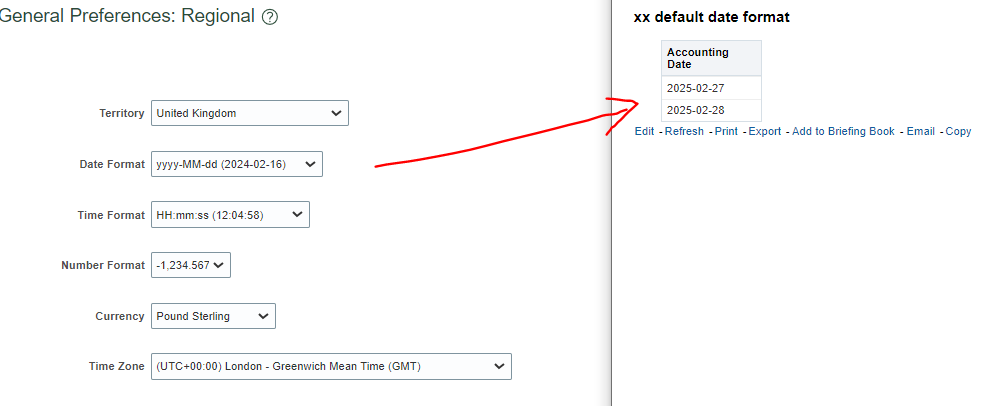
In OTBI the date format IS taken from your preferences in Oracle Fusion Cloud Applications.
Both the American and European date formats are bad because they are ambiguous for the first 12 days of each month which is about 39% of the days in a year. The better format to use is the international oraganization for standards ISO format YYYY-MM-DD which added bonus also sorts correctly to.
Anyway if you set your date format in General Preferences Regional in Fusion Applications then it gets used as the date format "Locale Short/Long" in your analysis / publisher report in OTBI. Each user using the same analytics and reports will get a different date format as per their user preference in FA.
0