I'm customizing a .rtf template associated to a BI Publisher report. I want to customize the page numbering to start at 0 and exclude the first page from the total number of pages.
Purpose:
- not to have page numbering on the first page ;
- start page numbering as of page 2 ;
- exclude the first page of the total number of pages.
Note: In order to illustrate the behavior, I'll use a 3 pages report for the following examples. Please note that the number of total pages may vary and isn't always of 3 pages.
When using the page number formatting in Word, I'm selecting "Different First Page" and the page numbering to start at 0 (see screenshot below).
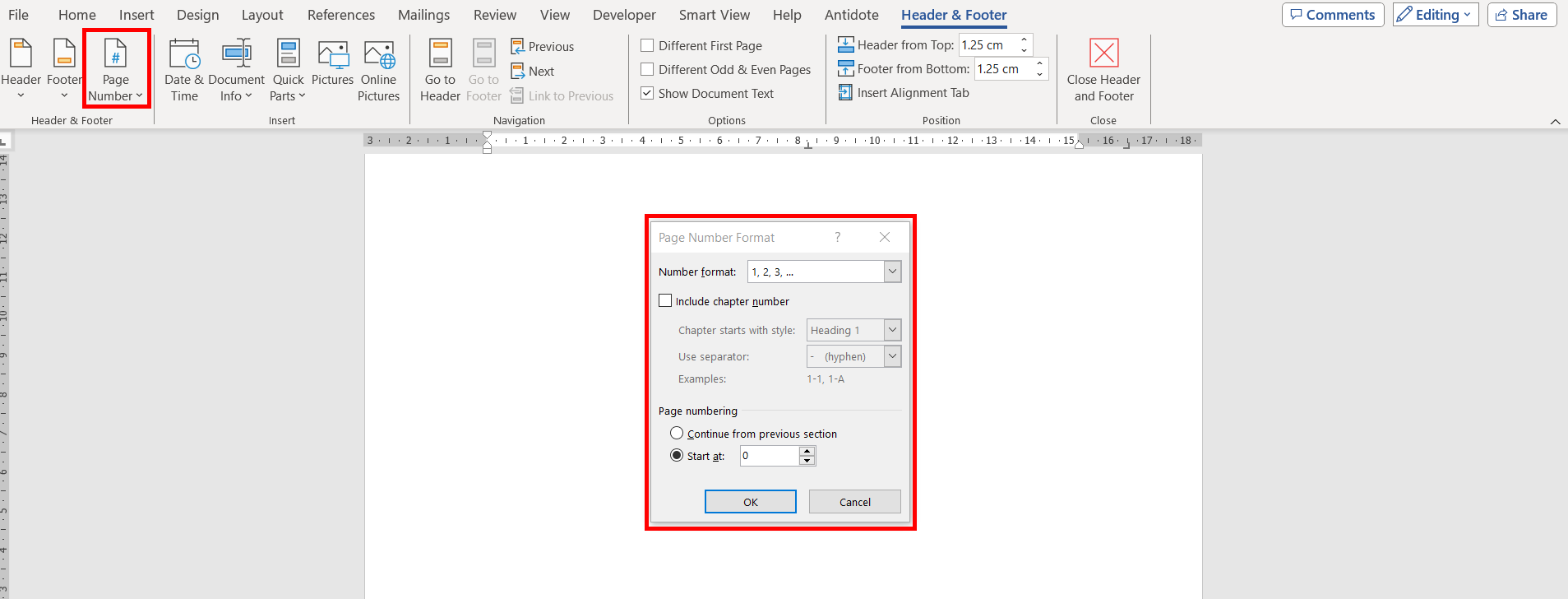
I have the correct page numbering when exporting the report in PDF but I need to have the same behavior in RTF.
Expected Result (correct in PDF format, see screenshot below):
- No page numbering/footer on Page 1.
- Page numbering starts displaying as of Page 2 of the report. (displaying "Page 1 of 2" for a 3 pages report)
- Page numbering on Page 3 (displaying "Page 2 of 2" for a 3 pages report)



Actual Result (exported RTF format):
- No page numbering on 1st page (expected)
- Page numbering starts at 2 (of 3) on page 2 (incorrect)
- Total Pages of 3 when first page should be excluded from total number of pages (incorrect).



What can I do to start page numbering at 0, to exclude the first page from the total number of pages and to be able to export both in PDF and in RTF?

