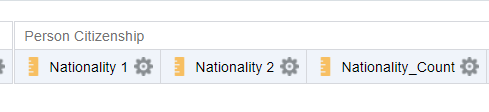
I have a requirement where I need all the nationalities of a person in a single row. Ideally when we fetch the citizenship we get multiple rows. We have tried RCOUNT and PIVOTTING Results but no luck. Has anyone achieved this already?
Hi @Vibha Pandey - Oracle ,
I have had a similar question in the past, but the problem was that all Nationalities were displayed but only the current one was desired. This is explained in a little more detail in Doc ID 3021065.1.
Diversity Analysis includes 'Country Of Citizenship' and it will show all citizenships (nationalities) by default. If you want to filter out expired citizenships, you can use the filter: Citizenship Status Code = E (expired) (CITIZENSHIP_STATUS).
Hope that helps.
Regards,
John
Thanks John!
My client has a population where dual citizenship is common. I need both of them on the report and in one single row. Something like Nationality1, Nationality2.
Hi @Vibha Pandey - Oracle Did you manage to get the multiple nationalities in a single row? I am having a similar use case and not able to achieve the desired output.
Hi @Madhura Saurabh Mirikar,
Welcome to the Oracle Analytics Community!
As it is an year old post (and if you are not able to receive any answer), I would recommend you to raise a new question with all relevant details like issue details, screenshot (without sensitive data) etc. so that someone can able to help you.
Thank you.
I agree it is better to start a new discussion instead of updating a year old post.
In any case regarding your question, OTBI cannot natively return multiple citizenships/nationalities in a single row for a person. But you can achieve it using BI Publisher (LISTAGG), a Data Model, or a custom SQL-based subject area, because OTBI does not support dynamic row-to-column pivoting or string aggregation.
Hope it helps!
Description: Join our Product Management team to learn about new features that are part of 26.R3 Application release of Fusion Data Intelligence (SCM). The session will cover updates on Supply Chain Management and Procurement. Presented by: Anil Sebastian - Senior Director, SCM Product Management, Fusion Data Intelligence…
We want a better grasp on what is considered custom data so we can plan ahead and scale properly before we get too big. Fortunately we are no where near the 50gb limit as found using the subject area for custom data but it doesn't tell us other than 'System' where the custom data is coming from. I found documentation here:…
Is there a way to refresh our development environments in OAC with production data? There a lot of developments that didn't make the cut into production and/or was only used for testing and we would like to clean up dashboards, datasets, data flows, etc… Possibly similar to how receive environment refreshes in our Oracle…
In FDI, most of the Hierarchy folder wont populating any data. This is one of the most required data from HR. Can anyone assist me how can I get that data in FDI.
Hello Oracle Team, Many organizations currently rely on both Oracle Transactional Business Intelligence (OTBI) and Oracle Fusion Data Intelligence (FDI) for reporting and analytics. While FDI continues to expand its subject area coverage, there are still several OTBI subject areas that are not yet available in FDI. Could…
Managers want the ability to assign delegates in Fusion Data Intelligence (FDI) so that delegated users can access and use reports on their behalf. Is that available in FDI now? If yes, anyone share docs about steps to implement that in FDI Thanks