I have been trying to split the field "Person Phones"."Search Phone Number" (Under the Workforce Management - Person Real Time subject area) into separate fields for Phone (Home) and Phone (Work). I want to have just one line per person.
The only fields used in the report currently are Person Number, Phone (Home), and Phone (Work), but the phone numbers are showing on separate rows, rather than one line.
** I will need to add in several more fields from multiple subject areas, so I do not believe a Pivot Table will work as a workaround. **
For the home phone column, I am using the formula:
CASE "Person Phones"."Phone Type Code" WHEN 'H1' THEN "Person Phones"."Search Phone Number" END
For the work phone column, I am using the formula:
CASE "Person Phones"."Phone Type Code" WHEN 'STF_SLOC' THEN "Person Phones"."Search Phone Number" END
Can you please help me achieve one row per person, with Person Number, Phone (Home), and Phone (Work), etc?
Screenshots…
What I see:
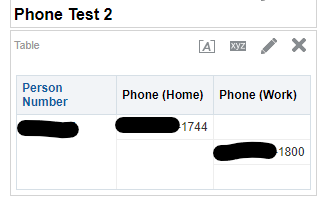
vs What I want to see:




