Categories
- All Categories
- Oracle Analytics and AI Learning Hub
- 42 Oracle Analytics and AI Sharing Center
- 20 Oracle Analytics and AI Lounge
- 277 Oracle Analytics and AI News
- 54 Oracle Analytics and AI Videos
- 16.2K Oracle Analytics and AI Forums
- 6.4K Oracle Analytics and AI Idea Labs
- Oracle Analytics and AI User Groups
- 103 Oracle Analytics and AI Trainings
- 19 Oracle Analytics and AI Challenge
- Find Partners
- For Partners
Data Augmentation - Extend Entity - Rename Columns Option
While creating a data augmentation to extend the Inventory Item dimension with Item EFFs, it comes over very messy. During the augmentation process, everything looks fine. It's formatted with nice labeling.
I set it to extend the Inventory Item dimension. Everything worked as desired; however, the way they get displayed is unwieldy and unorganized.
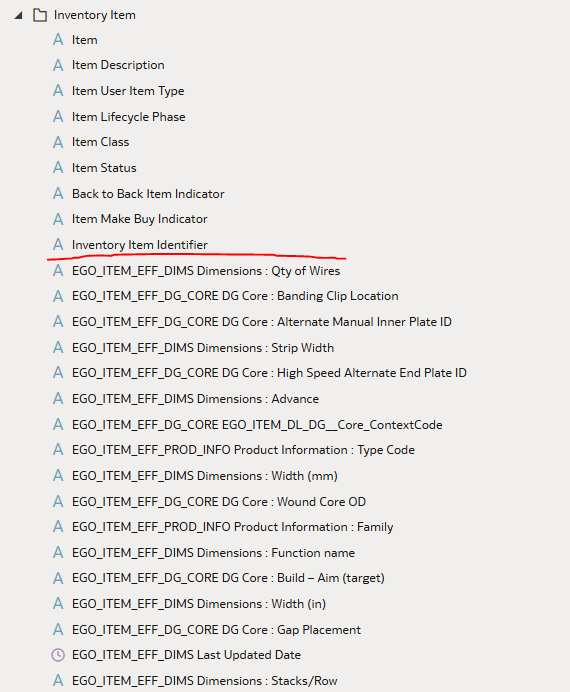
So my next step was to create a copy of the subject area so I can rename them and create folders to organize it. That somehow made it even worse. It removed the custom labels and it's illegible because you're only allowed to work in a small box.
I have 2 suggestions:
- Allow us to create folders, reorganize, and rename fields in the out-of-the-box subject areas. Then I don't need to create a custom SA.
- Allow us to rename and control the format of the columns while extending the entity in augmentation.
Comments
-
Please use the create Dataset option in Data Augmentations to bring the data into FDI. Once the data is available in FDI, you can use Semantic Model extensions to join them as the existing Dimensions. This allows you to customize the presentation layer.
1 -
That's a helpful workaround. I can do that in the meantime; however, if there's going to be an option to directly extend a dimension using the wizard, I need more control than I'm currently given.
0 -
@Branden Pavol Thank you for the update.
We do not recommend using Extend Dimension Wizard. We plan to move all the customers away from this wizard, as it caused issues in some scenarios.
So kindly please use the create Dataset option in Data Augmentations.
0 -
Noted. Thank you.
0


