Hello,
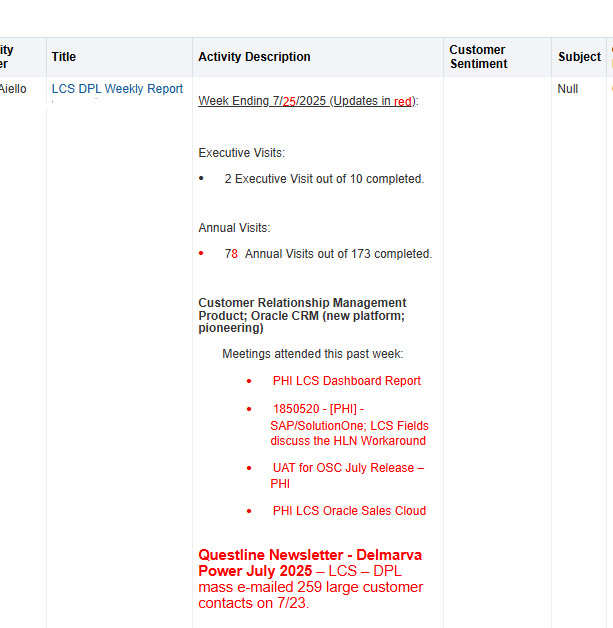
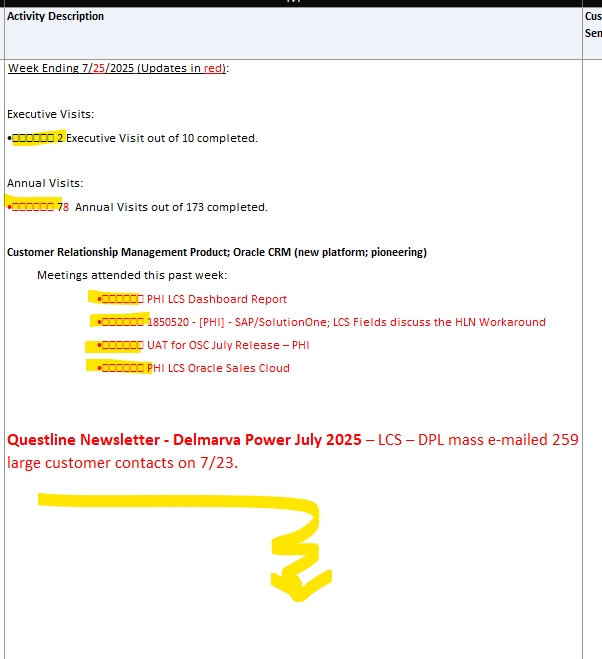
Upon extracting the report, the format of values in excel file have extra characters and extra spaces. Is there a way to correct the data upon exporting?
Report values
Exported values with special characters and extra space below.
Hi @Ivony Ann Paula Salango ,
Extra Spaces or Characters. These often come from:
Concatenated columns with manual spacing. Hidden HTML tags or formatting in text columns. Null values being replaced with placeholders.
sql TRIM(REPLACE("Person"."Display Name", CHR(160), ' ')) CHR(160) removes non-breaking spaces.
TRIM() cleans leading/trailing spaces.
2. Date Format Issues Dates may appear as serial numbers (e.g., 44348.10469) in Excel.
Set a custom date format in OTBI: Go to Column Properties → Data Format. Choose Custom Format like MM/dd/yyyy. Avoid using time zones unless necessary.
Check below as it might be helpful:
Creating Analyses and Dashboards in Oracle Transactional Business Intelligence
OTBI Report Date Format changes when exporting to Excel — Oracle Analytics
Thanks, Riyaz Ali
Hi @Riyaz Ali-Oracle ,
The extra spaces turn out to be extra rows in the excel file. I tried to check any possible option in the properties, but they are not working.
Where AI meets business outcomes Oracle AI World brings the Oracle community together to explore how AI and other technology innovations are driving real business outcomes across industries. Discover what’s new through: Mainstage keynotes to hear the latest directly from Oracle leadership Product demonstrations Customer…
Our Requisition OTBI analysis is having many values Requisition Number Requisition Title Requisition Status Hiring Manager Full Name Recruiter Full Name am able to see values for all. When am passing Prompt(Hiring Manager Full Name or Recruiter Full Name) am not able to see the data. Am sure we have values/data for passed…
Hi Experts, We are using Oracle BI Publisher Email Bursting to distribute reports via email. Currently, one of our bursting outputs generates a report of approximately 20 MB, and we are trying to understand whether there are any size limitations that could impact email delivery. Scenario: Report Delivery Method: Email…
Team, We have a requirement to select below PVOs HcmTopModelAnalyticsGlobalAM.ProfileAM_ProfileItemPVO HcmTopModelAnalyticsGlobalAM.ProfileAM_ProfilePVO HcmTopModelAnalyticsGlobalAM.ProfileAM_ContentItemPVO HcmTopModelAnalyticsGlobalAM.ProfileAM_ContentTypePVO Do we have any documentation around these?
We have a requirement of enabling OTBI report in Purchase Requisition Redwood page similar to classic UI.How can that be done?