How to run bip report from oracle analytics cloud ?
Hi @Shlomo Elnekave, Thanks for posting your question.
BI Publisher (aka Oracle Analytics Publisher) is part of Oracle Analytics Cloud’s Enterprise Edition.
You can directly run any existing publisher report by navigating to its report path, e.g. /Shared Folders/BIP_Reports_Folder/YourReportName
And if you are trying to programmatically run a publisher report, you can do it using the available REST endpoints, please refer to the following documentation for more details:
https://blogs.oracle.com/analytics/run-schedule-publisher-reports-on-oac-using-rest-apis
https://docs.oracle.com/middleware/bi12214/bip/BIPAP/op-v1-reports-reportpath-run-post.html
Hope this helps!
Thanks @Aman Jain-Oracle how can i know if i am using the "Oracle Analytics Cloud’s Enterprise Edition"? is there any other version of Oracle Analytics Cloud?
Hi @Shlomo Elnekave , Please login to the OCI (Oracle Cloud Infrastructure) console and navigate to your OAC instance, there you should be able to get this information under instance details section else check with the environment admin.
Also if you want to know which OAC version you are currently running , please login to your OAC environment → Go to Homepage → click on your user profile icon → From the dropdown menu, select the About option
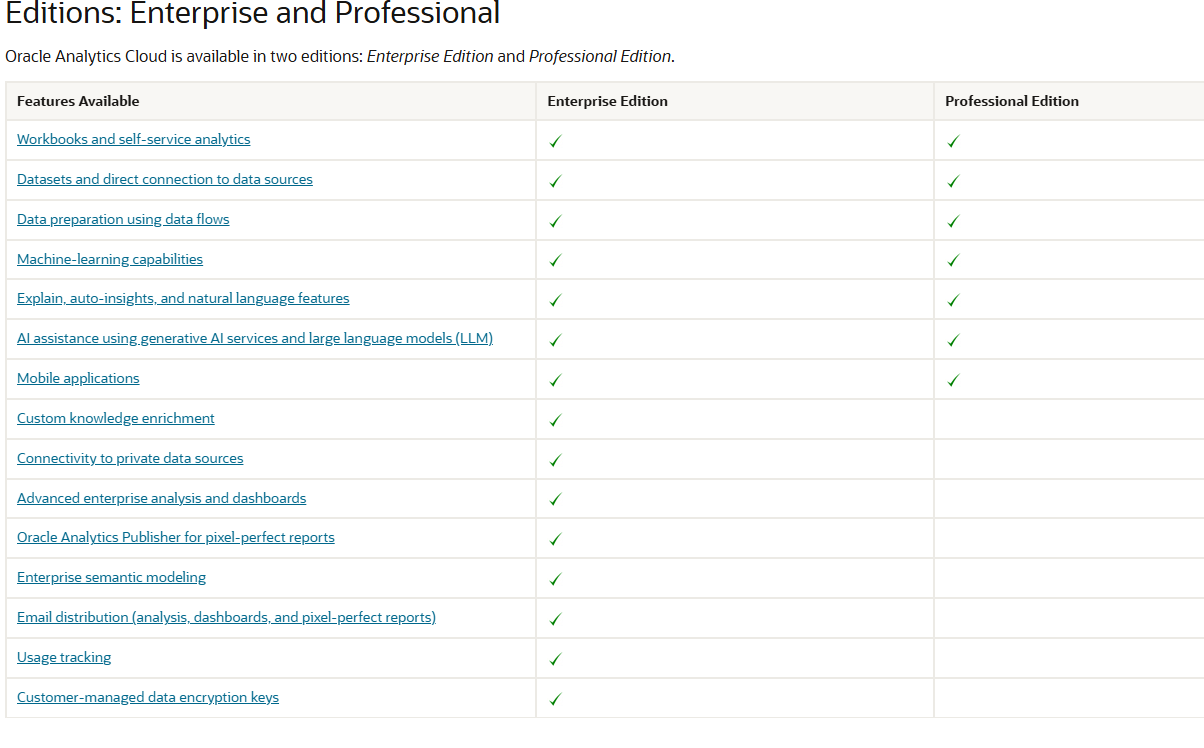
Please refer to the following document to get more information about the Editions: Enterprise and Professional
https://docs.oracle.com/en/cloud/paas/analytics-cloud/acsgs/editions-enterprise-and-professional.html
Thanks
Very helpful & useful information.
Thanks for sharing @Aman Jain-Oracle!
Thanks, Aman, for providing the information.
Currently, Oracle supports two versions for OAC and here is the comparison between these versions:
Where AI meets business outcomes Oracle AI World brings the Oracle community together to explore how AI and other technology innovations are driving real business outcomes across industries. Discover what’s new through: Mainstage keynotes to hear the latest directly from Oracle leadership Product demonstrations Customer…
I have been tasked with creating a run book for ESS jobs. Whilst the queries are centred on the ESS_REQUEST_HISTORY table I would appreciate any suggestions/best practice for implementing a set of reports
Hi,😊 I have a technical issue that I am struggling to resolve. I created an RTF layout, and the preview works correctly when using the BI Publisher Add-in tool. However, when I upload the layout in eText format, the generated report displays only question marks (???) instead of the expected data. I have not been able to…
hi Oracle team, Have a scenario: Country = A, then page 1 should have a notification for that country with no header/footer however page 2 onwards, the existing content with header/footer. but if Country != A then no notification and has to display existing one with the header/footer. Tried option A: Native word option…
Hi Oracle Community, I have a requirement in Oracle Fusion HCM Performance Management and would like to understand the recommended approach for BI Publisher. The business flow is as follows: A Manager logs into Oracle Fusion using their manager account. The manager can see the performance documents of their direct reports.…
I have Windows 64-Bit in my system and I have downloaded Oracle BI Publisher Desktop 64-bit. when trying to install Oracle BI Publisher in my system, I get error like "Set Word2007 flg failed" or "Please uninstall the current version using Add or Remove Program from the control Panel" But there is no program for Oracle BI…