Oracle Analytics Data Visualization Gallery

Welcome to the Oracle Analytics Community: Please complete your User Profile and upload your Profile Picture

Infant Product Sales Performance Dashboard

Data Visualization
132
Views
4
Comments
User_TUBT2
User_TUBT2 Rank 2 - Community Beginner
Discussion thumbnail

This set of dashboards provides a comprehensive and interactive view of business performance, focusing on key areas such as sales, revenue, profitability, customer behavior, and marketing effectiveness. It is designed to support data-driven decision-making by presenting high-level KPIs alongside detailed analytical insights.

These dashboards are designed to:

  • Provide a single source of truth for business performance
  • Enable quick identification of trends and anomalies
  • Support strategic and operational decision-making
  • Improve visibility into key drivers of revenue and profit
  • Facilitate efficient monitoring and performance tracking

Key Features

  • Interactive Filters for dynamic analysis across multiple dimensions (e.g., product, category, region, and time)
  • KPI Tiles summarizing critical metrics for quick understanding
  • Multi-visual Layout combining charts, graphs, and tables for diverse insights
  • Drill-down Capability enabling users to move from summary views to detailed analysis
Infant Product Sales Performance Dashboard – Overview

This dashboard provides a comprehensive, executive-level view of infant product sales, combining revenue performance, customer behavior, and marketing effectiveness into a single, interactive canvas.

Profit Analysis Dashboard – Overview

The Profit Analysis section of the dashboard in Oracle Analytics Cloud focuses on evaluating profitability across regions, sales channels, marketing campaigns, and cities to uncover key revenue drivers and optimization opportunities.
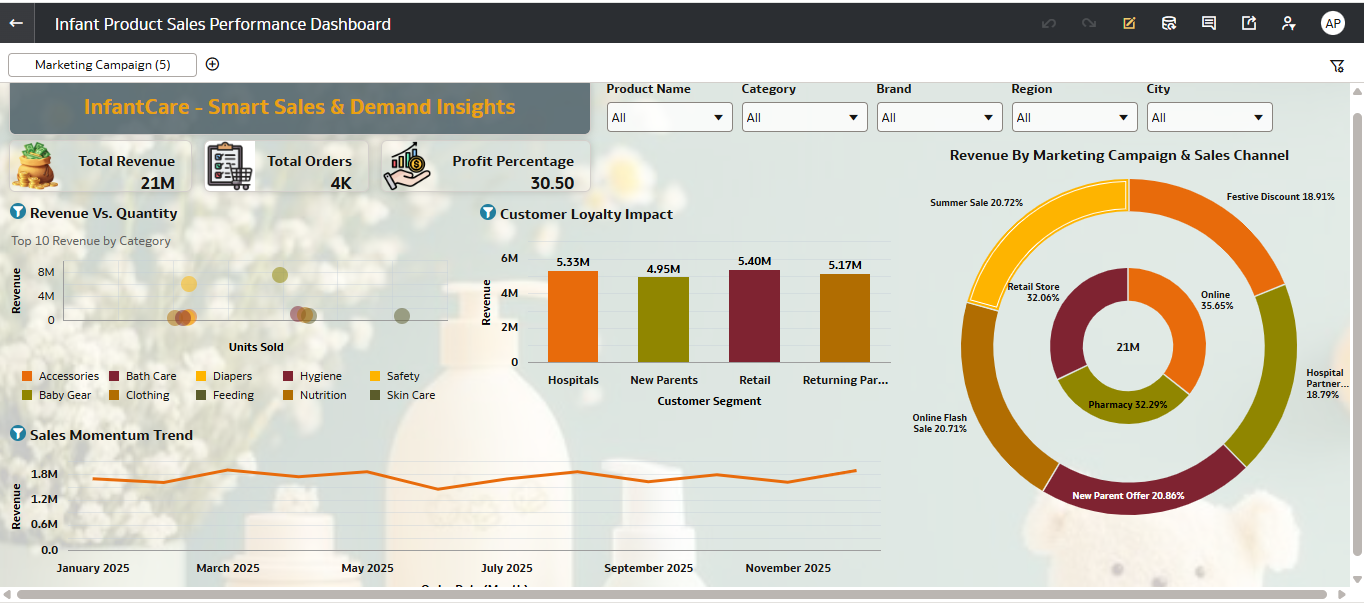
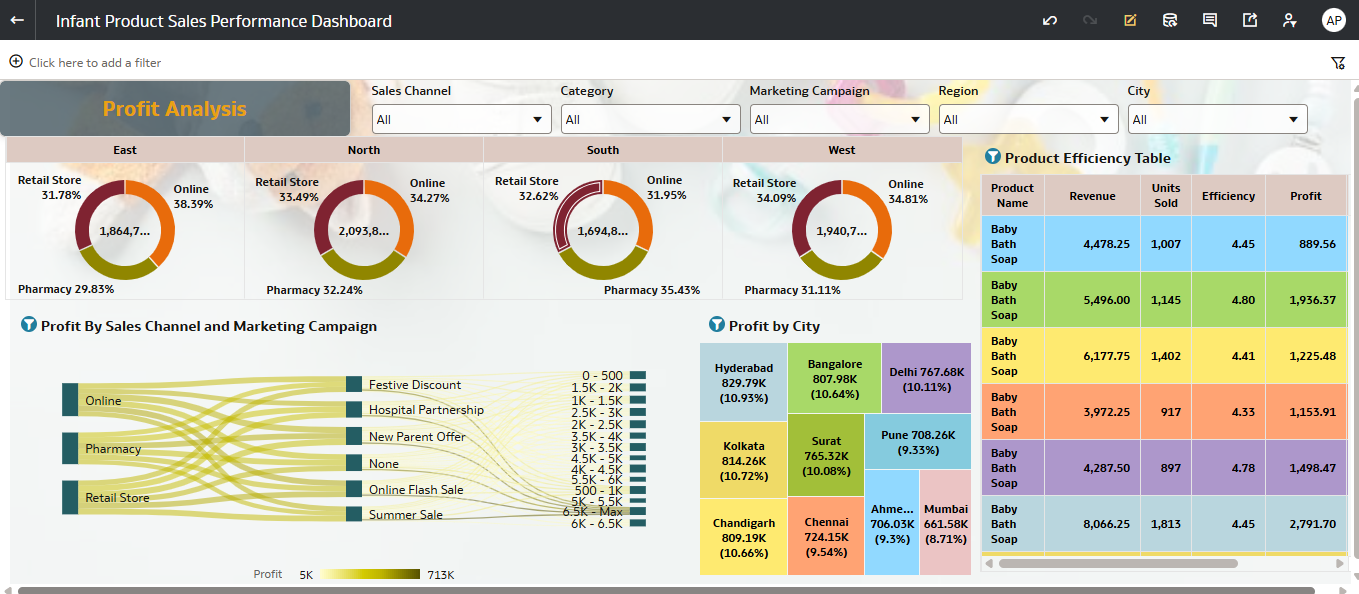
image.png image.png
Tagged:
5
5 votes

Data Visualization · Last Updated

Default status for visualizations

Comments

  • User_77H3N
    User_77H3N Rank 2 - Community Beginner

    Excellent work on this dashboard suite. You have built a highly effective tool that hits exactly what we need: a comprehensive, executive-level view that seamlessly bridges top-line revenue with bottom-line profitability.

    Here are a few specific things that stand out, along with a couple of minor adjustments to consider for the final polish:

    What is working incredibly well:

    • Information Hierarchy: Your use of the KPI tiles at the top left anchors the dashboard perfectly. It immediately grounds the user in the core metrics (21M Revenue, 30.5% Profit) before they dive into the deeper analytics.
    • Visual Variety & Choice: The use of the Sankey diagram (Profit by Sales Channel and Marketing Campaign) in the Profit Analysis view is a fantastic choice. It visualizes the flow and impact of our marketing spend much better than a standard bar chart would. The Treemap for city profitability is also a very clean way to show density.
    • Navigation & Layout: Separating the high-level Sales/Demand insights from the deeper Profit Analysis keeps the user from experiencing cognitive overload. The interactive filters at the top are clearly labeled and intuitively placed.

    A few quick tweaks to consider:

    • Sales Momentum Trend (Jan 2026 Drop): The line chart shows a massive drop in January 2026. This is likely because it is an incomplete, current month, but executives tend to panic when they see lines drop to zero. Consider adding a filter to exclude the current incomplete month by default, or use a dotted line to indicate it is a "month-in-progress."
    • Scatter Plot Legend Density: The "Revenue vs. Quantity" scatter plot is a great concept, but with 14 different categories in the legend, the colors become a bit difficult to distinguish at a glance. Consider grouping these into broader parent categories (e.g., "Apparel," "Care," "Gear") or adding a top-N filter so the chart breathes a bit better.
    • Product Efficiency Table: Ensure the purple background in the table cells provides enough contrast against the text for accessibility, especially when projected on a screen.

    Overall, this is a highly functional, visually appealing, and data-driven deliverable. It provides a true single source of truth for our operations. Great job bringing this to life!

    Best regards,

  • Bhaskar Konar
    Bhaskar Konar Rank 9 - Analytics & AI Expert

    Excellent Dashboard!

    Very clean layout and strong storytelling. The combination of sales, customer segments and campaign performance gives a well-rounded view.

    Great Work & Thanks for sharing @User_TUBT2!

  • User_TUBT2
    User_TUBT2 Rank 2 - Community Beginner
    edited Mar 31, 2026 12:43PM

    Hi User_77H3N, Thank you for the feedback and suggestions. Updated and uploaded accordingly

  • @User_TUBT2 , beautiful visualization.

