Summary
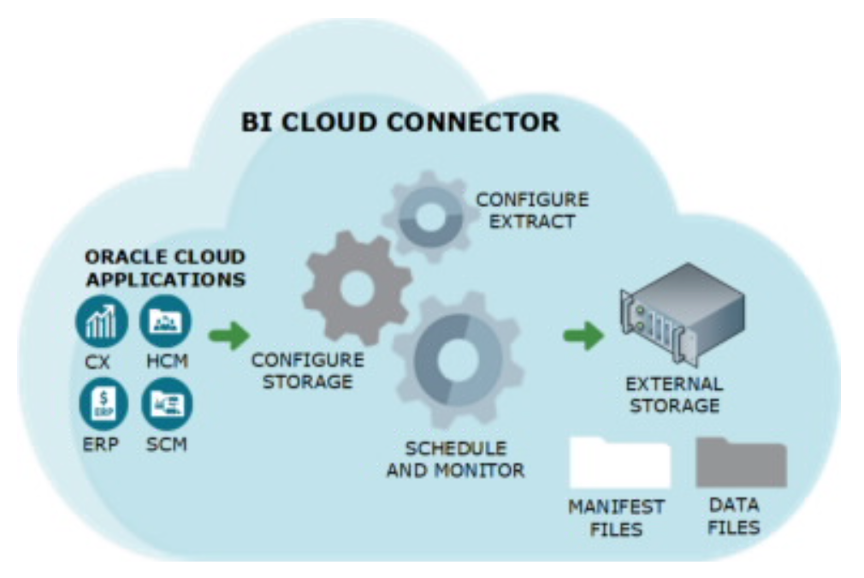
Customers hold a large amount of high-quality enterprise data in their Fusion Applications and in Fusion Data Intelligence. The ability to bring that data to Oracle AI Data Platform (AIDP) to be leveraged for AI use cases represents a great opportunity for organizations. The Oracle Business Intelligence Cloud Connector (BICC) is an enterprise-grade, governed path to land Fusion Application data into AIDP to power AI. Organizations have much to gain by bringing this Fusion data to AIDP and additionally have options to bring data from AIDP to FDI/OAC for analysis.
Connecting Fusion Data to Oracle AI Data Platform
We all know that the success of AI use cases depends on the quality of the data behind them. That’s one of the key strengths of AIDP. It makes it easy to unify data from across the enterprise to power AI initiatives. A great example is the ability to bring high-quality enterprise data from Fusion Applications into the platform, helping Oracle customers maximize the value of their AI investments.
Understanding this need, Oracle simplifies data movement with the Oracle Business Intelligence Cloud Connector (BICC). After being configured within a Fusion Applications instance, BICC can be accessed through code running in AIDP notebooks. The snippet below shows how to use the connector in a notebook using AIDP's Spark compute processing.
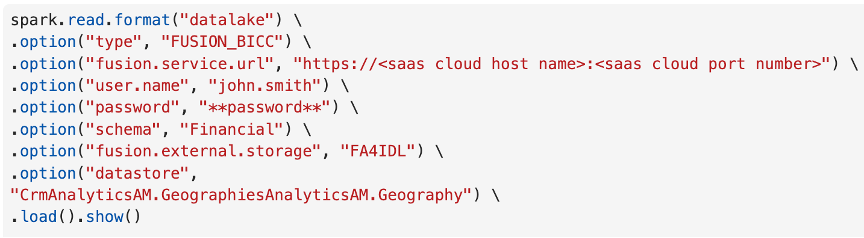
The above code uses BICC to extract specific Fusion data into the notebook session. It is important to note that BICC also exports the extracted Fusion data to a designated Object Storage bucket, where it is stored as compressed CSV files. This provides additional flexibility, allowing you to access the data directly in the notebook session or create tables and volumes from the files stored in Object Storage. You can choose the approach that best fits your use case.
While bringing data from Fusion Applications to AIDP helps with AI use cases, you also have the option to move data in the opposite direction from AIDP to Fusion Data Intelligence (FDI) or Oracle Analytics Cloud (OAC). This allows you to dive into your data using the rich visualization capabilities of Oracle Analytics to highlight insights for yourself and others. This connection can be created using the AIDP connector for Oracle Analytics, or by created a data share in AIDP and using the Delta Share connector in Oracle Analytics.
Quick Tips:
- Be sure to convert the zipped .csv files of the BICC extract to a usable format, such as Delta or Parquet, before using them.
- Prefer Data Shares (Delta Sharing) when you need governed, multi-team distribution. These can also be used to share data to locations other than Oracle Analytics.
Call to Action
Build new connections in your Oracle ecosystem today by bringing Fusion data to AIDP, and vice versa (using the AIDP or Delta Share connector).