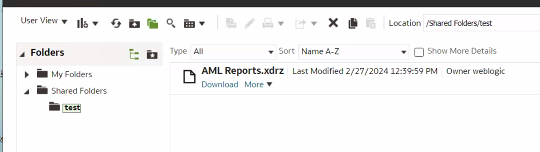
I can download the folder from Oracle Analytics
so when uploaded folder can't read it
as picture below :
Dears Christian Berg and Gianni Ceresa
I need help copying all of my reports from my old BIP to OAS.
Does anyone have any advice or suggestions?
I posted a step by step documentation above. It has all steps with screenshots.
The important part is that you're using BIP which means the /xmlpserver URL.
NOT the /analytics URL for classic
If Publisher is integrated with the Oracle Analytics Server, then use the archive and unarchive features of the Oracle BI Presentation Catalog to perform this function.
Pay attention to the details in the doc like this one above, and then evaluate the best strategy for what you are trying to do. You are doing a big jump between OBIEE 11.1.1.7 and OAS 2023 (not just 23: it isn't a Fusion product using the "23" naming), the official process is going through a number of intermediate versions usually.
Therefore you should adopt a strategy that isn't documented as a "single step" thing.
Edit since Gianni chipped in with the above: We still don't know what precise product with what precise version you started out with.
You are using "OBIEE" and "BIP" interchangeably which is wrong. OBIEE contained BIP whereas BI also existed as stand-alone installations which used different object storage methods than OBIEE.
So if once you say "I have obiee 11.1.1.7.1 trail edition" and then you say "I used BIP 11.1.1.7.1 trail edition" then that's a clear contradiction with an actual impact on your use case.
"I have obiee 11.1.1.7.1 trail edition"
"I used BIP 11.1.1.7.1 trail edition"
You have one or the other.
Dear Christian Berg
I have BIP 11.1.1.7.1
Dear Gianni Ceresa
What can I do to move all Publisher reports ??
Hi @Zuhair Amjad
Can you refer below -
Moving Catalog Objects Between Environments (oracle.com)
or
you can copy your catalog folder from source to target after taking target catalog backup .
Regards,
Arjun
Dear Mallikarjuna Kuppauru-Oracle, Gianni Ceresa, Christian Berg
I Migrate all reports from BIP 11.1.1.7.1 to OAS
download all catalog and upload them on OAS
So I need now to move all users Do you have any advice?
Do not hijack your own thread. This question was about uploading a folder, and it already moved into how to migrate Publisher reports from an old OBIEE to a new OAS.
Users have nothing to do with uploading folders...
Keep in mind this is a community forum: the content is meant to help everybody and not just yourself (that would be consulting work). Mark what is correct in this thread so that other users with the same question will find the answer, and the thread is considered as solved.
If you have a question about users migration, ask that one independently providing all the info for people to understand the context.
Explore how to build agents using code in AI Data Platform. We'll create an agent that examines and analyzes the contents of a Github repository and reports its findings. The session demonstrates how to use different developer tools to create agents including the AIDP extension for VS Code and Codex. Using these tools we…
Hi , We are developing a BI Publisher report to retrieve only Learning Initiatives. We are currently using: WLF_EVENT_ASSIGNMENTS_F WLF_EVENT_ASSIGNMENTS_F_TL WLF_ALL_LEARNING_ITEMS_V WLF_ASSIGNMENT_DESTINATIONS_F We are filtering EVENT_TYPE = 'ORA_REQUIRE_ASSIGNMENT'; however, the results also include other assignment…
Hi Experts, I have a report with simple SQL but large output (140M). Its output file was ,xlsx base on an rtf templete. It always takes time to run. May I know is there any good way to reduce the ruing time of it ? Thanks in advence! Weutao
I have been tasked with creating a run book for ESS jobs. Whilst the queries are centred on the ESS_REQUEST_HISTORY table I would appreciate any suggestions/best practice for implementing a set of reports
Hi,😊 I have a technical issue that I am struggling to resolve. I created an RTF layout, and the preview works correctly when using the BI Publisher Add-in tool. However, when I upload the layout in eText format, the generated report displays only question marks (???) instead of the expected data. I have not been able to…
hi Oracle team, Have a scenario: Country = A, then page 1 should have a notification for that country with no header/footer however page 2 onwards, the existing content with header/footer. but if Country != A then no notification and has to display existing one with the header/footer. Tried option A: Native word option…