Categories
- All Categories
- Oracle Analytics and AI Learning Hub
- 44 Oracle Analytics and AI Sharing Center
- 20 Oracle Analytics and AI Lounge
- 278 Oracle Analytics and AI News
- 55 Oracle Analytics and AI Videos
- 16.2K Oracle Analytics and AI Forums
- 6.4K Oracle Analytics and AI Labs
- Oracle Analytics and AI User Groups
- 103 Oracle Analytics and AI Trainings
- 20 Oracle Analytics and AI Challenge
- Find Partners
- For Partners
Latest data changes not reflecting in OTBI report immediately
Answers
-
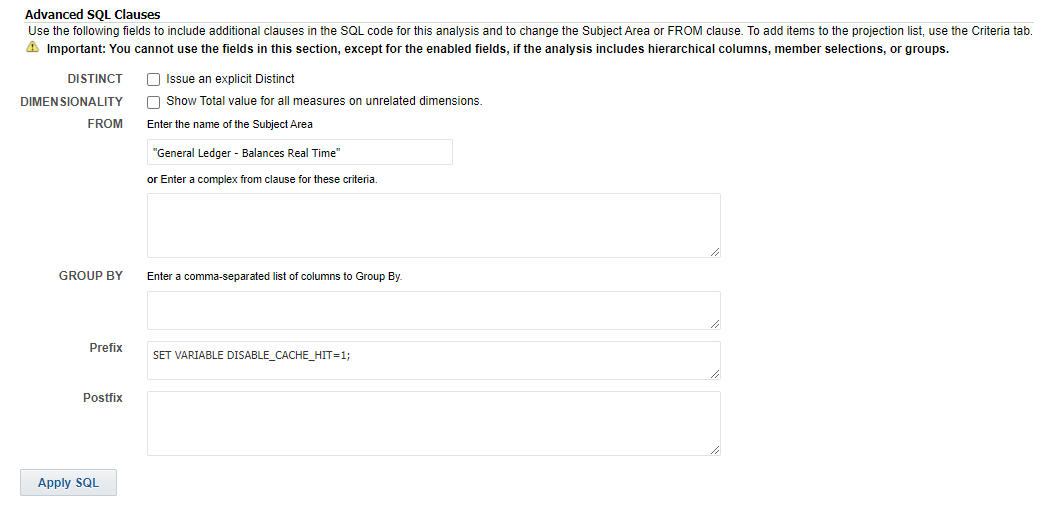
Try adding this in prefix
SET VARIABLE DISABLE_CACHE_HIT=1;
Under advanced tab, do similar, then click apply sql.
I have had good luck in the past, but if not I have advised to just close down web browser and restart that usually gets rid of any caching in the session.
0 -
Hi,
If in your "drill down OTBI report" if you are using the subject areas in the metadata repository database (RPD), so you have created an analysis in OTBI or you have created a report in OTBI with a data model with dataset with SQL data source "Oracle BIEE" or data set data source is an analysis in the catalog, then before setting this session variable DISABLE_CAHCE_HIT on your logical query, you can use page Manage Sessions https://fa-esxc-dev3-saasfaprod1.fa.ocs.oraclecloud.com/analytics/saw.dll?Sessions to View Log to see if your logical query DID in fact hit the middleware application server Oracle BI Server "cache" (getting stale data) or not (to send one or more physical sql get the latest data from the application database).
Oracle® Fusion Middleware
Metadata Repository Builder's Guide for Oracle Business Intelligence Enterprise Edition
12c (12.2.1.3.0)
E80927-03 October 2018
About Session Variables
https://docs.oracle.com/middleware/12213/biee/BIEMG/GUID-F1204007-2846-425D-8BF1-A05CF153CA7B.htm
1 -
Please try the below:
- Edit the analysis
- Click on Advanced Tab
- In the Prefix input box, add the following and click Apply and Save the analysis:
SET VARIABLE DISABLE_CACHE_HIT=1,DISABLE_PLAN_CACHE_HIT=1;
0 -
You can also resolve this by simply clearing your browser cache, logging out, and logging back in.
This is the easiest solution.
OTBI reports do appear to store data in the cache at the browser level.
0