Categories
- All Categories
- Oracle Analytics and AI Learning Hub
- 34 Oracle Analytics and AI Sharing Center
- 22 Oracle Analytics and AI Lounge
- 272 Oracle Analytics and AI News
- 47 Oracle Analytics and AI Videos
- 16.1K Oracle Analytics and AI Forums
- 6.3K Oracle Analytics and AI Idea Labs
- Oracle Analytics and AI User Groups
- 99 Oracle Analytics and AI Trainings
- 16 Oracle Analytics and AI Challenge
- Find Partners
- For Partners
Add option on number formatting percentage tab to not multiply metric by 100
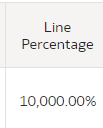
When adding out of the box metrics that have to do with percentage such as line percentage from Labor Distribution subject area, if I add the percentage number format it takes the value from 100 to 10,000% for example. This is not the correct data I'd like displayed. If I want to use the number formatting, I have to create a custom calculation that divides the metric by 100 before adding the percentage formatting. What would be nice is if there was an option when you selected the percentage number formatting to either have it multiply by 100 or not.
Comments
-
Hey Caroline! Alternatively, if we brought the percentage metric in as a value from 0-1 versus 0-100, would that solve your issue?
1 -
That would also solve the problem!
1 -
Great, I'll pass that along to the team.
0

