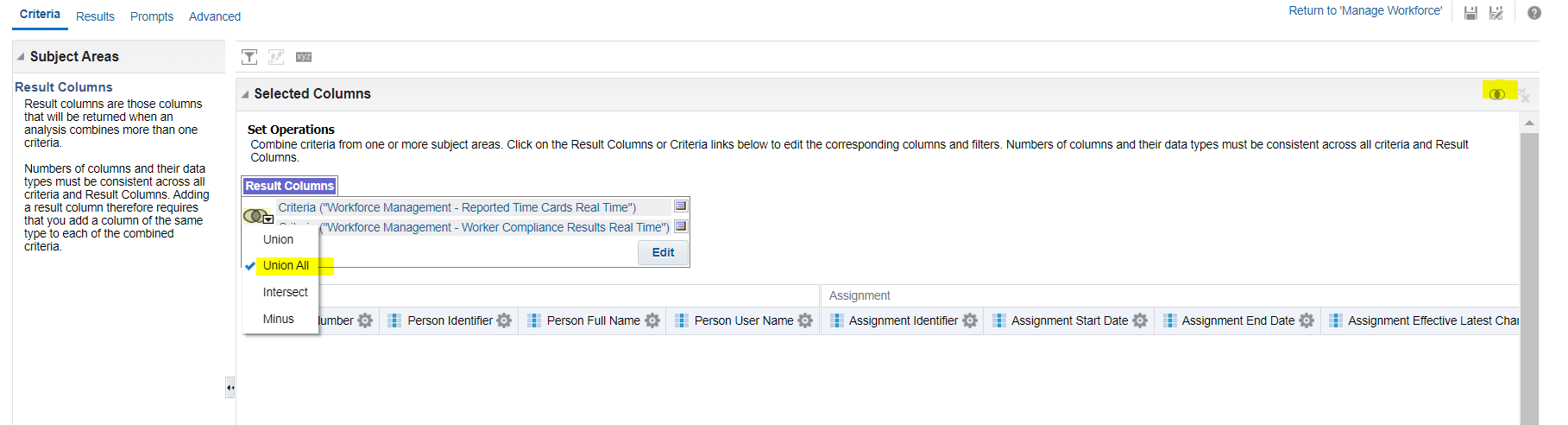
I am looking for tutorial where we create Report using 2 subject areas using union all operator
Hi,
In your analysis in OTBI you press this button here "Combine results based on …".
The number and data type of columns in all query must match. Select the row in the result columns to edit each query. Remember to add filters on each query. Select Result Columns to manage the combined columns.
For more information read the manual
Oracle® Fusion Middleware User's Guide for Oracle Business Intelligence Enterprise Edition 12.2.1.4.0 E91522-03 September 2020 Combining Columns using Set Operations
https://docs.oracle.com/html/E91522_03/GUID-EF3F4409-A734-4FD9-9967-8F027FACAEDB.htm#GUID-A6B1FE7C-24AD-432D-A934-718B4CFA8DC1
If as you say for some reason you want to create a report in OTBI on this data, then create a data model with a data set either i) of type Analysis that refence the path to your analysis above then keep the analysis or ii) cut paste the logical sql from the advanced tab of that analysis to a data set of type SQL Query with data source Oracle BI EE then delete the analysis.
Description: The Oracle Fusion Data Intelligence (FDI) Product Roadmap Update provides an overview of the latest developments and future plans for FDI. Oracle Product Management experts will share upcoming capabilities, key enhancements, and product direction, helping attendees understand what is changing and how these…
We have a Talent Community Pool configured with Organization and Job Family criteria. Some candidates were added to the pool, but we are unable to determine which specific criterion they matched. Is there a report, analysis subject area, audit history, or backend table that shows the attribute values that resulted in a…
Hi, We are looking for PVOs for below tables in BICC Can you guide us on the approach to extract data for these? PON_AGREEMENT_LINES_ALL PON_AGREEMENTS_ALL PON_APPROVAL_HISTORY PON_CONTRACT_PARTIES PON_PRICING_TERMS PON_TERMS_AND_CLAUSES Thanks, Nitin
Hi All, We are using Oracle Fusion Cloud Procurement and would like to secure the Purchase Order (PO) PDF that is generated from Oracle Fusion. Our requirement is to have the generated PO PDF password-protected, so that the recipient must enter a password before the PDF can be opened. Can someone please advise? We are…
Does Fusion release supports propagating an HTTP XML Feed authentication exception into the BIP-based ESS job’s completion text.