🎉 Ever wanted a button 🆒 🔗 or menu with links in your Oracle Analytics workbook?
Here how to do it now with The Menu Bar extension. Enjoy!
Great one!
Happy for this one. I will try to use that extension.
For moment I use simple text boxes (on top) to change the canvas and the standard OAC navigation (on bottom).
Have a good day!
This is a great start to having a full navigation menu viz.
Is it possible to navigate to a canvas within the same workbook without reopening the entire workbook?
Hello,
Yes it's just a start to a full navigation viz.
I just tested the extension and I have some observations:
My url for passing to Canvas 2 is:
"url": "/ui/dv/ui/project.jsp?pageid=visualAnalyzer&reportmode=full&reportpath=%2F%40Catalog%2Fusers%2Fd.vornicu%40anfh.fr%2FMenuBarExtensionTest&canvasname=canvas!2"
Regards,
Daniel
Yes currently this extension only support URL navigation. So it will always do a full page refresh. Best way to change canvas in an existing workbook is to use the tabs. This is more intended for navigation to another canvas on another workbook.
Daniel for your observations.
These are just URLs so it will always be like you pasted a new URL in the address bar.
You likely do not have a background color property set or it is set incorrectly. "backgroundColor": "#227E9E" I would start by checking that.
Same comment as above.
For the color issue post your JSON and let me know what browser you are using.
Hello Matt,
I'm using Chome, I already put "backgroundColor": "#227E9E", "textColor": "white" in the json text, the white rectangles in the picture (on the buttons) appears only for 1 second just after the page reload then disappears
Personnaly I use the normal tabs (bottom) to change canvas in an existing workbook. I create also a so called 'navigation bar' with text boxes on top (like in image) to have a second navigation option. There is no standard viz for that for the moment. I realise that a need a simple button who invoke a canvas navigation action. Maybe it's time for me to coding a new extention. I'm not familiar with this for the moment.
Maybe you intend to add anothers properties in the future for your extension like: height, text fond.. if invoking an workbook action is not possible.
Bellow the entire Json content:
{ "buttons": [ { "name": "Canvas 1", "tooltip": "Navigation to Canvas 1", "backgroundColor": "#227E9E", "textColor": "white", "width": "120px", "url": "/ui/dv/ui/project.jsp?pageid=visualAnalyzer&reportmode=full&reportpath=%2F%40Catalog%2Fusers%2Fd.vornicu%40anfh.fr%2FMenuBarExtensionTest&canvasname=canvas!1", "sameWindow": true }, { "name": "Canvas 2", "tooltip": "Navigation to Canvas 2", "backgroundColor": "#227E9E", "textColor": "white", "width": "120px", "url": "/ui/dv/ui/project.jsp?pageid=visualAnalyzer&reportmode=full&reportpath=%2F%40Catalog%2Fusers%2Fd.vornicu%40anfh.fr%2FMenuBarExtensionTest&canvasname=canvas!2", "sameWindow": true } ] }
Hi Daniel, I found interesting your questions, because I have some use cases where I tried to recreate another style of navigate content (would like to have more capabilities to style the nav. menu, not just the position). So I have been trying this, apply an URL (hyperlink) to a text or image, this could be an other canvas of the workbook, like you.
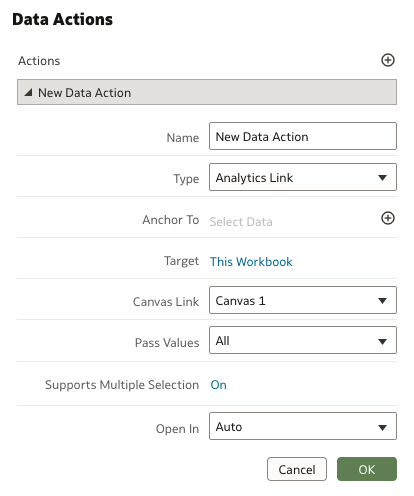
I have been trying Data actions and have the option to add URL, but don't have the option to select an other canvas of the workbook.
Is curious for me that text and image properties allow this but not other more complex like Data actions.
Have you try some other ways to create an other kind of navigation?
For data actions to select a canvas you need to use the Analytics Link option. This allows a canvas in the same workbook and a canvas in another workbook.
Attending Oracle AI World 2026? Join us for the first Oracle AI Data Platform Hackathon on Sunday, October 25, for hands-on experience with AIDP and an opportunity to connect with our executive leadership, Product Management, and Engineering teams! Limited spots remaining! Request your seat here: Oracle AI Data Platform…
Oracle AI World 2026 (Oct 25–28) is almost here! We have exciting product announcements coming for AI Data Platform, Oracle Analytics Cloud, and Fusion Data Intelligence. Bret Grinslade Gabrielle Prichard Jacques Vigeant Philippe LIONS and I are excited to share the new agentic experiences we’ve been building for business…
The countdown to Oracle AI World is on! The AI Data Platform Hackathon at AI World is just 18 days away. Registration is filling up quickly, but there are still some seats available. We would love for you to join us at this in-person event! If you’re attending AI World, don’t delay registering because there are only a few…
Where AI meets business outcomes Oracle AI World brings the Oracle community together to explore how AI and other technology innovations are driving real business outcomes across industries. Discover what’s new through: Mainstage keynotes to hear the latest directly from Oracle leadership Product demonstrations Customer…
Oracle AI Data Platform Hackathon at Oracle AI World 2026 Sunday, October 25, 2026 12:00–5:00 p.m. PT Request your spot at the AI Data Platform Hackathon Join us in person for the Oracle AI Data Platform Hackathon on Sunday, October 25, from 12:00–5:00 p.m. PT in Las Vegas at Oracle AI World. Lunch will be provided.…
Oracle AI Data Platform team will host an in-person Customer Advisory Council for AIDP customers attending Oracle AI World 2026 on October 26, from 1–3 PM PT. Join Oracle AI Data Platform executive leaders and selected customers for interactive discussions on our product roadmap, priorities, and future direction. Share…