🎉 Ever wanted a button 🆒 🔗 or menu with links in your Oracle Analytics workbook?
Here how to do it now with The Menu Bar extension. Enjoy!
Great one!
Happy for this one. I will try to use that extension.
For moment I use simple text boxes (on top) to change the canvas and the standard OAC navigation (on bottom).
Have a good day!
This is a great start to having a full navigation menu viz.
Is it possible to navigate to a canvas within the same workbook without reopening the entire workbook?
Hello,
Yes it's just a start to a full navigation viz.
I just tested the extension and I have some observations:
My url for passing to Canvas 2 is:
"url": "/ui/dv/ui/project.jsp?pageid=visualAnalyzer&reportmode=full&reportpath=%2F%40Catalog%2Fusers%2Fd.vornicu%40anfh.fr%2FMenuBarExtensionTest&canvasname=canvas!2"
Regards,
Daniel
Yes currently this extension only support URL navigation. So it will always do a full page refresh. Best way to change canvas in an existing workbook is to use the tabs. This is more intended for navigation to another canvas on another workbook.
Daniel for your observations.
These are just URLs so it will always be like you pasted a new URL in the address bar.
You likely do not have a background color property set or it is set incorrectly. "backgroundColor": "#227E9E" I would start by checking that.
Same comment as above.
For the color issue post your JSON and let me know what browser you are using.
Hello Matt,
I'm using Chome, I already put "backgroundColor": "#227E9E", "textColor": "white" in the json text, the white rectangles in the picture (on the buttons) appears only for 1 second just after the page reload then disappears
Personnaly I use the normal tabs (bottom) to change canvas in an existing workbook. I create also a so called 'navigation bar' with text boxes on top (like in image) to have a second navigation option. There is no standard viz for that for the moment. I realise that a need a simple button who invoke a canvas navigation action. Maybe it's time for me to coding a new extention. I'm not familiar with this for the moment.
Maybe you intend to add anothers properties in the future for your extension like: height, text fond.. if invoking an workbook action is not possible.
Bellow the entire Json content:
{ "buttons": [ { "name": "Canvas 1", "tooltip": "Navigation to Canvas 1", "backgroundColor": "#227E9E", "textColor": "white", "width": "120px", "url": "/ui/dv/ui/project.jsp?pageid=visualAnalyzer&reportmode=full&reportpath=%2F%40Catalog%2Fusers%2Fd.vornicu%40anfh.fr%2FMenuBarExtensionTest&canvasname=canvas!1", "sameWindow": true }, { "name": "Canvas 2", "tooltip": "Navigation to Canvas 2", "backgroundColor": "#227E9E", "textColor": "white", "width": "120px", "url": "/ui/dv/ui/project.jsp?pageid=visualAnalyzer&reportmode=full&reportpath=%2F%40Catalog%2Fusers%2Fd.vornicu%40anfh.fr%2FMenuBarExtensionTest&canvasname=canvas!2", "sameWindow": true } ] }
Hi Daniel, I found interesting your questions, because I have some use cases where I tried to recreate another style of navigate content (would like to have more capabilities to style the nav. menu, not just the position). So I have been trying this, apply an URL (hyperlink) to a text or image, this could be an other canvas of the workbook, like you.
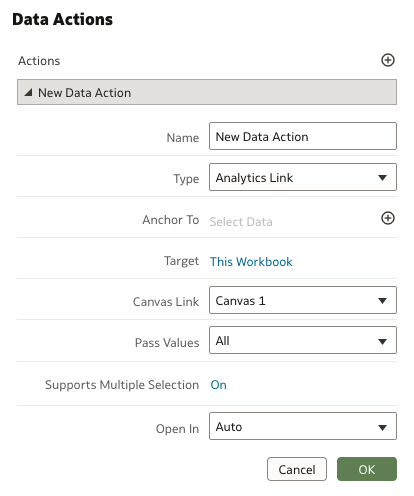
I have been trying Data actions and have the option to add URL, but don't have the option to select an other canvas of the workbook.
Is curious for me that text and image properties allow this but not other more complex like Data actions.
Have you try some other ways to create an other kind of navigation?
For data actions to select a canvas you need to use the Analytics Link option. This allows a canvas in the same workbook and a canvas in another workbook.
This quarter, we’re celebrating five members of the Oracle AI & Analytics Community for their outstanding participation in the Idea Labs. Through their ideas, engagement, and collaboration, they help shape the future of Oracle AI & Analytics. By sharing thoughtful suggestions, sparking discussion, and earning community…
The Oracle AI Data Platform Keynote is now available in replay. See the following link to watch it: Youtube Video
The September 2026 Oracle AI and Analytics Product Roadmap is here, bringing the latest product direction, innovation highlights, and upcoming capabilities into focus. This quarterly update gives you a fresh look at recently delivered innovations and what is ahead across Oracle AI Data Platform, OCI Enterprise AI, Fusion…
Explore how to build agents using code in AI Data Platform. We'll create an agent that examines and analyzes the contents of a Github repository and reports its findings. The session demonstrates how to use different developer tools to create agents including the AIDP extension for VS Code and Codex. Using these tools we…
Agenda Presentation: Optimize FDI Workbook Performance Learn best practices and optimization strategies for building performant workbooks in Oracle FDI. We’ll share practical tips and lessons learned to help report authors avoid common pitfalls and design workbooks with performance in mind from the start. As a special…
Learn how to deploy an AI Data Platform agent, register it to the AI Registry, and introduce it to business users through Agent Hub. This session covers how to prepare an agent for deployment, configure endpoint access and authentication, invoke a deployed agent, and monitor it after deployment. The session also introduces…