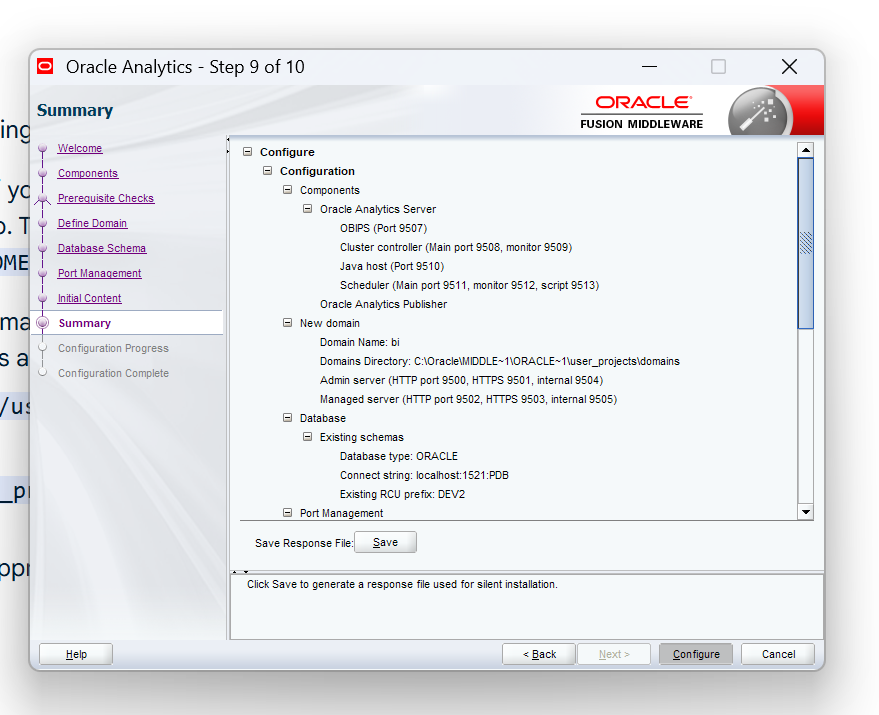
Hi ,I was trying to configure OAS but it is stuck at configure button .Button is greyed out.Please help on this
Hi,
Welcome to the Oracle Analytics community and forum.
Help us in helping you…
Always keep in mind nobody here can see your screen, or know what you did, how, when, where and what your plan was.
Start from the beginning: what version are you installing? On what kind of environment? Is your environment certified? Did you check the log files?
Because even during the installation and configuration steps, there are log files.
ANd below are log files
of page DatabasePage with no validation exceptions 2025-09-20 21:42:16,467 INFO [18] oracle.as.install.engine.modules.handler.engine.HandlerLauncher$ListenerManager - Handler launch end: biPageQueries.databasePageHandler 2025-09-20 21:42:16,467 INFO [18] oracle.as.install.engine.modules.handler.engine.HandlerLauncher - Handler returned status: SUCCESS 2025-09-20 21:42:16,467 INFO [18] oracle.as.install.engine.modules.presentation.PresentationModule - Presentation Module Received Event Id: 2301 Event: END_INPUT_VALIDATION 2025-09-20 21:42:16,467 INFO [18] oracle.as.install.engine.datamodel.content.DataCenter$AbstractContent - Setting valueOf(SCHEMA_TYPE) to:SCHEMA_TYPE_EXISTING. Value obtained from:USER 2025-09-20 21:42:16,467 INFO [18] oracle.as.install.engine.datamodel.content.DataCenter$AbstractContent - Setting valueOf(EXISTING_DATABASE_TYPE) to:ORACLE. Value obtained from:USER 2025-09-20 21:42:16,467 INFO [18] oracle.as.install.engine.datamodel.content.DataCenter$AbstractContent - Setting valueOf(DATABASE_TYPE) to:ORACLE. Value obtained from:USER 2025-09-20 21:42:16,467 INFO [18] oracle.as.install.engine.datamodel.content.DataCenter$AbstractContent - Setting valueOf(CONNECT_STRING) to:localhost:1521:PDB. Value obtained from:USER 2025-09-20 21:42:16,467 INFO [18] oracle.as.install.engine.datamodel.content.DataCenter$AbstractContent - Setting valueOf(FAN_CONNECT_STRING) to:. Value obtained from:USER 2025-09-20 21:42:16,467 INFO [18] oracle.as.install.engine.datamodel.content.DataCenter$AbstractContent - Setting valueOf(NEW_DB_ADMIN_USERNAME) to:. Value obtained from:USER 2025-09-20 21:42:16,467 INFO [18] oracle.as.install.engine.datamodel.content.DataCenter$AbstractContent - Setting valueOf(NEW_DB_PASSWORD) to:<SECURE>. Value obtained from:USER 2025-09-20 21:42:16,467 INFO [18] oracle.as.install.engine.datamodel.content.DataCenter$AbstractContent - Setting valueOf(NEW_DB_SCHEMA_PREFIX) to:. Value obtained from:USER 2025-09-20 21:42:16,467 INFO [18] oracle.as.install.engine.datamodel.content.DataCenter$AbstractContent - Setting valueOf(NEW_DB_SCHEMA_PASSWORD) to:<SECURE>. Value obtained from:USER 2025-09-20 21:42:16,467 INFO [18] oracle.as.install.engine.datamodel.content.DataCenter$AbstractContent - Setting valueOf(NEW_DB_CONFIRM_SCHEMA_PASSWORD) to:<SECURE>. Value obtained from:USER 2025-09-20 21:42:16,467 INFO [18] oracle.as.install.engine.datamodel.content.DataCenter$AbstractContent - Setting valueOf(EXISTING_DB_PREFIX) to:DEV2. Value obtained from:USER 2025-09-20 21:42:16,467 INFO [18] oracle.as.install.engine.datamodel.content.DataCenter$AbstractContent - Setting valueOf(EXISTING_DB_PASSWORD) to:<SECURE>. Value obtained from:USER 2025-09-20 21:42:16,526 INFO [18] oracle.bi.install.ui.basepages.InterviewPage - Load data for page PortManagementPage from response file 2025-09-20 21:42:19,085 INFO [18] oracle.as.install.engine.datamodel.content.DataCenter$AbstractContent - Setting valueOf(PORT_RANGE_START) to:9500. Value obtained from:USER 2025-09-20 21:42:19,085 INFO [18] oracle.as.install.engine.datamodel.content.DataCenter$AbstractContent - Setting valueOf(PORT_RANGE_END) to:9999. Value obtained from:USER 2025-09-20 21:42:19,085 INFO [18] oracle.as.install.engine.modules.handler.HandlerModule - Processing the validation event 2025-09-20 21:42:19,085 INFO [18] oracle.as.install.engine.modules.handler.engine.HandlerLauncher$LaunchHelper - Inputs passed to the handler: NONE 2025-09-20 21:42:19,085 INFO [18] oracle.as.install.engine.modules.handler.engine.HandlerLauncher$ListenerManager - Handler launch begin: biPageQueries.portManagementPageHandler 2025-09-20 21:42:19,117 INFO [18] oracle.bi.install.ui.basepages.validation.PageValidator - Starting validation of page PortManagementPage 2025-09-20 21:42:19,117 INFO [18] oracle.bi.install.ui.basepages.validation.PageValidator - Page variables for page PortManagementPage PORT_RANGE_START=9500 PORT_RANGE_END=9999 STATIC_PORTS_FILE=
2025-09-20 21:42:19,148 INFO [18] oracle.bi.install.endpoints.PersistedPortAllocations - Validating and persisting ports using Auto port allocator from range [9500,9999] for 9 instances 2025-09-20 21:42:19,148 INFO [18] oracle.bi.install.endpoints.PersistedPortAllocations - Port allocations have not been persisted to C:\Oracle\Middleware\Oracle_Home\config2025-09-20_09-35-45PM\ports.ser 2025-09-20 21:42:19,148 INFO [18] oracle.bi.install.endpoints.PersistedPortAllocations - No ports persisted - allocating afresh using Auto port allocator from range [9500,9999] for 9 instances 2025-09-20 21:42:19,163 INFO [18] oracle.bi.install.endpoints.PersistedPortAllocations - Allocated ports: OBIJH1 --> [9510] OBIPS1 --> [9507] OBICCS1 --> [9508, 9509] MANAGEDSERVER1 --> [9502, 9503, 9505] SERVICEINSTANCE1 --> [9514, 9515] NODEMANAGER1 --> [9506] OBISCH1 --> [9511, 9512, 9513] ADMINSERVER1 --> [9500, 9501, 9504] COHERENCE1 --> [9516] 2025-09-20 21:42:19,163 INFO [18] oracle.bi.install.endpoints.PersistedPortAllocations - Persisting port allocations to C:\Oracle\Middleware\Oracle_Home\config2025-09-20_09-35-45PM\ports.ser 2025-09-20 21:42:19,173 INFO [18] oracle.bi.install.ui.basepages.validation.PageValidator - Completed validation of page PortManagementPage with no validation exceptions 2025-09-20 21:42:19,173 INFO [18] oracle.as.install.engine.modules.handler.engine.HandlerLauncher$ListenerManager - Handler launch end: biPageQueries.portManagementPageHandler 2025-09-20 21:42:19,173 INFO [18] oracle.as.install.engine.modules.handler.engine.HandlerLauncher - Handler returned status: SUCCESS 2025-09-20 21:42:19,173 INFO [18] oracle.as.install.engine.modules.presentation.PresentationModule - Presentation Module Received Event Id: 2301 Event: END_INPUT_VALIDATION 2025-09-20 21:42:19,173 INFO [18] oracle.as.install.engine.datamodel.content.DataCenter$AbstractContent - Setting valueOf(PORT_RANGE_START) to:9500. Value obtained from:USER 2025-09-20 21:42:19,173 INFO [18] oracle.as.install.engine.datamodel.content.DataCenter$AbstractContent - Setting valueOf(PORT_RANGE_END) to:9999. Value obtained from:USER 2025-09-20 21:42:19,233 INFO [18] oracle.bi.install.ui.basepages.InterviewPage - Load data for page ApplicationPage from response file 2025-09-20 21:42:20,787 INFO [18] oracle.as.install.engine.datamodel.content.DataCenter$AbstractContent - Setting valueOf(APPLICATION_TYPE) to:APPLICATION_TYPE_EMPTY. Value obtained from:USER 2025-09-20 21:42:20,787 INFO [18] oracle.as.install.engine.datamodel.content.DataCenter$AbstractContent - Setting valueOf(BI_BUNDLE_FILE) to:. Value obtained from:USER 2025-09-20 21:42:20,787 INFO [18] oracle.as.install.engine.datamodel.content.DataCenter$AbstractContent - Setting valueOf(BI_BUNDLE_PASSWORD) to:<SECURE>. Value obtained from:USER 2025-09-20 21:42:20,787 INFO [18] oracle.as.install.engine.datamodel.content.DataCenter$AbstractContent - Setting valueOf(BI_DEFAULT_SERVICE_INSTANCE_KEY) to:ssi. Value obtained from:USER 2025-09-20 21:42:20,787 INFO [18] oracle.as.install.engine.modules.handler.HandlerModule - Processing the validation event 2025-09-20 21:42:20,787 INFO [18] oracle.as.install.engine.modules.handler.engine.HandlerLauncher$LaunchHelper - Inputs passed to the handler: NONE 2025-09-20 21:42:20,787 INFO [18] oracle.as.install.engine.modules.handler.engine.HandlerLauncher$ListenerManager - Handler launch begin: biPageQueries.applicationPageHandler 2025-09-20 21:42:20,846 INFO [18] oracle.bi.install.ui.basepages.validation.PageValidator - Starting validation of page ApplicationPage 2025-09-20 21:42:20,846 INFO [18] oracle.bi.install.ui.basepages.validation.PageValidator - Page variables for page ApplicationPage APPLICATION_TYPE=APPLICATION_TYPE_EMPTY BI_BUNDLE_FILE= BI_BUNDLE_PASSWORD=**** BI_APP_LITE_PASSWORD=**** BI_APP_LITE_CONFIRM_PASSWORD=**** BI_DEFAULT_SERVICE_INSTANCE_KEY=ssi
2025-09-20 21:42:20,846 INFO [18] oracle.bi.install.ui.basepages.validation.PageValidator - Completed validation of page ApplicationPage with no validation exceptions 2025-09-20 21:42:20,846 INFO [18] oracle.as.install.engine.modules.handler.engine.HandlerLauncher$ListenerManager - Handler launch end: biPageQueries.applicationPageHandler 2025-09-20 21:42:20,846 INFO [18] oracle.as.install.engine.modules.handler.engine.HandlerLauncher - Handler returned status: SUCCESS 2025-09-20 21:42:20,846 INFO [18] oracle.as.install.engine.modules.presentation.PresentationModule - Presentation Module Received Event Id: 2301 Event: END_INPUT_VALIDATION 2025-09-20 21:42:20,846 INFO [18] oracle.as.install.engine.datamodel.content.DataCenter$AbstractContent - Setting valueOf(APPLICATION_TYPE) to:APPLICATION_TYPE_EMPTY. Value obtained from:USER 2025-09-20 21:42:20,846 INFO [18] oracle.as.install.engine.datamodel.content.DataCenter$AbstractContent - Setting valueOf(BI_BUNDLE_FILE) to:. Value obtained from:USER 2025-09-20 21:42:20,846 INFO [18] oracle.as.install.engine.datamodel.content.DataCenter$AbstractContent - Setting valueOf(BI_BUNDLE_PASSWORD) to:<SECURE>. Value obtained from:USER 2025-09-20 21:42:20,846 INFO [18] oracle.as.install.engine.datamodel.content.DataCenter$AbstractContent - Setting valueOf(BI_DEFAULT_SERVICE_INSTANCE_KEY) to:ssi. Value obtained from:USER 2025-09-20 21:42:20,905 INFO [18] oracle.bi.install.ui.basepages.InterviewPage - Load data for page BISummaryPage from response file 2025-09-20 21:42:23,936 INFO [18] oracle.as.install.engine.modules.handler.HandlerModule - Processing the validation event 2025-09-20 21:42:23,936 INFO [18] oracle.as.install.engine.modules.presentation.PresentationModule - Presentation Module Received Event Id: 2301 Event: END_INPUT_VALIDATION 2025-09-20 21:42:24,028 INFO [18] oracle.as.install.template.screensnextgen.ConfigurationPage - [Common Screen]In Config Only RootSH Event... 2025-09-20 21:42:24,028 INFO [18] oracle.as.install.engine.modules.presentation.ui.common.wizard.ModifiedDWizard - STARTING CONFIG OPERATION ... 2025-09-20 21:42:24,028 INFO [18] oracle.bi.configassistant.installactions.BIInstallAction - Running BIInstallAction
Trying to install oa_platform-5.5.0.0.0-20200829051051-win64,fmw_12.2.1.4.0_infrastructure in windows 11
Hello,
Make sure to apply the required Stack Bundle Patches before configuring OAS, and follow the installation instructions. This will help avoid many issues.
Preparing to Install and Configure Oracle Analytics Server
https://docs.oracle.com/en/middleware/bi/analytics-server/install-config-oas/preparing-install-and-configure-product.html#GUID-16F78BFD-4095-45EE-9C3B-DB49AD5CBAAD
You can stop directly, that isn't a certified environment…
https://docs.oracle.com/en/middleware/bi/analytics-server/administer-oas/certification-systems.html#GUID-BD72F48C-3DF8-4B9E-81AB-23164B497AB4
You are trying to install an enterprise analytical platform on a desktop OS, this is not supported. Also, OAS 5.5 is 5 years old, not supported anymore for the past 3 years.
Look the link above, make sure your environment is supported before to try to install OAS. There is a countless number of threads of people who really tried very hard to install on Windows 10 and 11, with no success.
If you are installing on your laptop/desktop, use a virtual machine to provide a supported OS first. Or docker will also work. WSL2 images I didn't try, but has chances to work if you start from a supported OS image.
Explore how to build agents using code in AI Data Platform. We'll create an agent that examines and analyzes the contents of a Github repository and reports its findings. The session demonstrates how to use different developer tools to create agents including the AIDP extension for VS Code and Codex. Using these tools we…
Hi , We are developing a BI Publisher report to retrieve only Learning Initiatives. We are currently using: WLF_EVENT_ASSIGNMENTS_F WLF_EVENT_ASSIGNMENTS_F_TL WLF_ALL_LEARNING_ITEMS_V WLF_ASSIGNMENT_DESTINATIONS_F We are filtering EVENT_TYPE = 'ORA_REQUIRE_ASSIGNMENT'; however, the results also include other assignment…
Hi Experts, I have a report with simple SQL but large output (140M). Its output file was ,xlsx base on an rtf templete. It always takes time to run. May I know is there any good way to reduce the ruing time of it ? Thanks in advence! Weutao
I have been tasked with creating a run book for ESS jobs. Whilst the queries are centred on the ESS_REQUEST_HISTORY table I would appreciate any suggestions/best practice for implementing a set of reports
Hi,😊 I have a technical issue that I am struggling to resolve. I created an RTF layout, and the preview works correctly when using the BI Publisher Add-in tool. However, when I upload the layout in eText format, the generated report displays only question marks (???) instead of the expected data. I have not been able to…
hi Oracle team, Have a scenario: Country = A, then page 1 should have a notification for that country with no header/footer however page 2 onwards, the existing content with header/footer. but if Country != A then no notification and has to display existing one with the header/footer. Tried option A: Native word option…