Oracle Analytics Publisher Forum

Welcome to the Oracle Analytics Community: Please complete your User Profile and upload your Profile Picture

Publisher report is not sent due to timeout even though it took 6 minutes 1 month ago

Received Response
35
Views
6
Comments

Hello Team,
I created a publisher report that took 6 minutes to send a month ago, but now it times out after 1800 seconds. I tried step-by-step to figure out which dataset is the bottleneck, but even with just a few datasets, the report struggles to send after several minutes. I checked the underlying tables in the database, but they haven't significantly increased data. What could be the cause?
Regards

Answers

  • Rajasekhar Bandaru-Oracle
    Rajasekhar Bandaru-Oracle Rank 6 - Analytics & AI Lead

    Sub-optimal SQL Queries cause this kind of issue hence we suggest you to optimize custom SQL used in the data model by reviewing the validate Log option in the BIP data model.

    https://docs.oracle.com/en/cloud/saas/otbi/otbi-pub-design/validate-data-models.html#GUID-1FB8BC31-3546-4237-867C-4A592425395F

    For more details about custom report and performance availability please review the given documentation
    KB61670 Fusion Applications (SAAS) BI Publisher Custom Report Performance and Availability Reference

  • _vero_
    _vero_ Rank 5 - Community Champion

    Hello Rajasekhar Bandaru

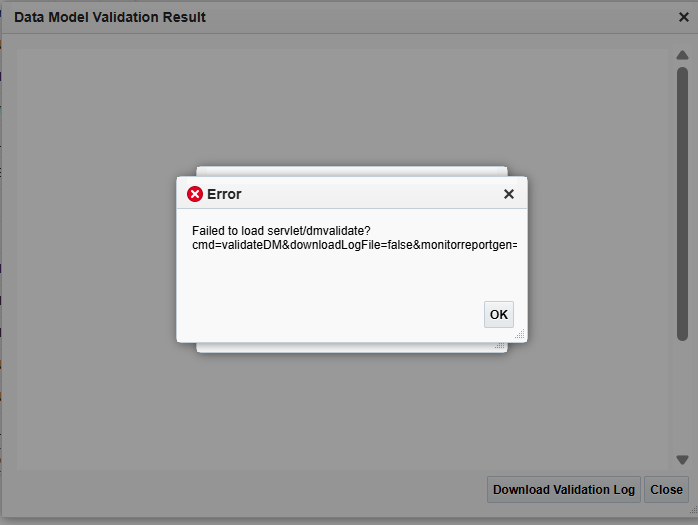
    Unfortunately, even when creating data models with small datasets, I get this type of error when I try to validate the dataset

    image.png

    . The queries are already optimized, and in fact, a month ago the report took 6 minutes. How is it possible that after a month it's taking so much longer?

    Regards

  • Mallikarjuna Kuppauru-Oracle
    Mallikarjuna Kuppauru-Oracle Rank 8 - Analytics & AI Strategist

    Hi @_vero_

    Based on your Error screenshot try below?

    Solution 1:

    =========
    1. Login to BI Publisher.

    2. Click 'Administration' link.

    3. Click JDBC Data Source.

    4. Click the relevant JDBC data source connnection.

    5. Remove the value set for 'Pre Process Function'.

    6. Click 'Apply' button.

    7. Click 'Catalog' link.

    8. Navigate to folder that contains the data model.

    9. Click the data model.

    10. Edit data set.

    11. Save the data set.

    Solution 2:

    1. Save the query as non-standard SQL. This means the query is just saved with no checking.

    2. Break down the SQL query into pieces to find out where the problem code is.

    Solution 3:

    To Clear Metadata

    1. Ensure you have a good size of JVM (16 GB is recommended)
    2. Identify your Repository/Metadata location
    3. Shut down the BI Publisher server/OAS on all nodes - you may use stop.sh
    4. Go to the Repository path identified above
    5. Rename instance/domains/<domainname>/BIDomain/config/bipublisher/repository/meta/mbase.bin to .../repository/meta/mbase.bin.bkp
    6. Remove any old lock files (e.g. mbase.bin.lock)
    7. Start BI publisher server/OAS on all nodes - you may use start.sh - This will create fresh mbase.bin files
    8. Login to XMLP server and validate if you are able to access it
    9. Rebuild Metadata by going to BIP > Catalog. Then try accessing the Data model and see if it works

    Refer - Getting "Failed to Load Servlet/dmvalidate" Error on Opening or Saving the Data Model -

    KB338261

    Regards,

    Arjun

  • MandeepGupta
    MandeepGupta Rank 8 - Analytics & AI Strategist

    Hi,

    Can you schedule the report and check approx how much time it is taking to run?

    The error while editing, can you try it in incognito mode? I have seen this happening where there was a lot of code in one of MY BIP reports.

    Thanks.

  • _vero_
    _vero_ Rank 5 - Community Champion

    hello,

    After several launch attempts, it returned to a 6-minute duration. I'm concerned that it will have to be a monthly schedule, and the data changes every month, considering that it retrieves data from the previous month. Perhaps after several timed-out attempts, it retrieved what it could from the cache and returned to an acceptable time?

    This difference in performance is worrying

    Regards

  • MandeepGupta
    MandeepGupta Rank 8 - Analytics & AI Strategist

    Please confirm if there were some performance intensive programs were running during the last execution. Monitor for few days, if you encounter an issue again, it would be better towards working on the perf enhancement or make sure that no resource intensive program is running in parallel.

    Thanks.