Discussions
Stay up-to-date with the latest news from NetSuite. You’ll be in the know about how to connect with peers and take your business to new heights at our virtual, in-person, on demand events, and much more.
Now is the time to ask your NetSuite-savvy friends and colleagues to join the NetSuite Support Community! Refer now! Click here to watch and learn more!
Update your Profile with your Support type to get your Support Type badge.
Nominate Your Peers for NetSuite Support Community's Choice of the Quarter! Submit your nomination today.
No Limits. Just possibilities.
Join us for complimentary one-day events around the world and step into a future fueled by AI and limitless potential. Explore new breakthroughs, sharpen your skills, and connect with experts who are shaping what’s next. Experience bold keynotes, interactive learning, and connections that span the global NetSuite community. Discover what's next at SuiteConnect Tour 2026.
Try Intelligent Payment Automation – Fee Free For Your First Month
Intelligent Payment Automation, powered by BILL (aka Bill.com), lets you automate payments, manage vendor details, and bank account information within NetSuite.
The SuiteApp is available to organizations based in the U.S. with a valid U.S. address, or to global customers (except Canada, China, and Japan) with U.S. business subsidiaries. It only supports payments to vendors operating in the United States.
For more information, visit this thread.
Intelligent Payment Automation, powered by BILL (aka Bill.com), lets you automate payments, manage vendor details, and bank account information within NetSuite.
The SuiteApp is available to organizations based in the U.S. with a valid U.S. address, or to global customers (except Canada, China, and Japan) with U.S. business subsidiaries. It only supports payments to vendors operating in the United States.
For more information, visit this thread.
Community Articles: What Topic Should We Cover Next? Your idea could be our next feature—drop your suggestion now and spark the next big discussion!
How to configure a custom sublist to appear only on some kinds of sales transactions?
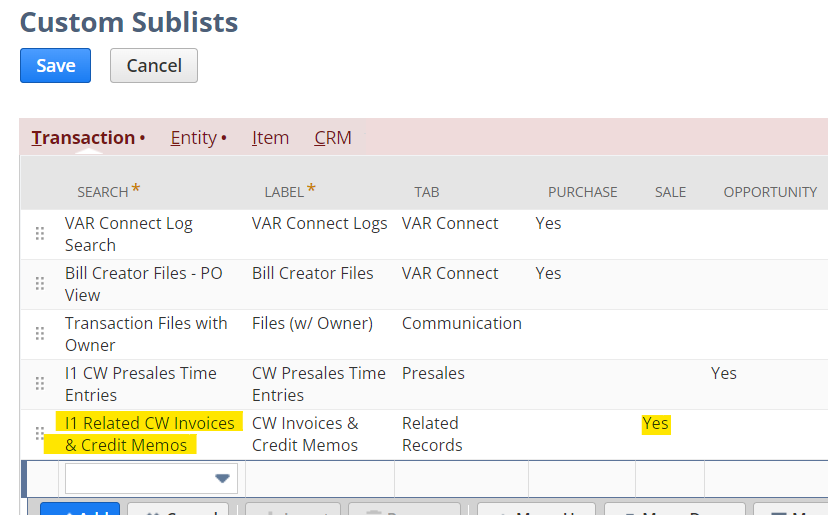
I was able to create a custom sublist and have it show up on Sales transactions under the Related Transactions tab. As such, it appears on sales orders, invoices, credit memos, etc. Due to the nature of the sublist though, it really only applies to sales order transactions. Is it possible to configure the sublist to only appear on sales orders?
The Custom Sublists configuration page doesn't offer granularity beyond checking the generic type of transaction. In this case Sale is checked
... the custom sublist doesn't appear in the list of sublists configured on invoice transaction forms
... yet the sublist appears on the invoice form.
Tagged:
0