Did you know?
When importing address records to entities, a common mistake is to add more addresses to the entity, instead of replacing the addresses present. During implementations, I have seen consultants end up with 10-15 addresses per customer, when each customer has a single billing & Shipping address. I have seen end users upload 'address corrections' that also end up as new addresses, and it can become a mess quite quickly.
If you want to add new addresses to your entities, and keep the existing, or if you prefer to replace all existing addresses - there is a setting within the import assistant that controls this. During your import, expand 'Advanced Options' in step 2:
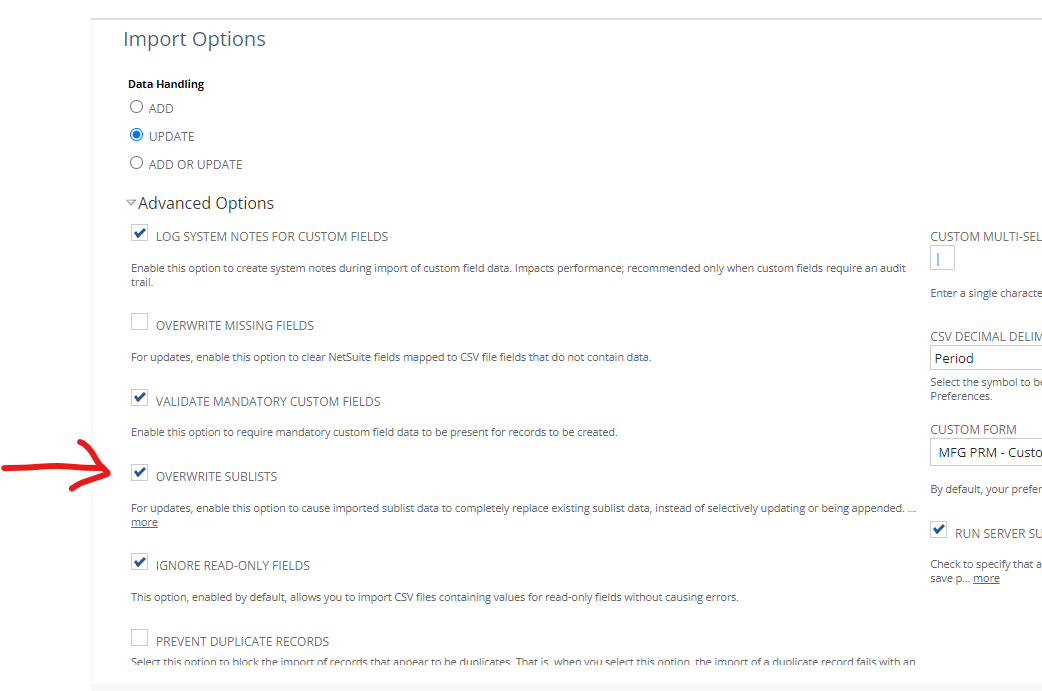
To REPLACE the addresses, check the 'Overwrite Sublists'. To Add new addresses, leave this box unchecked. One box can prevent a big mess, when used properly.
~angela