
The Fixed Asset Management SuiteApp automates the management of transactions involving Fixed Assets. Through this Suiteapp, you will be able to keep track of the asset’s life cycle from creation, depreciation and disposal. There are also predefined reports that you can generate to check if the records are accurate for compliance and reporting.
Assets Transactions include Asset Proposal, Creation, Depreciation, Disposal, Revaluation, Split, and Transfer.

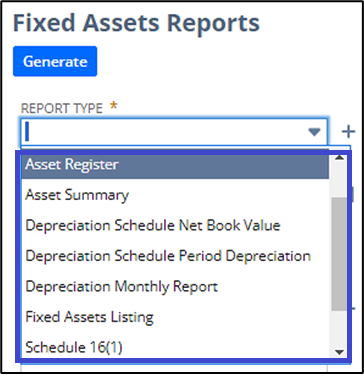
Fixed Asset Management Reports include:
Prerequisites:
Before you can install the Suiteapp, the following features must be enabled on your account first:
Navigate to Setup > Company > Enable Features, and then click the SuiteCloud tab
- Custom Records
- Custom Transactions
- Client SuiteScript
- Server SuiteScript
Installing the Bundle
- Navigate to Customization > SuiteBundler > Search & Install Bundles
- Search for Bundle ID: 464363 (Fixed Asset Management)
Note: This is a shared bundle. If the Install button is not available, you need to contact NetSuite Customer Support so it can be provisioned in your account.
To learn more about setting up the Fixed Asset Management Suiteapp, check out these articles:
Stay-up-to date on the latest articles by following the Basic Accounting category in the New to NetSuite corner. Topics include Journal Entries, Budgets, Bank Feeds, Reconciliation, and Fixed Asset Management.
