Does anyone know the reasoning behind the KPI Meter End Range Value, specifically when you enter a Threshold?
SuiteAnswer 85778 defines the KPI Meter End Range value as the Actual Value *1.5.
On the KPI Meter, there are 3 values on the curved graph. These are placed on the left (start range), the 2/3 (actual value) and the right (end range).
The End Range is calculated as Actual Value * 1.5. This is the reason why the Actual Value is 2/3 of the meter. The End Range is used to represent the End Range and does not reflect or affect any record in NetSuite.
Does anyone know the reasoning behind this seemingly arbitrary * 1.5 calculation? I would have expected it to be a specific defined goal.
In my case, We have 7029 Tax Rates we want to update every year and want to see how we are progressing toward that goal so I am hunting for a way to demonstrate in a KPI Meter..
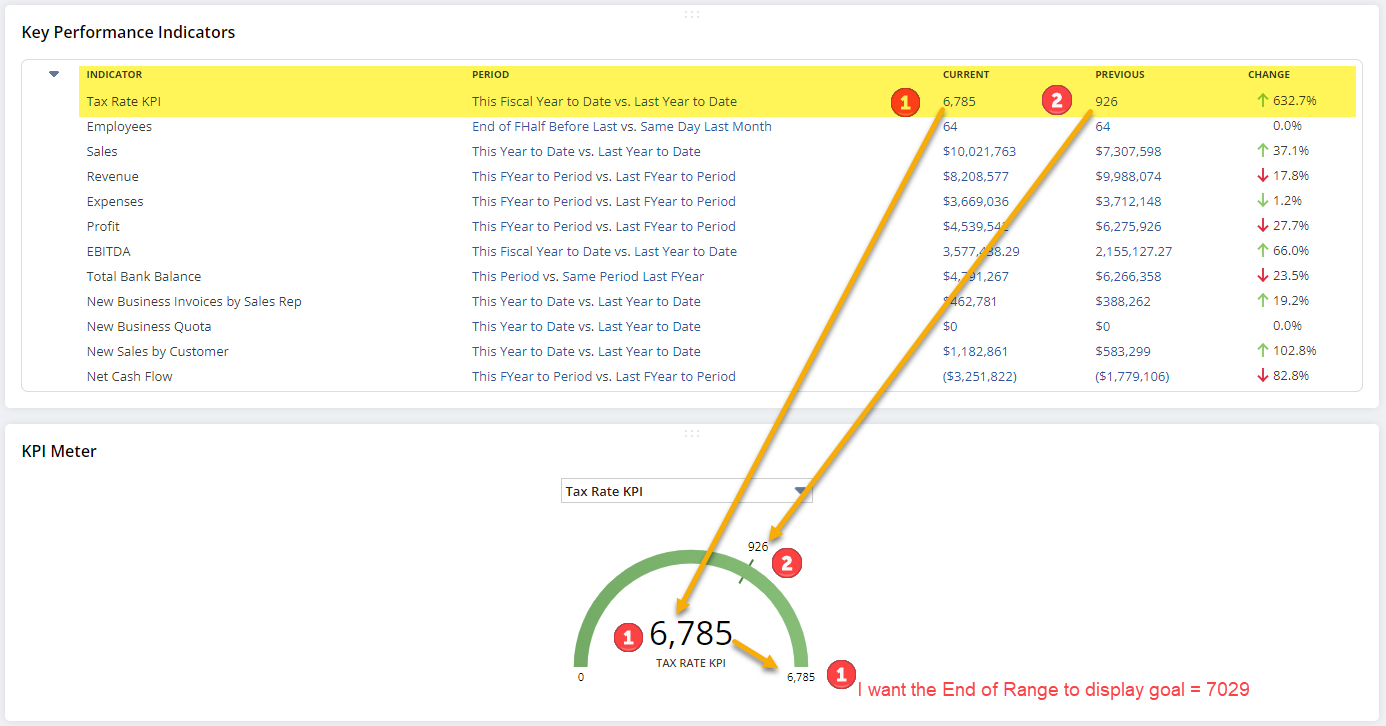
Just to see the result, I added a "Threshold" to the comparison and NetSuite calculated an End Range that is 1.5 times the Threshold.

I can "fake out" the system and back into the 7029 by entering 4686 (2/3 of the 7029 goal) but the irrelevant 4686 is displayed in the meter, & I don't want management to see the irrelevant #.

Anyway… All this to ask…. Does anyone know the reasoning behind this seemingly arbitrary Threshold * 1.5 calculation?
Does anyone have any suggestions? I'm still tinkering…
Thanks all
