Python is a programming language which is commonly used for data processing tasks. For example, Python can be used to extract data from an API or database, transform and cleanse data, for data science projects, or for data analysis. While it takes some learning to be comfortable, it is a widely used language and there are a vast array of resources available online for learning.
Why use Python with NSAW? Some example use cases:
- Extract data from another application, transform the data, and load into the NSAW data warehouse (ETL)
- Query the NSAW data warehouse and use Python libraries like Scikit-Learn or Pandas for data science projects with your NS data
- Aggregate external data in the data warehouse and push into NS ERP via the REST API (Reverse ETL)
The possibilities are endless but the first step is establishing a connection to your NSAW data warehouse (ADW) which I'll show you how to do here.
Gather Credentials
- Install Python and an IDE to work in. I'm using Jupyter Notebooks here.
- Ensure the following libraries are installed: Pandas, Os, Oracledb, and SQLalchemy. These can be installed with pip.
- Gather your ADW credentials. Download the wallet file from the NSAW admin console. In the wallet file, open the readme and use the link for Database Actions to access the web console. Login as admin using password you set/used to download the wallet initially.
- Under the Administration tab, navigate to Database Users. Find OAX_USER and ensure they are REST enabled. Set the password if you haven't already.
- Also Under Administration, download the Wallet file again. Here you will be asked to set a password for the wallet. Note this password and replace the previous wallet file with the one you just downloaded.
Create Connection
- Create a new Python notebook or script in your IDE. Import the libraries listed above. Create the following variables to store your credentials: user, pw, host, service, port, tns, pem, and wallet_password. Note: you may want to store sensitive info like passwords in your Windows path variable and use the OS library to access them vs hardcoding into the script like I've done here.
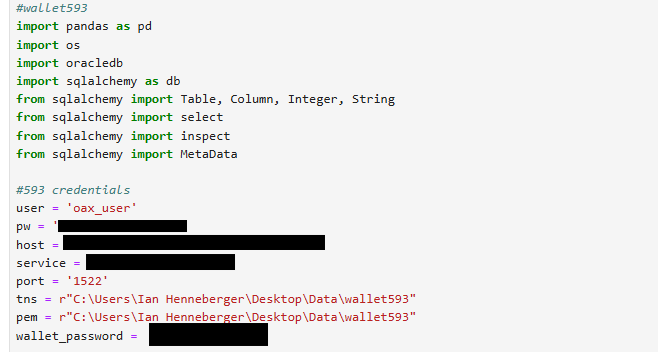
'pw' is the password you set for oax_user. 'host', 'service', and 'port' are found in the wallet, in a file called tnsnames.ora. You should see three options for 'service': high, medium, and low. I'm using the high service here. The value for 'service' should look something like oax#######_high.
'tns' and 'pem' are the path to your wallet file.
2. Create a database engine using sqlalchemy (with the oracledb driver) which takes your connection inputs and then initiates the connection.

3. You should now have established the connection to your NSAW ADW. To test it, use sqlalchemy to get the metadata and print the names of any tables created (these are custom tables, not your default NS tables, you may not have any unless you've created them with SQL Developer).

4. I haven't found a way to list the default NSAW tables, which are stored as synonyms. I recommend using SQL Developer or checking the documentation here to see those table names if you'd like to work with the native NS data. You can query them but they are read only (can only be written to by the NSAW data pipeline from NS ERP for data integrity reasons). You can always store any transformations you make to the NS data as a view or table.
Here's an example running a SQL Select query on the Customer dimension table and putting the result in a Pandas dataframe:

5. Close your connection:

