
Upon enabling the Financials module in your NetSuite Planning and Budgeting application, the system creates out-of-the-box account metadata hierarchy containing the upper-level members of Income Statement and Balance Sheet. These accounts are prefixed with NFS_ and are valid for NSP_NFS cube

When executing MD_AcctBalSht and MD_AcctStmt integration jobs, these upper-level members no longer need to be imported and must be excluded during import. Otherwise, the job will result in validation errors.
To exclude these upper-level members:
- Log into NetSuite
- Navigate to NetSuite EPM > Planning and Budgeting > Account Metadata Hierarchy
- Click Edit
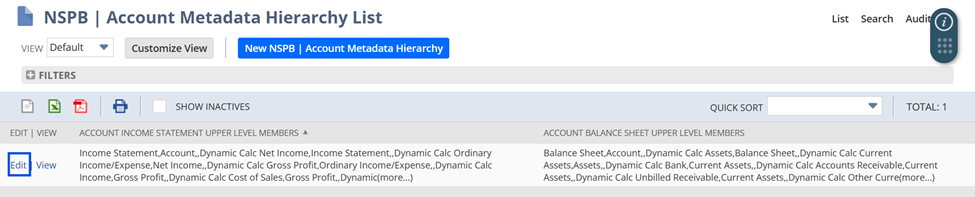
- Clear the contents of Account Income Statement Upper Level Members and Account Balance Sheet Upper Level Members
Before:

After:

- Click Save
- After saving, the Planning and Budgeting Sync SuiteApp will no longer include these upper-level members in the generation of Account Metadata Hierarchy
Alternatively, the exclusion can be done for every Account Metadata search
- Log into NetSuite
- Navigate to NetSuite EPM > Planning and Budgeting > Manage Saved Searches
- Click Customize/Edit beside the Account Metadata search (i.e. NSPB (Metadata) FIN Income Statement Accounts, NSPB (Metadata) FIN Balance Sheet Accounts)
- Check the Exclude Upper Level Hierarchy Members field

- Click Save
Make sure to follow the New to NetSuite > NetSuite Planning and Budgeting (NSPB)category to be notified when new articles are posted.
