Saved searches can help admins review and monitor customizations more efficiently. When an account has many custom fields, custom records, forms, workflows, or scripts, saved searches can make it easier to identify what exists, what is active, and what may need further review.
Using saved searches for customization reviews helps support cleanup, documentation, and long-term account maintenance.
Scenario
An admin needs to review existing NetSuite customizations.
Examples may include:
- custom fields
- custom records
- custom forms
- workflows
- scripts
- saved searches
- custom lists
The account may include older customizations that are still active, no longer used, duplicated, or missing documentation.
Solution
Create saved searches to help organize and review customization-related records.
Saved searches can help admins filter, group, and export information for review. This makes it easier to build a customization inventory and identify areas that may need cleanup or documentation.
Useful Saved Searches to Create
Custom Field Review Search
Use this search to review custom fields across the account.
Helpful columns may include:
- field name
- internal ID
- field type
- record type
- inactive status
- owner or description
- last modified date, if available
This can help identify unclear, duplicate, or inactive fields.
Custom Record Review Search
Use this search to review custom record types.
Helpful columns may include:
- record type name
- internal ID
- inactive status
- permissions
- owner or purpose
- related forms or fields
This helps admins understand which custom records still support active processes.
Script Review Search
Use this search to review scripts and deployments.
Helpful columns may include:
- script name
- script type
- deployment status
- deployed record type
- audience or role access
- last modified date
- owner or developer
This can help identify inactive scripts, broad deployments, or scripts that need documentation.
Workflow Review Search
Use this search to review workflows.
Helpful columns may include:
- workflow name
- record type
- release status
- trigger type
- owner
- active or inactive status
- description
This helps admins understand what automation may affect record behavior.
I don’t have access to a live NetSuite account to show an actual saved search from an account, but you can use this simple example in the article.
Example: Create a Script Review Saved Search
An admin wants to review script deployments to see which scripts are active, where they are deployed, and which ones may need cleanup or documentation.
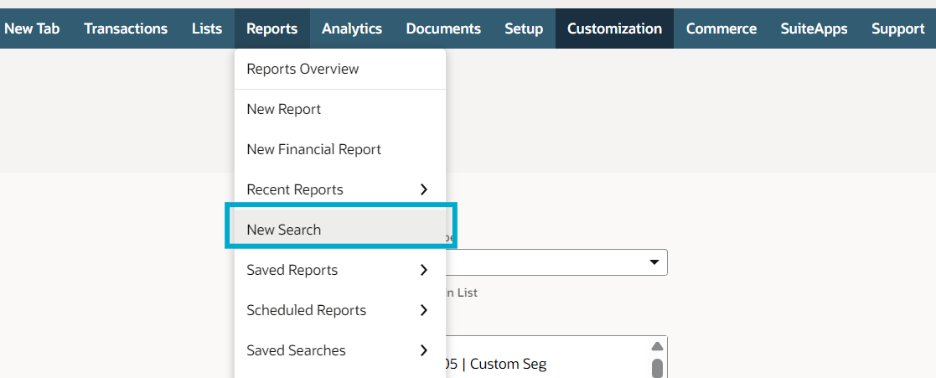
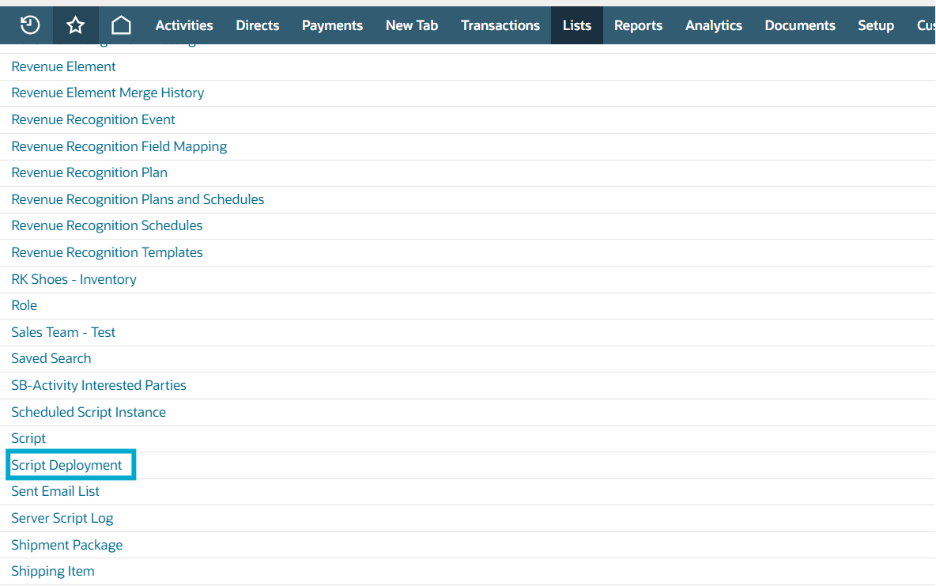
Navigation
NetsSuite: Go to: Reports > New Search & Select: Script Deployment
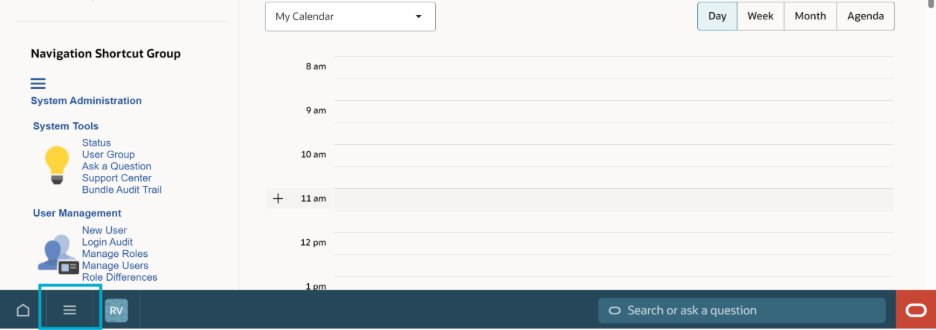
NetSuite Next:
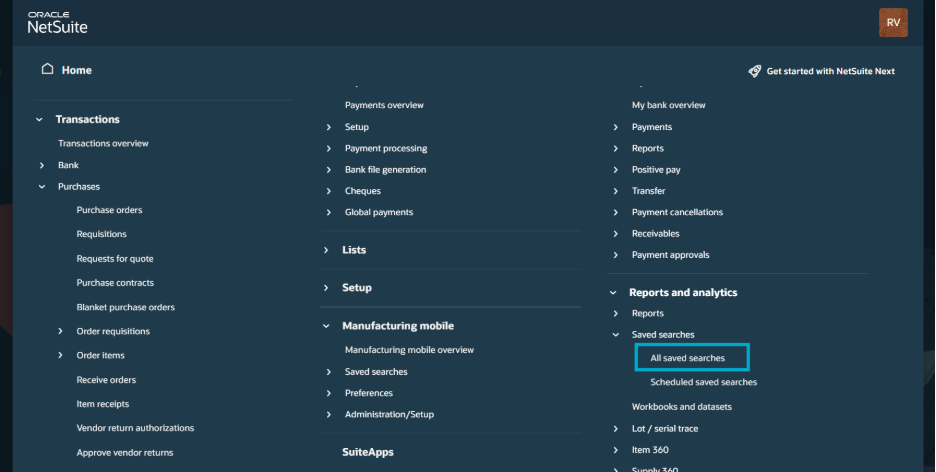
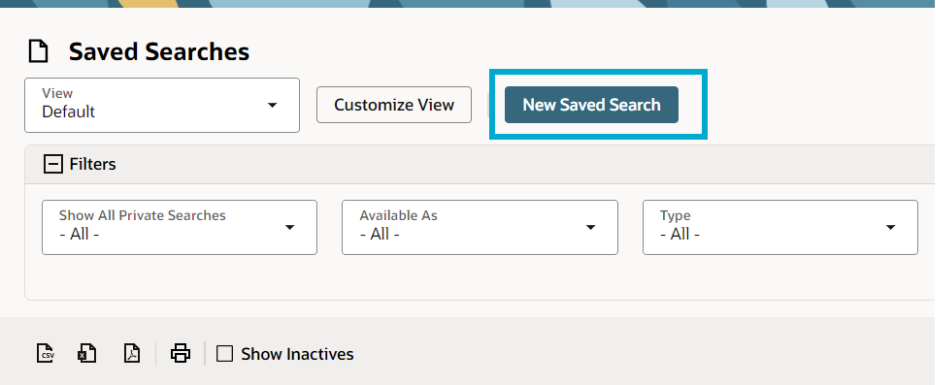
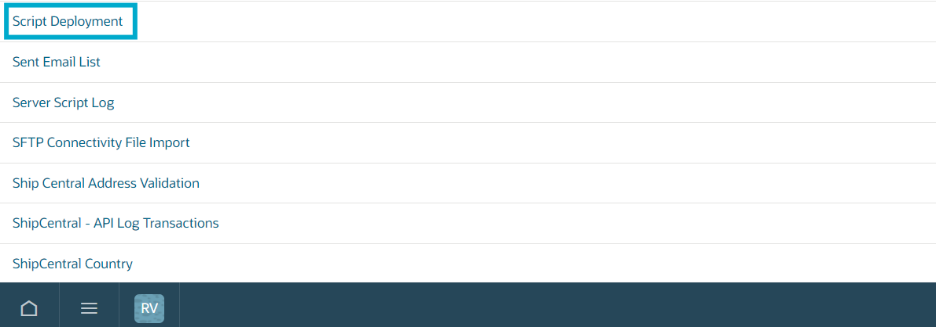
Click Explore (hamburger icon in the bottom left corner beside the home button). In the menu, go to Reports and analytics > All saved searches. Then, on the next page, click on New Saved Search. On another page select Script Deployment
3-Step Setup
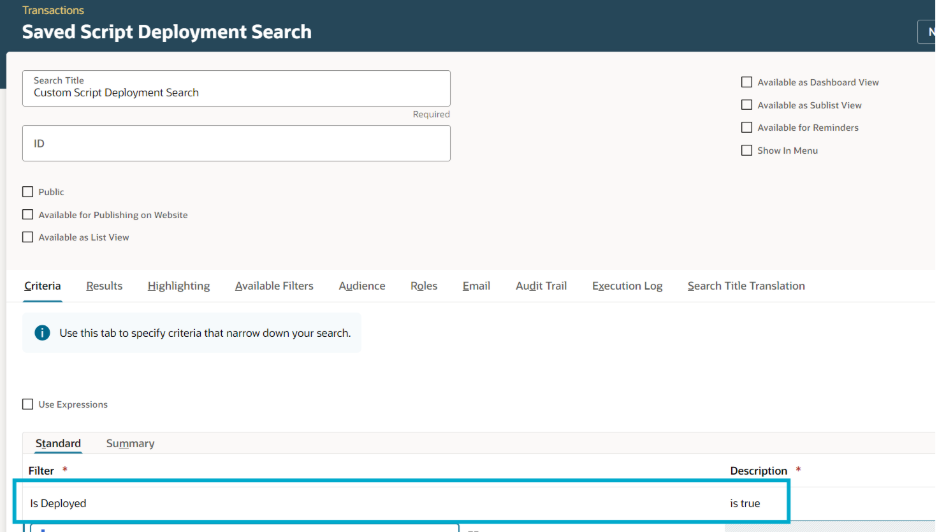
Step 1: Add Criteria
Use criteria to narrow the search.
Example:
This helps show active script deployments first.t
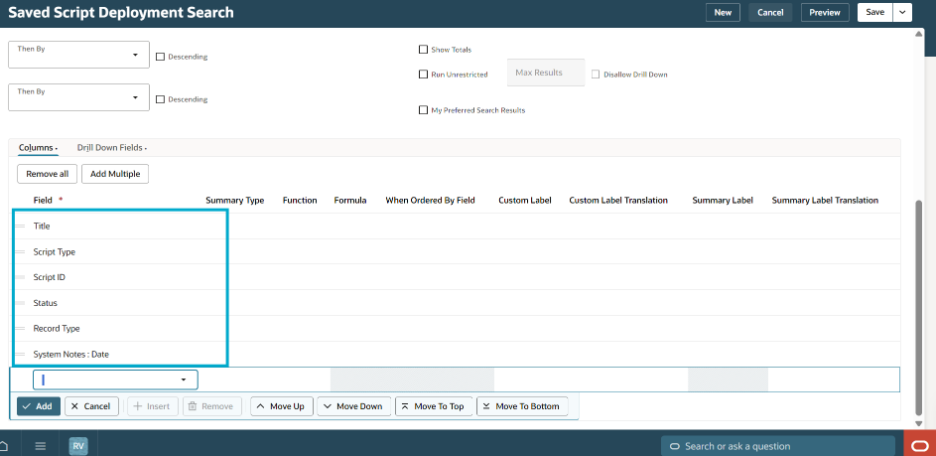
Step 2: Add Results Columns
Add columns such as:
- Script Name (Title)
- Script Type
- Script ID
- Status
- Record Type
- Last Modified Date(System Notes: Date)
These columns help the admin review what each deployment is used for.
Step 3: Save and Review
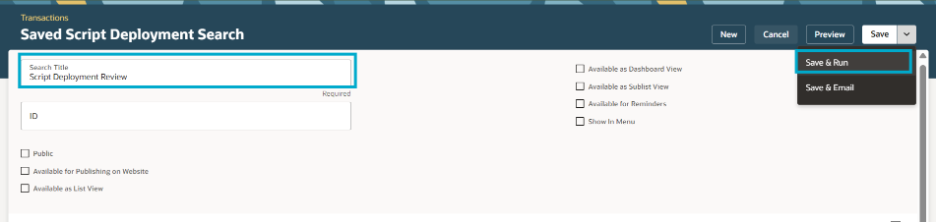
Name the search:
Script Deployment Review
Click Save & Run.
Review the results to identify active scripts, broad deployments, or scripts that need documentation.
Result
The admin now has a saved search that can be used as part of a customization review. It helps show which scripts are active, where they are deployed, and whether any deployments need cleanup or further review.
Why It Helps
Saved searches for customization reviews can help:
- build a customization inventory
- identify inactive or duplicate customizations
- support documentation cleanup
- review ownership and purpose
- prepare for admin handoffs
- reduce troubleshooting time
- support safer production changes
References
- SA: Defining a Saved Search (ID: 8474)
- SA: SuiteBuilder – Customization (ID: 1045873)
Notes
- Start with high-impact customization areas first.
- Include internal IDs in saved search results.
- Add owner or purpose information where available.
- Export results if the team needs an external review tracker.
- Review inactive items separately before cleanup.
- Confirm dependencies before deleting or disabling anything.
- Keep saved searches updated as part of admin maintenance.
Summary
Saved searches can make customization reviews easier by giving admins a structured way to review fields, records, forms, scripts, and workflows. They help identify what exists, what is active, and what may need cleanup or documentation.
A good set of review searches can improve visibility, reduce risk, and make future NetSuite administration easier.
Disclaimer: The sample code described herein is provided on an "as is" basis, without warranty of any kind, to the fullest extent permitted by law. Oracle + NetSuite Inc. does not warrant or guarantee the individual success developers may have in implementing the sample code on their development platforms or in using their own Web server configurations.
Oracle + NetSuite Inc. does not warrant, guarantee or make any representations regarding the use, results of use, accuracy, timeliness or completeness of any data or information relating to the sample code. Oracle + NetSuite Inc. disclaims all warranties, express or implied, and in particular, disclaims all warranties of merchantability, fitness for a particular purpose, and warranties related to the code, or any service or software related thereto.
Oracle + NetSuite Inc. shall not be liable for any direct, indirect or consequential damages or costs of any type arising out of any action taken by you or others related to the sample code.
Share your insights and experiences in the NetSuite Admin Corner.
