
Knowing how long it’s been since a transaction was created can be important for Administrators. For example, if a journal entry or any other transaction hasn’t been processed within a certain time, it might need attention. By tracking the age of transactions in days and hours and comparing this to today's time and date when the Saved Search is run, Administrators can quickly identify delays and ensure everything is on track.
How to track the age of transactions:
1.) Navigate to Lists > Search > Saved Searches > New.
2.) Select Transactions
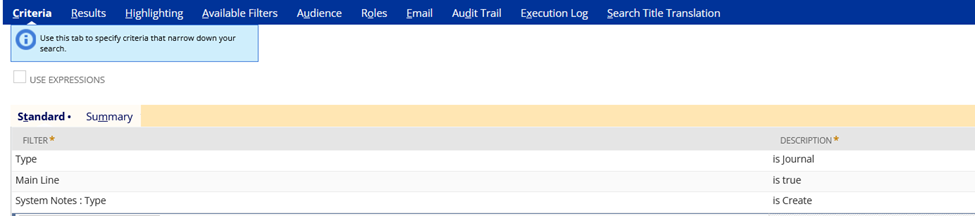
3.) In the Criteria tab > Standard:
Main Line = True
Type = Journal (or any other transaction type you wish to track).
System Notes…fields > Type > Create
4.) In the results tab:
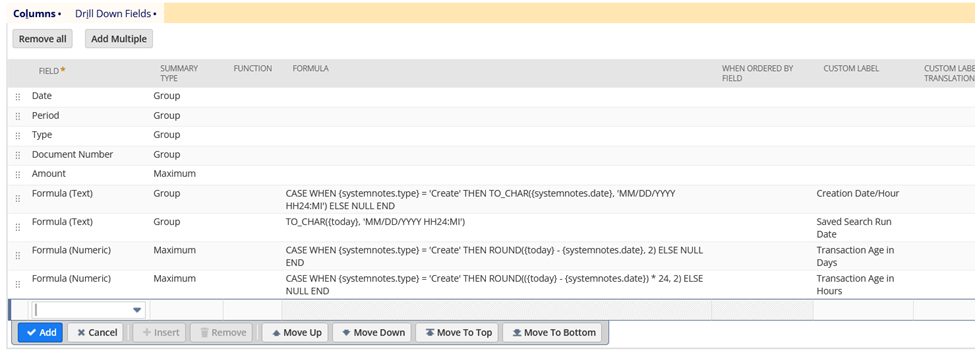
Add the following fields with a
Summary type of Group:
- Date
- Period
- Type
- Document Number
Summary type of Maximum:
For the formulas:
- Formula (Text) | Formula: CASE WHEN {systemnotes.type} = 'Create' THEN TO_CHAR({systemnotes.date}, 'MM/DD/YYYY HH24:MI') ELSE NULL END | Summary Type: Group | Label: Creation Date/Hour |
- Formula (Text) | Formula: TO_CHAR({today}, 'MM/DD/YYYY HH24:MI') | Summary Type: Group | Label: Saved Search Run Date and Hour
- Formula (Numeric) | Formula: CASE WHEN {systemnotes.type} = 'Create' THEN ROUND({today} - {systemnotes.date}, 2) ELSE NULL END | Summary Type: Maximum| Label: Transaction Age in Days
- Formula (Numeric) | Formula: CASE WHEN {systemnotes.type} = 'Create' THEN ROUND(({today} - {systemnotes.date}) * 24, 2) ELSE NULL END | Summary Type: Maximum | Label: Transaction Age in Hours
5.)RenameSearch
6.) Save and Run
The system will calculate how many days and hours have passed since the creation of the transaction.

Have any tips or best practices in NetSuite? Share them here in NetSuite Admin Corner!
