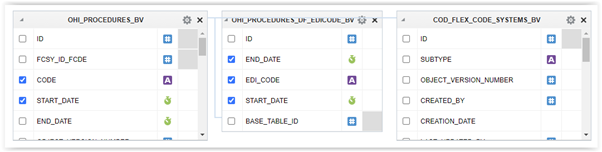
When creating a data model with the query builder, the box showing the columns from the table or view, only shows five columns at the time (the box is not resizable) and the columns are not sorted in alphabetical order. For tables having larger numbers of columns, this is very impractical. There is also no filter option to limit the number of columns being displayed.
For the classic EMP and DEPT tables this always works fine. But a real system usually has much more columns and then it is really an omission that the tool doesn't order the columns properly.
Please consider options to:
- Resize the box to show more columns at a glance.
- Add a filter option to reduce the set of columns being displayed and being able to select the required one.
Thank you!



