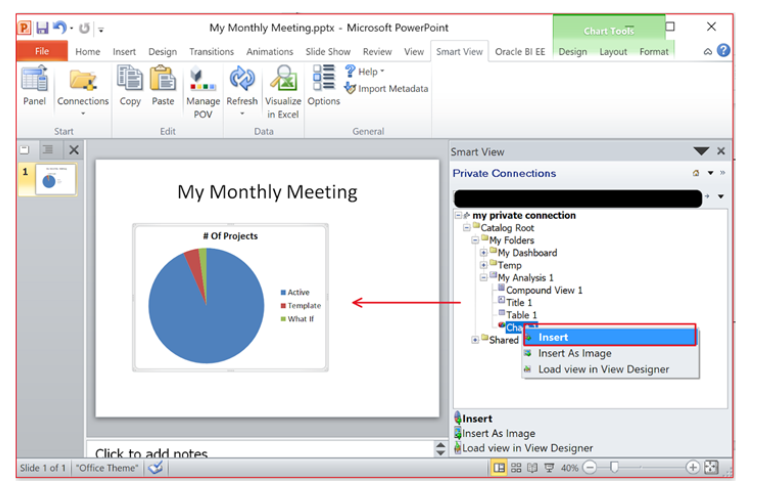
We have a requirement where we need to be able to pull individual OTBI analysis (with graphs) to be pulled into a slide in PPT. I looked on the documentation, there is no plugin available for PPT.
Could somebody help on this topic ?
Thanks,
Prasad
Hi,
Yes the Oracle Business Intelligence (OBI) platform part of Oracle Transactional Business Intelligence is a suite of products. One of the products is a client side tools you can download to install in MS Office. So you can embed a pie chart from an analysis in OBI into your power point then just press refresh each time you present to show the latest information.
To install. If, your user or a role your user is granted or inherit, is granted by the bi administrator using page /analytics/saw.dll?PrivilegeAdmin, is granted privilege Access to Oracle Analytics for Microsoft Office, Access to Oracle Analytics Client Installer, which by default is granted to users with role bi consumer, then you can find the download links on the bi home page /analytics/saw.dll?bieehome in list of values "Download Desktop Tools" then "Smart View for Office" and "Oracle Analytics Client Installer". But these are just external links so you can go direct to the download pages in any case even if you do not have the links on the home page.
For Example,
Install Smart View add-in on your local machine to integrate Oracle Business Intelligence with Microsoft Office.
For more information see
Oracle® Smart View for Office User Guide
https://docs.oracle.com/en/applications/enterprise-performance-management/smart-view/22.100/opgsv/index.html
Download
https://www.oracle.com/middleware/technologies/epm-smart-view-downloads.html
To check support for your version of MS Office
Smart View Support Matrix and Compatibility FAQ (Doc ID 1923582.1) https://support.oracle.com/
To check what version of MS Office
https://support.microsoft.com/en-us?correlationid=0d324fb1-5403-4abd-9271-f95833d3b754&ui=en-us&rs=en-us&ad=us
Thank you! Nathan,
Really appreciate your response,
Hi Nathan,
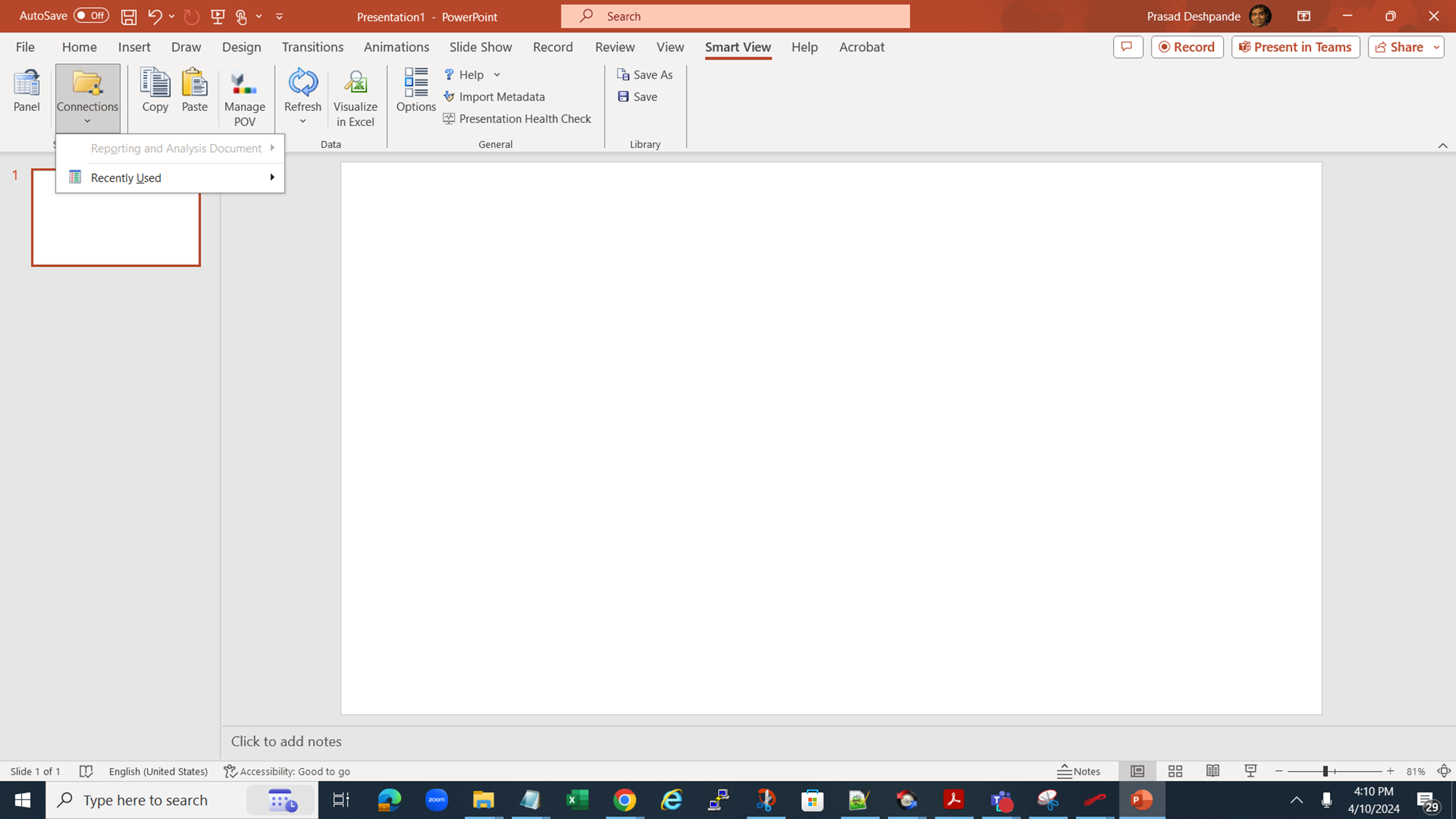
I installed Smart view but I am not able to create any connection. did I do something wrong here ? if you could help again :) Thank you!
Regards,
Where AI meets business outcomes Oracle AI World brings the Oracle community together to explore how AI and other technology innovations are driving real business outcomes across industries. Discover what’s new through: Mainstage keynotes to hear the latest directly from Oracle leadership Product demonstrations Customer…
Our Requisition OTBI analysis is having many values Requisition Number Requisition Title Requisition Status Hiring Manager Full Name Recruiter Full Name am able to see values for all. When am passing Prompt(Hiring Manager Full Name or Recruiter Full Name) am not able to see the data. Am sure we have values/data for passed…
Hi Experts, We are using Oracle BI Publisher Email Bursting to distribute reports via email. Currently, one of our bursting outputs generates a report of approximately 20 MB, and we are trying to understand whether there are any size limitations that could impact email delivery. Scenario: Report Delivery Method: Email…
Team, We have a requirement to select below PVOs HcmTopModelAnalyticsGlobalAM.ProfileAM_ProfileItemPVO HcmTopModelAnalyticsGlobalAM.ProfileAM_ProfilePVO HcmTopModelAnalyticsGlobalAM.ProfileAM_ContentItemPVO HcmTopModelAnalyticsGlobalAM.ProfileAM_ContentTypePVO Do we have any documentation around these?
We have a requirement of enabling OTBI report in Purchase Requisition Redwood page similar to classic UI.How can that be done?