Categories
- All Categories
- Oracle Analytics Learning Hub
- 30 Oracle Analytics Sharing Center
- 20 Oracle Analytics Lounge
- 247 Oracle Analytics News
- 45 Oracle Analytics Videos
- 16K Oracle Analytics Forums
- 6.3K Oracle Analytics Idea Labs
- Oracle Analytics User Groups
- 91 Oracle Analytics Trainings
- 16 Oracle Analytics and AI Challenge
- Find Partners
- For Partners
Welcome to the Oracle Analytics Community: Please complete your User Profile and upload your Profile Picture
Number format changed on a created report
Fred Kaffenberger-Oracle
Rank 3 - Community Apprentice
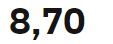
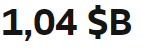
In FDI, I copied a prebuilt report and made changes to it. At some time, the number format changed from using commas as Thousand Separator to only using a space. A point or a period is now replaced by a comma. The currency sign is appearing after the number and not before.
The original report displays correctly with the US localization. When I make a new copy, the correct US localization appears. It seems to be some sort of workbook level localization which I can't find. How do I get the correct US localization for numbers back on this workbook?
Tagged:
0
Best Answer
-
Hmm. Seems to have fixed itself
0
Answers
-
0