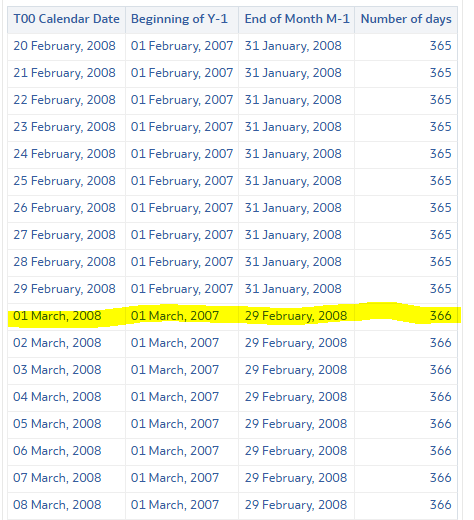
So, keeping it simple, you want to know if the February being in the last 12 months is a leap year or not? Because your calculation can only return 2 numbers: 365 most of the time, and 366 when it's a leap year.
I believe the first thing is to decide if you want to calculate based on your incremental key or you want to calculate based on dates. The incremental key is something you (or somebody else) manage, and while now it's a date and would give the same result, functionally it's a different thing if you use that vs. doing a date calculation.
If you want to work on dates (the formula will always work, whatever your incremental key is), you can build that login by using native LSQL formulas.
Here an example of what it could be like (based on a column giving me a date, so I can make sure it does work correctly):
The best way to get there is by cutting your need into small pieces: get the first day of month of 1 year ago, then get the last day of the previous month, then calculate the difference in days between the 2 dates.
TIMESTAMPDIFF(
  SQL_TSI_DAY,
  TIMESTAMPADD(
    SQL_TSI_YEAR,
    -1,
    TIMESTAMPADD(
      SQL_TSI_DAY,
      1-DAYOFMONTH("Time"."T00 Calendar Date"),
      "Time"."T00 Calendar Date"
    )
  ),
  TIMESTAMPADD(
    SQL_TSI_DAY,
    -DAYOFMONTH("Time"."T00 Calendar Date"),
    "Time"."T00 Calendar Date"
  )
) + 1
The formatting is just to make it readable, it can be a single line. You can easily replace the "Time"."T00 Calendar Date"in the formula by CURRENT_DATEif you want to always make the calculation based on the current date, or you can also use any other date column of your dataset in it.
"Time"."T00 Calendar Date"
CURRENT_DATE
Give it a read, make sure you understand what's going on in the formula (because that's what let you adjust it if needed), and you are good to go.
It isn't going to be the best ever formula to be in a dataset, if you can calculate that in your database and add it somewhere in a dataset it will be better from a performance point of view. But it does the job for sure.
Hi,
You maybe forgot to write the main part of the question because right now there is just a title.
You should describe a bit more what you are asking, where you are trying to do it (the product has various interfaces working differently one from the other), and what does "calculate total number days for last 12 months" mean for you, otherwise you will never get a helpful reply.
Thanks :)
Thanks Gianni
I am trying to dynamically calculate the total number of days in the last 12 months. For example, if we are in December 2024, the calculation should consider the period from December 2023 to November 2024. Similarly, if we move to January 2025, the formula should automatically adjust to include the period from January 2024 to December 2024.
I am working with a custom dataset and CAA to build the visualization. In the custom dataset, I have a column called Incremental Key, which represents the end-of-month date for each period. For instance, for November 2024, the Incremental Key would be 30/11/2024, and so on for each month.
To calculate the total number of days over the last 12 months dynamically, I used the formula below. However, instead of returning the expected total (366 days), it was returning 31 days.
FILTER(MSUM((DAYOFMONTH(XSA('vchoraria@atlassian.com'.'AR Aging DSO View')."DW_BIP_X_FAW_ARAGING_VIEW"."INCREMENTAL_KEY")), 12) USING "CAA"."Time"."Trailing Period Number" BETWEEN 1 AND 12)
Thanks Gianni Ceresa !
Where AI meets business outcomes Oracle AI World brings the Oracle community together to explore how AI and other technology innovations are driving real business outcomes across industries. Discover what’s new through: Mainstage keynotes to hear the latest directly from Oracle leadership Product demonstrations Customer…
What am I doing wrong here? There is only one selection in the Target Canvas??
In BIP. I was able to group tables. Is this possible in OAC
I creates a parameter "Role Name" and then I put the Role name field in the filter and made a bind to the parameter, When I add the value in the parameter, it works. When I delete it from the parameter it give me <empty> How do I get rid of the <empty>
Hi, all, I have been struggling with connecting to Teradata in OBIEE Admin tool. I can't import Metadata to the RPD that exists. I am not sure about if it is due to my config of ODBC Teradata is incorrect or anything else? Please find the following errors as attached: Many thanks for your help!
Hi Team, Has anyone upgrade OAS system from the 2024 to 2026 version? if yes, could you please share the resposne files. Regards, Chand