Hi All,
Can we hide the subject area while creating any new analysis in OTBI which are not relevant or client has not bought the license for that module ?
Similarly , can we hide the catalog folder too which are not needed .
Regards
Ankur
Thank you not sure why it don't pop while searching. but can we hide the catalog folders too ?
Have you searched the forum? https://community.oracle.com/products/oracleanalytics/discussion/23294/
few hits on that too…try this https://community.oracle.com/products/oracleanalytics/discussion/19847
Thanks @gclampitt for your quick help on this.
Hi @gclampitt ,
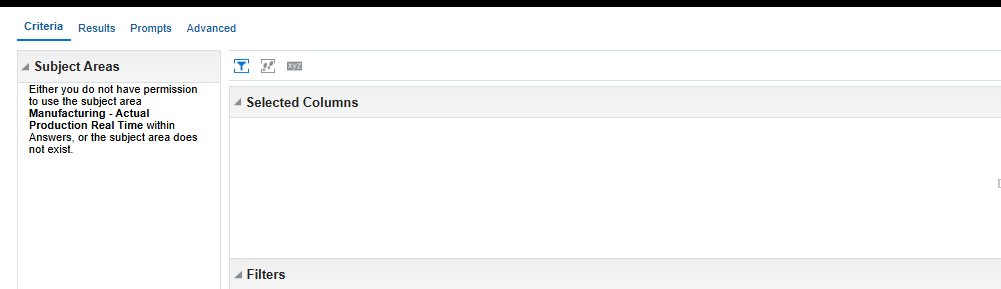
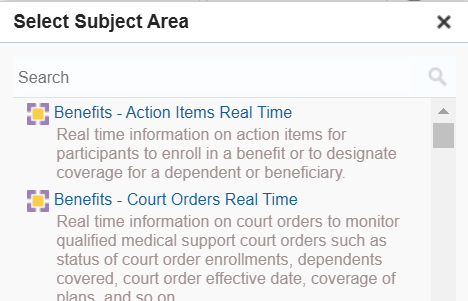
I tried to use manage privilege option but it is not hiding from search list. if we click on that subject area then it shows you don't have access. Our requirement is to completely remove from this search list as shown in screenshot.
Any suggestions on this?
hi you need to go to Admin> Manage priviledges - if you dont have this option, you need to get the BI admin role.
Once there. just set the permissions as required….
If you want to hide a SA area for everyone, say because you don't use that Module, just change the permissions to denied
this is exactly I have done but when we create the analysis then we first search subject area and there only I am still able to see the subject area. Although, when we click on subject area then it says you don't have permission to access the subject area as shown in following screenshot:
Requirement is to don't show subject area in the search list itself
Regards,
Hi - its works for me - try clearing your browser cache etc I can only see what has been granted
If I have BI administrator access, will I have still access to see these subject areas as I have denied the access for BI author role but BI administrator role was also not there so I thought it should not be visible with admin too.
I have BI admin and cant see it once denied - thats what we do for all the SAs that we dont use…just try it out…presume you have test envs
Where AI meets business outcomes Oracle AI World brings the Oracle community together to explore how AI and other technology innovations are driving real business outcomes across industries. Discover what’s new through: Mainstage keynotes to hear the latest directly from Oracle leadership Product demonstrations Customer…
Our Requisition OTBI analysis is having many values Requisition Number Requisition Title Requisition Status Hiring Manager Full Name Recruiter Full Name am able to see values for all. When am passing Prompt(Hiring Manager Full Name or Recruiter Full Name) am not able to see the data. Am sure we have values/data for passed…
Hi Experts, We are using Oracle BI Publisher Email Bursting to distribute reports via email. Currently, one of our bursting outputs generates a report of approximately 20 MB, and we are trying to understand whether there are any size limitations that could impact email delivery. Scenario: Report Delivery Method: Email…
Team, We have a requirement to select below PVOs HcmTopModelAnalyticsGlobalAM.ProfileAM_ProfileItemPVO HcmTopModelAnalyticsGlobalAM.ProfileAM_ProfilePVO HcmTopModelAnalyticsGlobalAM.ProfileAM_ContentItemPVO HcmTopModelAnalyticsGlobalAM.ProfileAM_ContentTypePVO Do we have any documentation around these?
We have a requirement of enabling OTBI report in Purchase Requisition Redwood page similar to classic UI.How can that be done?