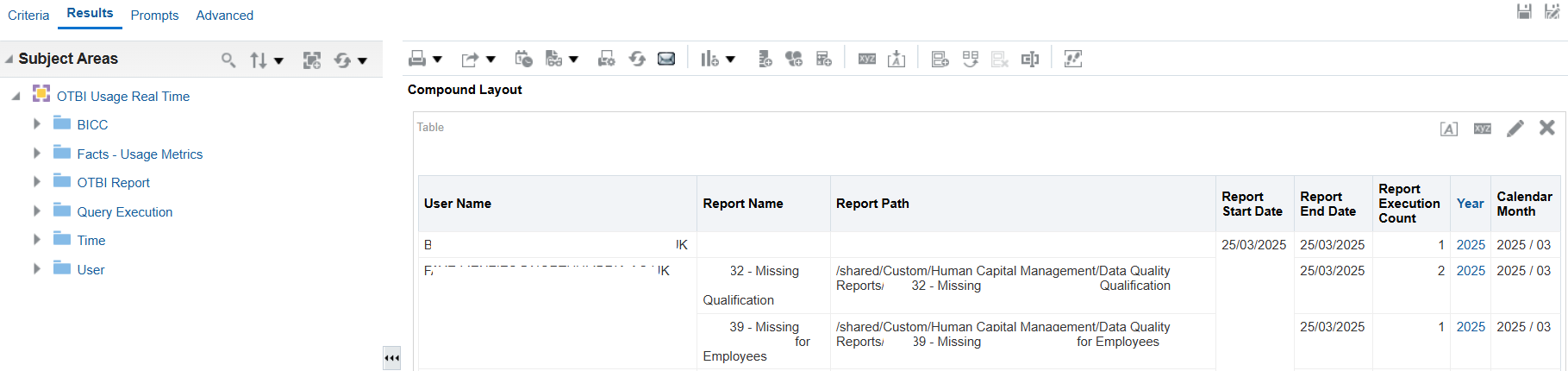
I am getting issue in OTBI Usage Tracking wherein I had used the above Subject areas - OTBI Usage Tracking , however for some reason its not showing the data for recent weeks.
Is their any job or setting that we need to enable for the same ?
HI @Prateek Dhawan,
Not aware of any special settings or jobs but this SA only holds last 6 months of data.
Please take a look into the following doc and following post which might be useful
https://docs.oracle.com/en/cloud/saas/human-resources/25a/faohb/OTBI-Usage-Real-Time-SA-97.html#Description
Real Time OTBI Usage & Performance — Cloud Customer Connect
Just to make sure BI cache or browser cache is not creating the issue, please clear the BI Cache and browser cache & cookies, logout & close the browser and then again have a fresh login to check if there's any betterment.
Hope this help.
Thank you.
Thanks . Have Tried suggested steps . However no luck
Hi Prateek,
Quick questions:
Are you getting any data with usage SA?
Are there any particular set of reports or subject areas that you are not getting for recent weeks?
Are you getting any other data for the recent weeks? like not getting any data from say 5 of this month for any reports. OR getting data for few reports but not for all?
Are you getting any data with usage SA?- yes
Are there any particular set of reports or subject areas that you are not getting for recent weeks?- not coming data from any SA from particular date but before able to see data before that
Not getting data from any SA from particular date(say mid of Feb) but before able to see data before that
Thanks for the details.
If possible please attach your report xml / catalog here so that will try to replicate the issue in our instance to see if we are facing the same.
Thanks Bhaskar
Following are the steps that can be used to recreate issue
Steps to recreate
--- Open the Fusion analytics application --- Click on Catalog -- Create Analysis --- Select Subject Area -"OTBI Usage Real Time" --- Select columns in the Criteria Tab Year, Calendar Month, User Name, Report Start Date, Report End Date, Report Execution Count
-- Click on Results Tab Sort the same by Report Start date DESC
Thanks for the details. I've tried in my instance and it is working fine and bringing the Real Time Data.
Here's the report output that I received.
Hi @Prateek Dhawan,
Please find below the report xml that have been used for the above report output.
Thanks for quick reply.
Have used the same xml , however still no luck
Have tried on other environment and have similar issue in that
We are using the application ver
Oracle Fusion Cloud Applications25A (11.13.25.01.0)
Is their any ESS standard job or some table config setting that we can check .?
Have tried clearing cache
I'm not able too replicate the issue in our instances and the data is coming fine for us.
I would recommend to raise with Oracle Support with all associated details and get their valuable suggestions.
Explore how to build agents using code in AI Data Platform. We'll create an agent that examines and analyzes the contents of a Github repository and reports its findings. The session demonstrates how to use different developer tools to create agents including the AIDP extension for VS Code and Codex. Using these tools we…
Our Requisition OTBI analysis is having many values Requisition Number Requisition Title Requisition Status Hiring Manager Full Name Recruiter Full Name am able to see values for all. When am passing Prompt(Hiring Manager Full Name or Recruiter Full Name) am not able to see the data. Am sure we have values/data for passed…
Hi Experts, We are using Oracle BI Publisher Email Bursting to distribute reports via email. Currently, one of our bursting outputs generates a report of approximately 20 MB, and we are trying to understand whether there are any size limitations that could impact email delivery. Scenario: Report Delivery Method: Email…
Team, We have a requirement to select below PVOs HcmTopModelAnalyticsGlobalAM.ProfileAM_ProfileItemPVO HcmTopModelAnalyticsGlobalAM.ProfileAM_ProfilePVO HcmTopModelAnalyticsGlobalAM.ProfileAM_ContentItemPVO HcmTopModelAnalyticsGlobalAM.ProfileAM_ContentTypePVO Do we have any documentation around these?
We have a requirement of enabling OTBI report in Purchase Requisition Redwood page similar to classic UI.How can that be done?