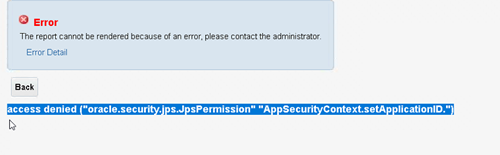
Having this error when trying to access report
i have tried adding roles to BI publisher but still persists
Try this Oracle note
Access Denied Error Encountered When User Runs BI Publisher Report - access denied ("oracle.security.jps.JpsPermission" "AppSecurityContext.setApplicationID.")
KB32316
Applies To
All Users Oracle Fusion Global Human Resources Cloud Service - Version 11.13.19.10.0 to Version 11.13.19.10.0Oracle Fusion Manufacturing Cloud Service - Version 11.13.18.01.0 and later
Summary
User(s) encounter an access denied error when running BI Publisher Report - access denied ("oracle.security.jps.JpsPermission" "AppSecurityContext.setApplicationID.")
Solution
Add the necessary role(s) to the "Oracle BI EE" data source:
1. Log into Analytics (https://<host.domain>/analytics/) as a user with BI Administrator role.2. Navigate to My Profile > Administration3. Select Manage Publisher > JDBC Connection (under Data Sources)4. Select the Oracle BI EE data source5. In the Security section add the required role(s) (ie BI Consumer) to the Allowed Roles by selecting the role and then use the Move option.6. Select Apply.7. Afterward log out and back in as the user experiencing the issue. Retest running the report.
Cause
The data model(s) associated with the report is using a Data Source of "Oracle BI EE (Default)". The "Oracle BI EE" data source does not include the role(s) that the user experiencing the issue has. For example, the user has BI Consumer role but the "Oracle BI EE" data source does not include the BI Consumer role.
Hi ,
we have tried above solution but it is also not working for us .We have given
BI Publisher Data Model Developer.BI consumer role we have already allocated .
We need to try with SR only.
Any Inputs?
Can you try assigning one of the roles which the user have? And assign that role to data model and report and recheck?
Where AI meets business outcomes Oracle AI World brings the Oracle community together to explore how AI and other technology innovations are driving real business outcomes across industries. Discover what’s new through: Mainstage keynotes to hear the latest directly from Oracle leadership Product demonstrations Customer…
Our Requisition OTBI analysis is having many values Requisition Number Requisition Title Requisition Status Hiring Manager Full Name Recruiter Full Name am able to see values for all. When am passing Prompt(Hiring Manager Full Name or Recruiter Full Name) am not able to see the data. Am sure we have values/data for passed…
Hi Experts, We are using Oracle BI Publisher Email Bursting to distribute reports via email. Currently, one of our bursting outputs generates a report of approximately 20 MB, and we are trying to understand whether there are any size limitations that could impact email delivery. Scenario: Report Delivery Method: Email…
Team, We have a requirement to select below PVOs HcmTopModelAnalyticsGlobalAM.ProfileAM_ProfileItemPVO HcmTopModelAnalyticsGlobalAM.ProfileAM_ProfilePVO HcmTopModelAnalyticsGlobalAM.ProfileAM_ContentItemPVO HcmTopModelAnalyticsGlobalAM.ProfileAM_ContentTypePVO Do we have any documentation around these?
We have a requirement of enabling OTBI report in Purchase Requisition Redwood page similar to classic UI.How can that be done?