Categories
- All Categories
- Oracle Analytics Learning Hub
- 30 Oracle Analytics Sharing Center
- 19 Oracle Analytics Lounge
- 239 Oracle Analytics News
- 45 Oracle Analytics Videos
- 16K Oracle Analytics Forums
- 6.3K Oracle Analytics Idea Labs
- Oracle Analytics User Groups
- 88 Oracle Analytics Trainings
- 16 Oracle Analytics and AI Challenge
- Find Partners
- For Partners
Facing the error msg.. while connecting OAS Dashboard Pages
Error Codes: WH4KCFW6:OPR4ONWY:U9IM8TAC:U9IM8TAC
Location: saw.connection.openConnection, saw.connectionPoolAsync.createConnectionJob, saw.threadpool.dbconnectionpool, saw.threads
Error during query processing (SQLDriverConnectW).
State: HY000. Code: 10058. [NQODBC] [SQL_STATE: HY000] [nQSError: 10058] A general error has occurred. (HY000)
State: HY000. Code: 73025. [nQSError: 73025] The Oracle BI Server is currently unavailable for queries. Please contact your System Administrator to report the failure. (HY000)

Answers
-
Hi @User_FQGFA ,
Based on the limited details you’ve provided, I found a Knowledge Management (KM) article that appears relevant:
OBIS Keeps Crashing When Running or Editing Analytics Dashboard and Reports (Doc ID 3052959.1).
However, please note that while the issue seems similar, it’s important to confirm that you are experiencing the same issue as described in the KM. I strongly suggest checking with Oracle Support before making any changes or following actions from the article, to ensure it is applicable for your issue.
Hope this helps!
1 -
Thanks for your inputs…
But our OAS patch is run on latest OAS BUNDLE PATCH 7.6.0.0.250905
[oracle@i03907licua001 OPatch ]$ ./opatch lsinventory | grep -i 36823847
[oracle@i03907licua001 OPatch ]$ ./opatch lsinventory | grep -i 36392269
[oracle@i03907licua001 OPatch ]$ ./opatch lsinventory | grep -i applied
Patch 38528248 : applied on Tue Nov 18 16:56:49 GMT 2025
Patch 38412437 : applied on Tue Nov 18 16:56:41 GMT 2025
Patch 38405729 : applied on Tue Nov 18 16:53:55 GMT 2025
Patch 38400138 : applied on Tue Nov 18 16:53:11 GMT 2025
Patch 38396889 : applied on Tue Nov 18 16:52:21 GMT 2025
Patch 38379810 : applied on Tue Nov 18 16:47:21 GMT 2025
Patch 38348152 : applied on Tue Nov 18 16:46:56 GMT 2025
Patch 38199225 : applied on Tue Nov 18 13:50:09 GMT 2025
Patch 38073767 : applied on Tue Nov 18 13:49:36 GMT 2025
Patch 37925688 : applied on Tue Nov 18 13:49:06 GMT 2025
Patch 37894414 : applied on Tue Nov 18 13:48:42 GMT 2025
Patch 37056593 : applied on Tue Nov 18 13:46:06 GMT 2025
Patch 36946553 : applied on Tue Nov 18 13:45:58 GMT 2025
Patch 36789759 : applied on Tue Nov 18 13:45:19 GMT 2025
Patch 1221427 : applied on Tue Nov 18 13:45:11 GMT 2025
Patch 35065206 : applied on Tue Sep 24 09:33:50 GMT 2024
Patch 31032676 : applied on Tue Sep 24 09:32:58 GMT 2024
Patch 34809489 : applied on Tue Sep 24 08:16:45 GMT 2024
Patch 36822804 : applied on Tue Sep 24 08:14:06 GMT 2024
Patch 36649916 : applied on Tue Sep 24 08:01:17 GMT 2024
Patch 36316422 : applied on Tue Sep 24 08:00:49 GMT 2024
Patch 35965629 : applied on Tue Sep 24 08:00:25 GMT 2024
[oracle@i03907licua001 OPatch ]$ ./opatch lspatches
38528248;OAS STACK PATCH BUNDLE 7.6.0.0.251010 (Patch 38528145)
38412437;WLS PATCH SET UPDATE 12.2.1.4.250910
38405729;FMW Thirdparty Bundle Patch 12.2.1.4.250909
38400138;WebCenter Core Bundle Patch 12.2.1.4.250904
38396889;OAS BUNDLE PATCH 7.6.0.0.250905
38379810;OSS 19C BUNDLE PATCH 12.2.1.4.250902
38348152;ADF BUNDLE PATCH 12.2.1.4.250822
38199225;RDA release 25.4-20251021 for OFM 12.2.1.4 SPB
38073767;OWSM BUNDLE PATCH 12.2.1.4.250613
37925688;JDBC19.27 BUNDLE PATCH 12.2.1.4.250514
37894414;DATABASE RELEASE UPDATE 19.27.0.0.0 FOR FMW DBCLIENT (37894414)
37056593;One-off
36946553;FMWCONTROL BUNDLE PATCH 12.2.1.4.240814
36789759;FMW PLATFORM BUNDLE PATCH 12.2.1.4.240812
1221427;Coherence Cumulative Patch 12.2.1.4.27
35065206;One-off
31032676;One-off
34809489;One-off
36822804;WLS STACK PATCH BUNDLE 12.2.1.4.240710 (Patch 36822778)
36649916;One-off
36316422;OPSS Bundle Patch 12.2.1.4.240220
35965629;ADR FOR WEBLOGIC SERVER 12.2.1.4.0 CPU JAN 2024
OPatch succeeded.
[oracle@i03907licua001 OPatch ]$
I tried some logs analyzed in that OAS server… which I carputer few things .. PFA below output
Bi_server.out log
<Dec 2, 2025 7:57:42,600 AM GMT> <Error> <oracle.bi.security.subject> <BEA-000000> <Unable to get the user profile for admin from underlying identity store. Error: [OBI-SEC-00501] Could not find user "admin" in the Identity Store.>
<Dec 2, 2025 7:57:42,615 AM GMT> <Warning> <oracle.bi.security.subject> <BEA-000000> <Not able to retrieve GUID for admin, Error: [OBI-SEC-00501] Could not find user "admin" in the Identity Store.>
[2025-12-02T07:57:42.600+00:00] [bi_server1] [ERROR] [] [oracle.bi.security.subject] [tid: [ACTIVE].ExecuteThread: '5' for queue: 'weblogic.kernel.Default (self-tuning)'] [userId: <anonymous>] [ecid: 0f8e683d-462a-4c24-9683-1dcbfc62d796-0000000a,0:767:10:17:1131:1:1] [APP: bi-security] [partition-name: DOMAIN] [tenant-name: GLOBAL] [SI-Key: ssi] Unable to get the user profile for admin from underlying identity store. Error: [OBI-SEC-00501] Could not find user "admin" in the Identity Store.
Bi_OBIPS.logs
{"ts":"1764663014206","time":"1764663014.206","datetime":"2025-12-02T08:10:14Z","app":"OBIPS","level":"ERROR","severity":"16","category":"saw.connectionPoolAsync.getConnection","ecid":"0f8e683d-462a-4c24-9683-1dcbfc62d796-0000000a","rid":"0:767:10:17:1202","thread":"2925893376","sik":"ssi","user":"admin","msg":"Timed out waiting (270000 ms) for in progress connection attempt to OBIS.","file":"connectionpoolasync.cpp","line":"658","log_sources":"saw.connectionPoolAsync.getConnection saw.connect.loadSubjectAreaList saw.soap.metadataservice saw.SOAP saw.httpserver.request.soaprequest saw.rpc.server.responder saw.rpc.server saw.rpc.server.handleConnection saw.rpc.server.dispatch saw.threadpool.socketrpcserver saw.threads","stacktrace":"","properties":{"SessionID":".5d.i4bt869","AuthProps":"AuthSchema=Impersonate-soap|IMPERSONATE=admin|NQ_SESSION.SERVICEINSTANCEKEY=ssi|PWD=******|UID=b5s4ywuxcznikrpfotmqjh1vla3dge70|User=admin"}}
{"ts":"1764663014206","time":"1764663014.206","datetime":"2025-12-02T08:10:14Z","app":"OBIPS","level":"ERROR","severity":"31","category":"saw.connectionPoolAsync.getConnection","ecid":"0f8e683d-462a-4c24-9683-1dcbfc62d796-0000000a","rid":"0:767:10:17:1202","thread":"2925893376","sik":"ssi","user":"admin","msg":"Query context (session) could not be acquired in a timely fashion. Your service administrator may need to review data source health / configuration.","file":"connectionpoolasync.cpp","line":"663","log_sources":"saw.connectionPoolAsync.getConnection saw.connect.loadSubjectAreaList saw.soap.metadataservice saw.SOAP saw.httpserver.request.soaprequest saw.rpc.server.responder saw.rpc.server saw.rpc.server.handleConnection saw.rpc.server.dispatch saw.threadpool.socketrpcserver saw.threads","stacktrace":"","properties":{"SessionID":".5d.i4bt869","AuthProps":"AuthSchema=Impersonate-soap|IMPERSONATE=admin|NQ_SESSION.SERVICEINSTANCEKEY=ssi|PWD=******|UID=b5s4ywuxcznikrpfotmqjh1vla3dge70|User=admin"}}
{"ts":"1764663014206","time":"1764663014.206","datetime":"2025-12-02T08:10:14Z","app":"OBIPS","level":"ERROR","severity":"16","category":"saw.connect.loadSubjectAreaList","ecid":"0f8e683d-462a-4c24-9683-1dcbfc62d796-0000000a","rid":"0:767:10:17:1202","thread":"2925893376","sik":"ssi","user":"admin","msg":"Query context (session) could not be acquired in a timely fashion. Your service administrator may need to review data source health /
0 -
Thanks for sharing the details.
Are you getting this error in one of the dashboards or its occurring across all the reports and dashboards ?
And also, is the connection from OAS to your DB working fine ? are you able to retrieve the data from your DB from a new analysis ?
0 -
In all the Reports.
Yes, DB is connecting from OAS server. I have checked telnet also from OAS server…
0 -
Can you create a new analysis and pull in few columns from any subject area to confirm that there is no issue related to the DB connection/RPD Connection Pool ?
0 -
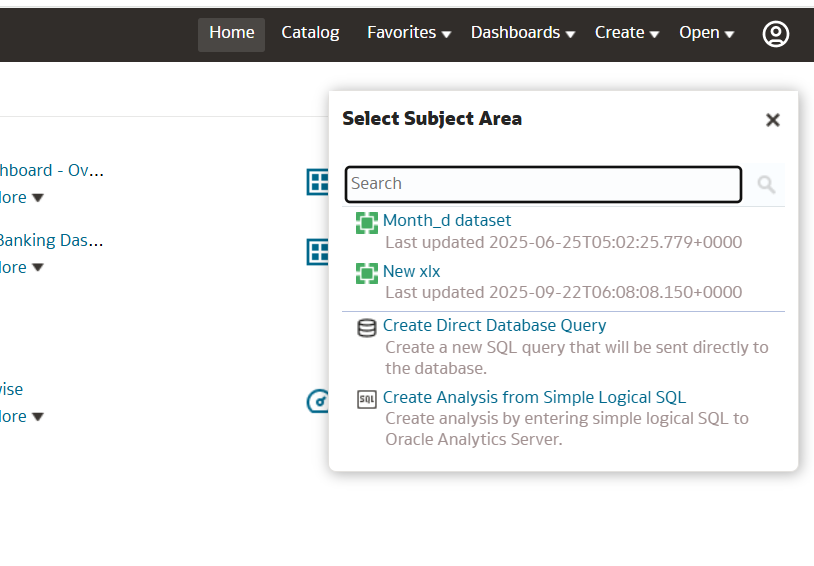
unable to see subject areas which used to be inside RPD.
0 -
That usually happens when there is an issue with the connection pool, Please check your RPD connection pool, and make sure all the details are given correctly. once done re-deploy the RPD and check if the subject areas are visible.
Hope this helps!
0