Dear Expert,
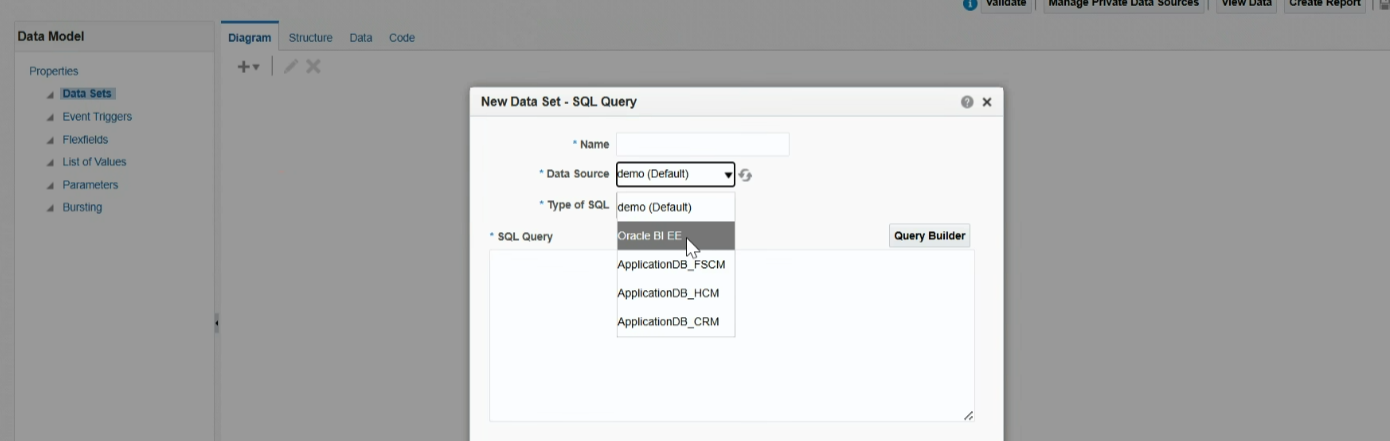
Could you please confirm how to get the access for Oracle BI EE access. for it's not coming in Drop down.
Thank you!
Please refer the following post
@jsmithA , Hope you got a chance to look at the above answer. If you are still having issues, please feel free to update the post. Thanks
Hi @jsmithA,
Please find below some more explanation which might be useful for the better understanding.
In Oracle Fusion BI Publisher, an Oracle BI EE (OBIEE) data source connects your reports to the underlying data model, often pulling from Subject Areas defined in OTBI, allowing you to leverage existing analytics (like Analyses/Answers) as a data source for BIP reports, simplifying data retrieval by using predefined logic instead of direct SQL, and managing access through BI Publisher's Administration pages. You define these connections via JDBC/JNDI in the Admin console and then select the OTBI analysis or subject area within the BIP Data Model editor to fetch data for your layouts.
Please note: we can't access the fusion database tables using Oracle BI EE data source.
If your requirement is to execute a direct query on a Fusion Database table, need to use the appropriate data source. For ERP, use 'ApplicationDB_FSCM'. Similarly for other modules accordingly.
Hope this help.
Thank you.
Additionally, if you are looking for more info regarding 'Integration of Oracle BI EE with Oracle BI Publisher', please take a look into the following Oracle Document:
https://docs.oracle.com/middleware/12211/biee/BIEUG/GUID-A20301E2-3B22-4284-90FB-2AF861E2E9CD.htm#BIEUG2774
We have built an OTBI report intended for Line Managers to view their subordinates’ emergency contact details. The report uses the Workforce Management - Person Real Time subject area. When a Line Manager runs the report, the emergency contact fields (e.g. EC Phone Type, EC Phone Number, EC Email Type and EC Email Address)…
Hi All, Good Day. We have created one custom OTBI report and it has "Business Unit" as of one of the parameter. The related list of values is showing all the business units and we want to restrict it to the user who has the related Business Unit data access set access. Please let us know how to achieve this in OTBI report.
I have a Leave Details Report with the condition below to restrict the report based on the logged-in user's AOR. However, the report is not returning any data for any legislation, when users run it under the 'About Me' context.
Our Requisition OTBI analysis is having many values Requisition Number Requisition Title Requisition Status Hiring Manager Full Name Recruiter Full Name am able to see values for all. When am passing Prompt(Hiring Manager Full Name or Recruiter Full Name) am not able to see the data. Am sure we have values/data for passed…