Categories
- All Categories
- Oracle Analytics and AI Learning Hub
- 40 Oracle Analytics and AI Sharing Center
- 20 Oracle Analytics and AI Lounge
- 277 Oracle Analytics and AI News
- 50 Oracle Analytics and AI Videos
- 16.2K Oracle Analytics and AI Forums
- 6.4K Oracle Analytics and AI Idea Labs
- Oracle Analytics and AI User Groups
- 103 Oracle Analytics and AI Trainings
- 18 Oracle Analytics and AI Challenge
- Find Partners
- For Partners
How to set a fixed width for a column in OAC Classic Dashboard?
Hello,
I'm creating a dashboard and adding some columns to include links to other dashboards. However, these columns are dynamic and keep adjusting to each other as I add items to them.
Is there a property that allows me to set a fixed width for the columns at a specific value?
Thank you in advance

Answers
-
What app within OAC are you using (DV, Classic, BIP) and inside the app what visualization are you using (table, pivot, text box)? A screenshot is also helpful.
If you are in DV for example and using Text box viz, you can change you canvas properties to Freeform and have complete control over the size of the Text box.
1 -
Hi @Carter Beaton ,
I am using Classic view in OAC. I am adding the column and embedding a Section and Link or Image object inside the section.
Thank you
0 -
Hi,
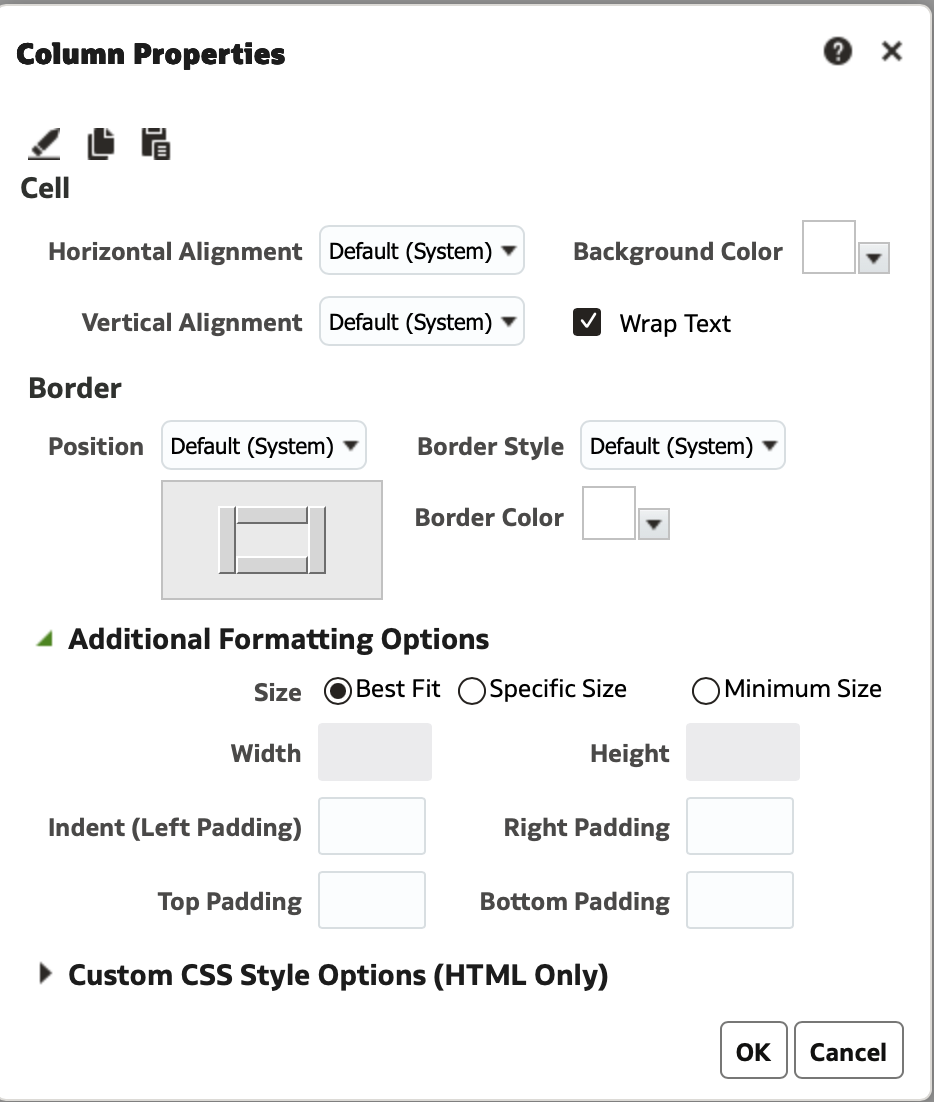
The column properties (gear icon > top right on column) allows you to set the properties for width.
Expand 'Additional Formatting Options'.4