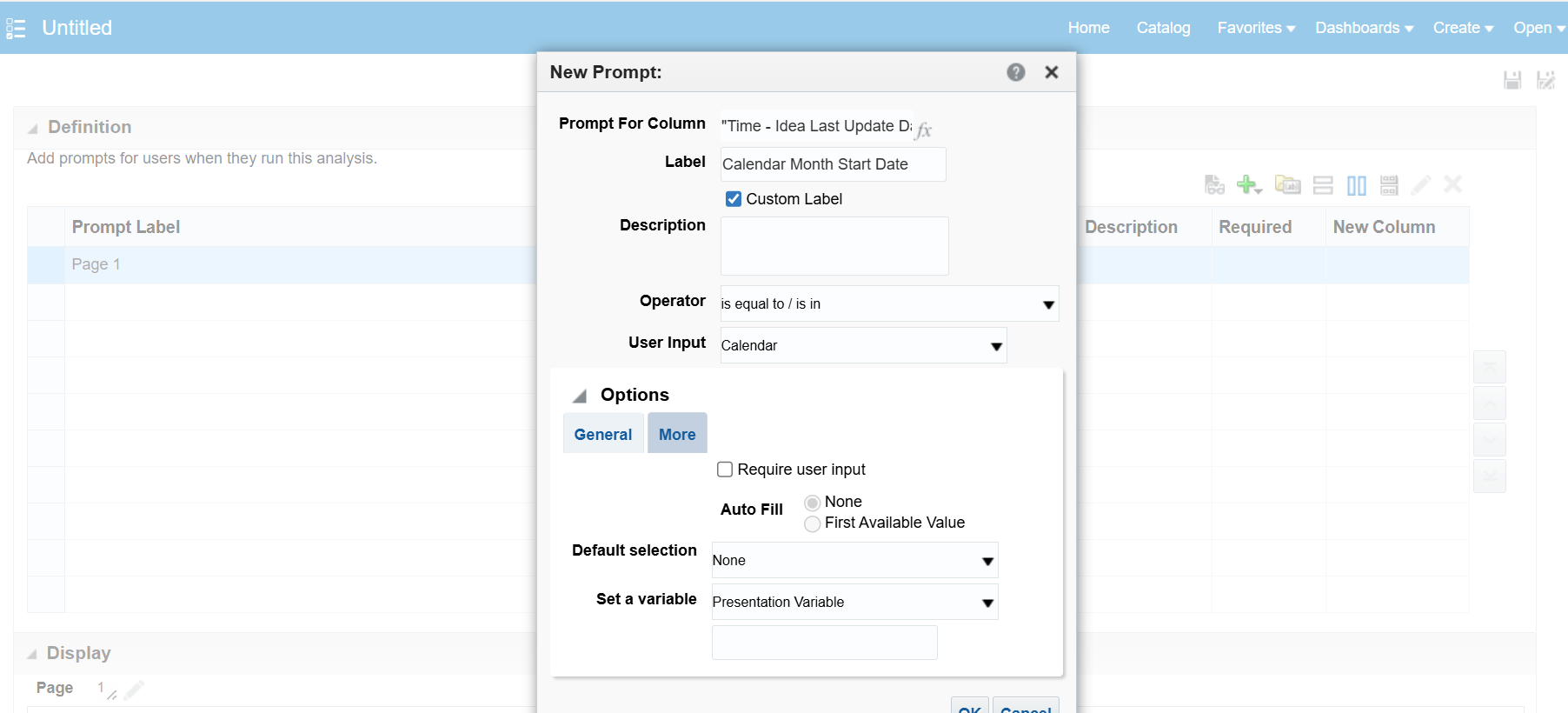
How would a prompted input be used for filtering the analysis (i.e user selects a date in a calendar dating from that date till present for generating the analysis)?
Hi,
Please check below resources to get more understanding on prompts and how to use them:
Filtering OTBI report off of the current system date? — Oracle
OTBI - Need filter on from date to To date as sysdate — Cloud Customer Connect
Fusion Katta: Oracle Fusion HCM OTBI - Chapter 5: Filtering and Prompts in OTBI Reports?
Create Prompts
Thanks.
Hi @User_M2U6X,
Welcome to the Oracle Analytics & AI Community!
You have to define a Presentation Variable while defining the Prompt and then need to use that Presentation Variable in the filter or in case you want to use it in any calculations.
Please take a look into the following docs for more information on Presentation Variable and some examples
Presentation Variable:
https://docs.oracle.com/en/cloud/saas/otbi/otbi-user/advanced-techniques-reference-stored-values-variables.html#GUID-0861B851-8E5D-45C3-9E92-B27821CF6F96
Advanced Techniques - How Dashboard Prompts and Analysis Prompts Interact:
https://docs.oracle.com/en/cloud/saas/otbi/otbi-user/advanced-techniques-how-dashboard-prompts-and-analysis-prompts-interact.html
Display Prompt filter values in a OTBI report:
https://erpwebtutor.com/display-prompt-filter-values-in-a-otbi-report/
Hope this help.
Thank you
@User_M2U6X , Welcome to the Oracle Analytics Community.
Here are the high-level steps with the screenshot …
Configure:
Example: Variable Name: P_FROM_DATE
This gives users a calendar picker.
Save the prompt.
Use the Presentation Variable in the Analysis Filter
Open the OTBI Analysis → Criteria → Filters.
Add filter: Transaction Date >= @{P_FROM_DATE}{01/01/2000}
Hope it helps!
Explore how to build agents using code in AI Data Platform. We'll create an agent that examines and analyzes the contents of a Github repository and reports its findings. The session demonstrates how to use different developer tools to create agents including the AIDP extension for VS Code and Codex. Using these tools we…
Our Requisition OTBI analysis is having many values Requisition Number Requisition Title Requisition Status Hiring Manager Full Name Recruiter Full Name am able to see values for all. When am passing Prompt(Hiring Manager Full Name or Recruiter Full Name) am not able to see the data. Am sure we have values/data for passed…
Hi Experts, We are using Oracle BI Publisher Email Bursting to distribute reports via email. Currently, one of our bursting outputs generates a report of approximately 20 MB, and we are trying to understand whether there are any size limitations that could impact email delivery. Scenario: Report Delivery Method: Email…
Team, We have a requirement to select below PVOs HcmTopModelAnalyticsGlobalAM.ProfileAM_ProfileItemPVO HcmTopModelAnalyticsGlobalAM.ProfileAM_ProfilePVO HcmTopModelAnalyticsGlobalAM.ProfileAM_ContentItemPVO HcmTopModelAnalyticsGlobalAM.ProfileAM_ContentTypePVO Do we have any documentation around these?
We have a requirement of enabling OTBI report in Purchase Requisition Redwood page similar to classic UI.How can that be done?