Organization Name
GSO
Description
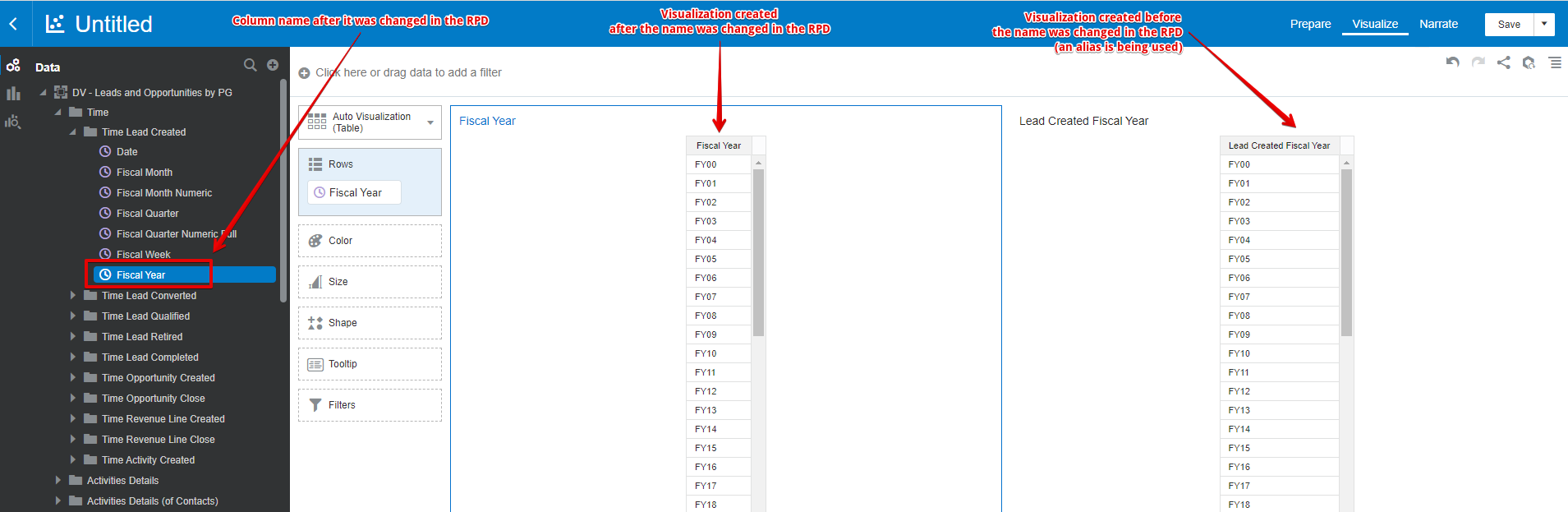
When a column name is changed in the RPD this is what happens in a DV Project:
1) the change is reflected in the Subject Area (Data pane)
2) the change is not reflected in the calculations and expression filters where the column is used (an alias is used instead)
3) the change is not reflected in the objects (visualizations and filters) where that column was added before (an alias is used instead)
We need the possibility to replace the alias of a column with its current name at the server level (all projects in the DV Catalog).
Use Case and Business Need
Column names are frequently changed in the RPD.
The effect is that their aliases are being used in the Projects where they were used before the name change.
It would be really helpful to have the possibility to replace the alias of a column with its current name at the server level.
I'm thinking at an option in the Console tab that will be available only for Administrators.
Original Idea Number: 63efd64284