Categories
- All Categories
- Oracle Analytics and AI Learning Hub
- 34 Oracle Analytics and AI Sharing Center
- 22 Oracle Analytics and AI Lounge
- 276 Oracle Analytics and AI News
- 47 Oracle Analytics and AI Videos
- 16.1K Oracle Analytics and AI Forums
- 6.3K Oracle Analytics and AI Idea Labs
- Oracle Analytics and AI User Groups
- 99 Oracle Analytics and AI Trainings
- 16 Oracle Analytics and AI Challenge
- Find Partners
- For Partners
Welcome to the Oracle Analytics Community: Please complete your User Profile and upload your Profile Picture
Option to select Excel column headers
Joel Acha11111
Rank 5 - Community Champion
Description
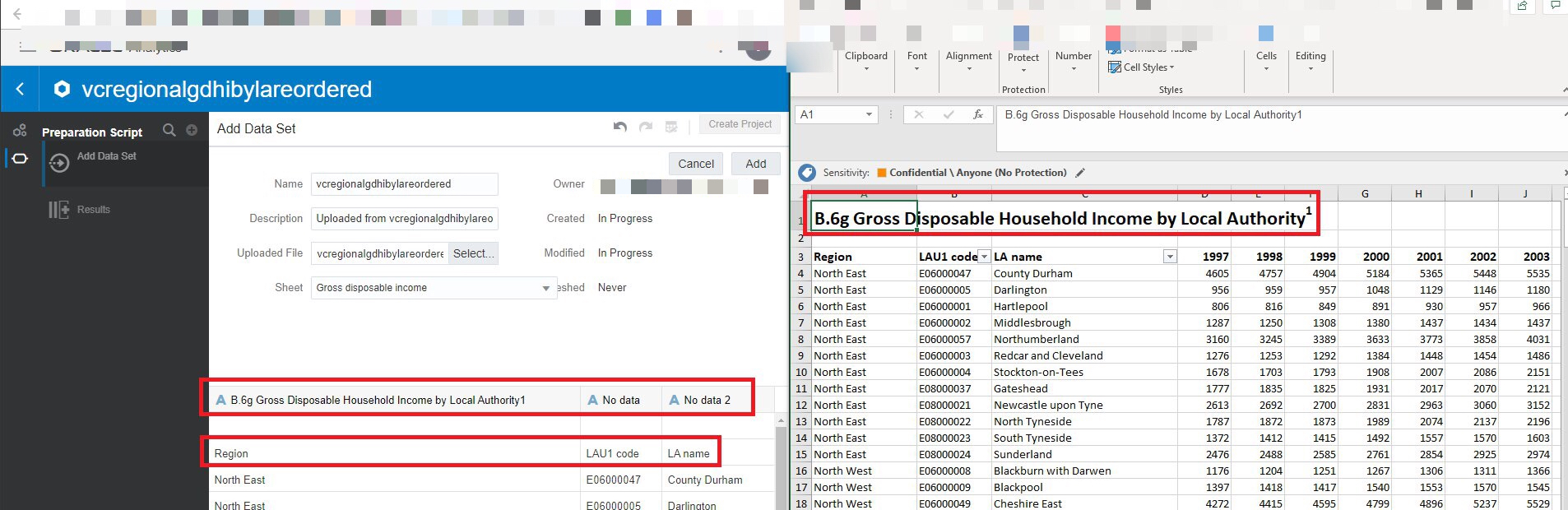
When importing an Excel dataset into OAC’s Data Visualisation, there is no option to select the row to use for column headers. The 1st row is used by default and there is no option to override that.
Use Case and Business Need
The only option available currently is to alter the Excel worksheets and to place the row with column headers in the 1st row. This is quite cumbersome and most tools that import from Excel do provide this option to allow the row with column headers to be selected.
More details
See above.
Original Idea Number: 1773eebe4a
Tagged:
22
Comments
-
Agreed!
0 -
Agree. Important to improve user experience.
0 -
Agree
0 -
This is a feature of Power BI and is heavily used. Would be good to have this same functionality as we move reporting to OAC.
0
