Organization Name
Uponor Oyj
Description
When Exporting OAC reports to Excel, The column value with similar value in different cells are merging, instead of repeating the values in each cell. There is no global setting/configuration available in OAC (like On Prem OBIEE11g/12c) to change this default behaviour of Exporting the reports to Excel. This is causing the readability issue as Excel cells are merging/suppress for the reports after exporting.
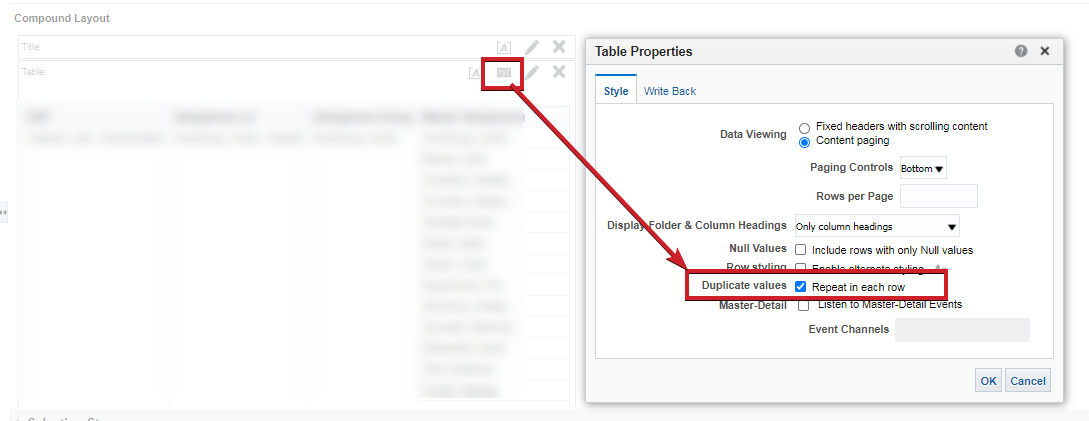
However we can make the changes at report level in OAC to repeat the values for each of the field in column properties (Column Format -> Value Suppression -> Repeat) and able to get exact same export output as generated from On-Prem BI application, But this will increase the effort to modify each and every report field as we have thousands of reports in the catalog.
Use Case and Business Need
When Exporting OAC reports to Excel, The column value with similar value in different cells are merging, instead of repeating the values in each cell. There is no global setting/configuration available in OAC (like On Prem OBIEE11g/12c) to change this default behaviour of Exporting the reports to Excel. This is causing the readability issue as Excel cells are merging/suppress for the reports after exporting.
However we can make the changes at report level in OAC to repeat the values for each of the field in column properties (Column Format -> Value Suppression -> Repeat) and able to get exact same export output as generated from On-Prem BI application, But this will increase the effort to modify each and every report field as we have thousands of reports in the catalog.
More details
When Exporting OAC reports to Excel, The column value with similar value in different cells are merging, instead of repeating the values in each cell. There is no global setting/configuration available in OAC (like On Prem OBIEE11g/12c) to change this default behaviour of Exporting the reports to Excel. This is causing the readability issue as Excel cells are merging/suppress for the reports after exporting.
However we can make the changes at report level in OAC to repeat the values for each of the field in column properties (Column Format -> Value Suppression -> Repeat) and able to get exact same export output as generated from On-Prem BI application, But this will increase the effort to modify each and every report field as we have thousands of reports in the catalog.
Original Idea Number: a99b1cf54e