Categories
- All Categories
- Oracle Analytics and AI Learning Hub
- 54 Oracle Analytics and AI Sharing Center
- 26 Oracle Analytics and AI Lounge
- 311 Oracle Analytics and AI News
- 57 Oracle Analytics and AI Videos
- 16.4K Oracle Analytics and AI Forums
- 6.7K Oracle Analytics and AI Labs
- Oracle Analytics and AI User Groups
- 117 Oracle Analytics and AI Trainings
- 24 Oracle Analytics and AI Challenge
- Find Partners
- For Partners
Dashboard Prompt - Second Parameter Filters Based on the First Parameter Selection

We have created a new Dashboard Prompt with two individual prompts.
1. Review Period
2. Goal Plan Name
If we select the Review Period, the Goal Plan Names should be filter for the selected review period. But it’s not changing.
Kindly support with some idea.
Attached the completed configuration steps.
Answers
-
(Assuming you are using OBIEE based on the category you posted in, and not having opened your attached file because I don't randomly download "Word" files from a public forum...)
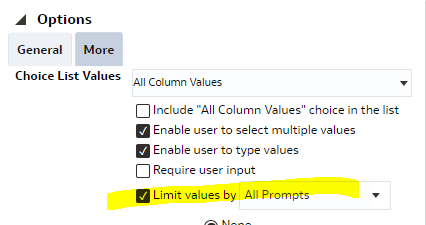
Did you try with using the "Limit values by" option in your prompt?
 0
0 -
Hi,
You can refer below MOS doc -
An Example of How To Create A Cascading Contrained Dependent Dashboard Prompt (Doc ID 1573682.1)
Regards,
Arjun
0 -
Hi ,
Kindly check the tables/columns used in the prompt has the join or relationship in the RPD.
Then do the "Limit values by" suggested above should work.
0

