Is there a way to identify list of analysis which are using a particular saved filter, how to do in OAC?
If you are looking for a way to check all the analysis present in the OAC catalog and create a analysis out of it. You can use catalog manager for the same. Please refer the below document for more details.
https://docs.oracle.com/en/middleware/bi/analytics-server/user-oas/creating-reports-display-catalog-data-using-catalog-manager.html#GUID-E804B1AF-B792-4929-BE47-33CA0F668715
There may not be an out of the box solution for this requirement, you probably can play around with usage tracking reporting data to see if you can match the logical sql for the saved filter and pull all analyses that have this matching sql. This will only give data for the reports that were executed/run. Other comments welcomed.
The full out of the box solution is to export the BAR, extract it and use the catalog manager in offline mode (to not enforce security) and then do a full catalog search for the path of your saved filter. You will find all the places where it is referenced.
If you work online with catalog manager you will be limited to only the places (the objects) your account can access. Working offline is the only way to have a 100% coverage.
The official method to extract the BAR is documented, but Oracle does everything to hide it and therefore I can't link to where it is still documented (last time I mentioned a MOS note with the command, the MOS note was removed a few hours later), if needed ask internally.
For offline catalog work, just unzipping the BAR will do the job (the official extract command is required for the RPD etc.).
I agree with @Gianni Ceresa and would add that it is good to experiment with the reports catalog manager provides. Try different options on a small catalog folder where you know the underlying content and check for your dependent objects appearing in the output. Some objects may not be listed in the report you run, so it is good to experiment with the options until you get what you are looking for.
This technique is really the only way to perform impact analysis on your shared code, as well as potentially identify dead code, which can be more challenging.
@Gianni Ceresa When using Full Catalog Search, we're unable to identify where the filter is being used, as it can only search for the name of the analysis or filter, not within the internal XML or unable the filter being utilized within any analysis.
What I mean by full catalog search is a content search, not generating reports from the catalog.
You can even search with any other tool you have available in the system where you extracted the catalog (fgrep if it’s Linux or any other tool in Windows).
You have to search for the full catalog path of your filter, because when an object reference a saved filter it does it by its full path in the catalog. It is stored in the object XML.
I don’t have a catalog manager in front of me right now, but you can definitely do a full catalog search (in the same place where you can then do a search & replace), and that should give you a list of all the catalog objects matching your search.
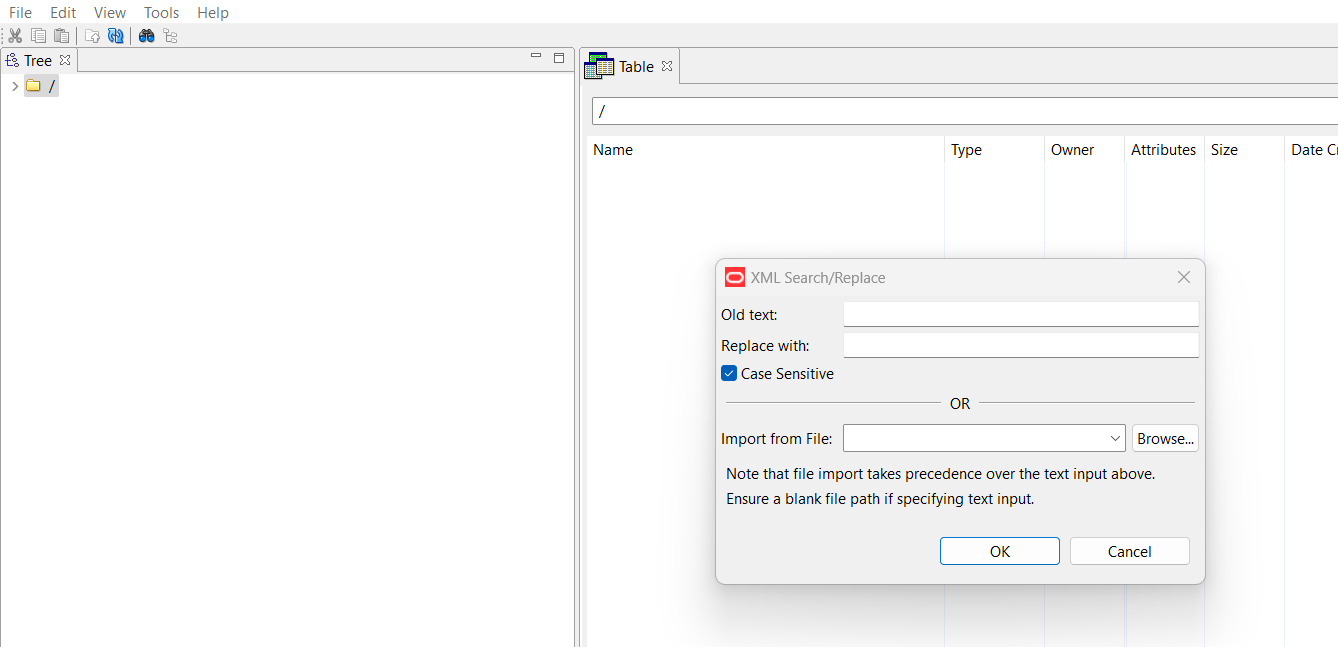
@Gianni Ceresa This is the place where i could search, correct ?
But here if we add something in old text and nothing in replace with then all the places where that text is present, it would replace that text with blank.
This is not doing search, but Search and replace.
Give it a try, I believe it will tell you where it does find all the occurrences.
And it doesn’t matter if you replace that search with blank, because it is anyway not a catalog used by anyone or anything.
You can search and replace with the same string, just to be able to run it again and again if needed…
But that catalog is useless, it is just for the search, you will anyway delete it when you get what you need.
Where AI meets business outcomes Oracle AI World brings the Oracle community together to explore how AI and other technology innovations are driving real business outcomes across industries. Discover what’s new through: Mainstage keynotes to hear the latest directly from Oracle leadership Product demonstrations Customer…
What am I doing wrong here? There is only one selection in the Target Canvas??
In BIP. I was able to group tables. Is this possible in OAC
I creates a parameter "Role Name" and then I put the Role name field in the filter and made a bind to the parameter, When I add the value in the parameter, it works. When I delete it from the parameter it give me <empty> How do I get rid of the <empty>
Hi, all, I have been struggling with connecting to Teradata in OBIEE Admin tool. I can't import Metadata to the RPD that exists. I am not sure about if it is due to my config of ODBC Teradata is incorrect or anything else? Please find the following errors as attached: Many thanks for your help!
Hi Team, Has anyone upgrade OAS system from the 2024 to 2026 version? if yes, could you please share the resposne files. Regards, Chand