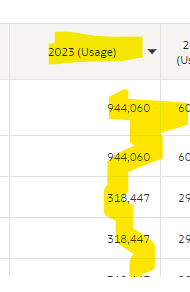
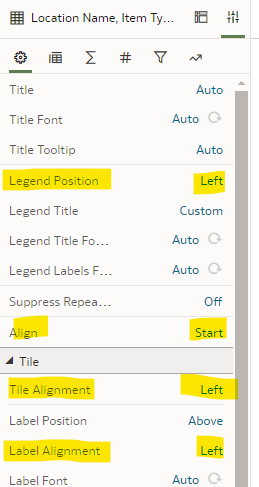
How to Left Align all contents Header as well as Rows in Table Visualization in NSAW Workbook?
Hi @Vismay Barot ,
Currently, this functionality is not available but there is an Enhancement Request in the Ideas Lab here:
The available adjustments you can make are documented here: https://docs.oracle.com/en/cloud/paas/analytics-cloud/acubi/adjust-visualization-properties.html#GUID-C22904E8-D778-4818-BAA5-8376478041F5
If you find this reply to your question useful, others might as well. By clicking the “Yes” button for “Did this answer the question?” below, you’ll be able to help the community members who might have a similar concern find the answer easier.
Regards,
John
Thank You so much John for your Prompt response, just so we're on the same page, wanted to clarify that, I am okay with Left Aligning everything and not just limited to 1 column.
Also, I was wondering if any of these would be useful for the same:
Hi @Vismay Barot,
Yes, you are in the right area and these are all customizable. It looks like you have a basic Tabular Workbook, so formatting is not as important as the other Data Visualizations where the look and feel is just as important as seeing the data.
Sorry, just to clear some air:
I am not using Tableau, it's NSAW Workbook (from OAC Console) and above screenshots are from here itself:
in which if you can see
Table Header (Highlighted Yellow) needs to be Left Centered
Table Rows (Highlighted Green) needs to be Left Centered
So, I was wondering if this is a possibility or not.
If yes, please let me know a workaround.
Thank You 😊
Yes, I understand. This is OAC functionality and the functionality is as mentioned earlier.
Do you know if connections that do not use TLS will be affected by the September 2026 update? Regards, Alison.
Hi Team, We would like to raise an enhancement request for the SSO/SAML configuration guidance for OAS 2026. We have already raised multiple SRs regarding OAS 2026 SSO configuration. However, we are facing difficulties getting the required guidance, as the available documentation does not clearly cover the OAS 2026 SSO…
We are planning to archive the Contract and Lease data currently sourced from the External Source as Contract and Lease accounting functions are being migrated to Oracle's CLM and Lease Accounting modules. At this stage, only active and partially closed records are being converted into Oracle and the remaining historical…
The difference column is a calculation, and I would like to average that row.
We are trying to convert our OAS reports to OAC and one of the parameters in the where clause of the report is what I am trying to make in OAC. I created a calculation as follows and I am trying to put it into a filter . The code validates EVALUATE('GREATEST ( TRUNC ( NVL (%1, TO_DATE (''1/1/2013'', ''mm/dd/yyyy'') ) ),…