Categories
- All Categories
- Oracle Analytics and AI Learning Hub
- 44 Oracle Analytics and AI Sharing Center
- 20 Oracle Analytics and AI Lounge
- 278 Oracle Analytics and AI News
- 56 Oracle Analytics and AI Videos
- 16.2K Oracle Analytics and AI Forums
- 6.4K Oracle Analytics and AI Labs
- Oracle Analytics and AI User Groups
- 103 Oracle Analytics and AI Trainings
- 20 Oracle Analytics and AI Challenge
- Find Partners
- For Partners
How to remove Fact Joins
Greetings, I'm trying to remove couple of Joins (previously made by another party):
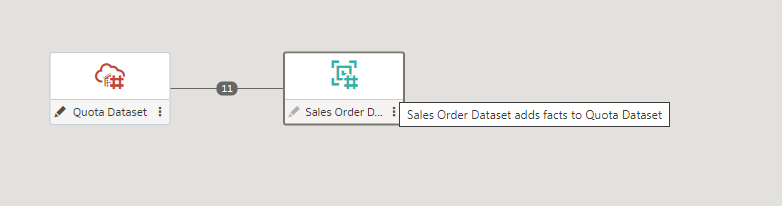
Out of these 11 Joins, I would like to remove
the Date Join:
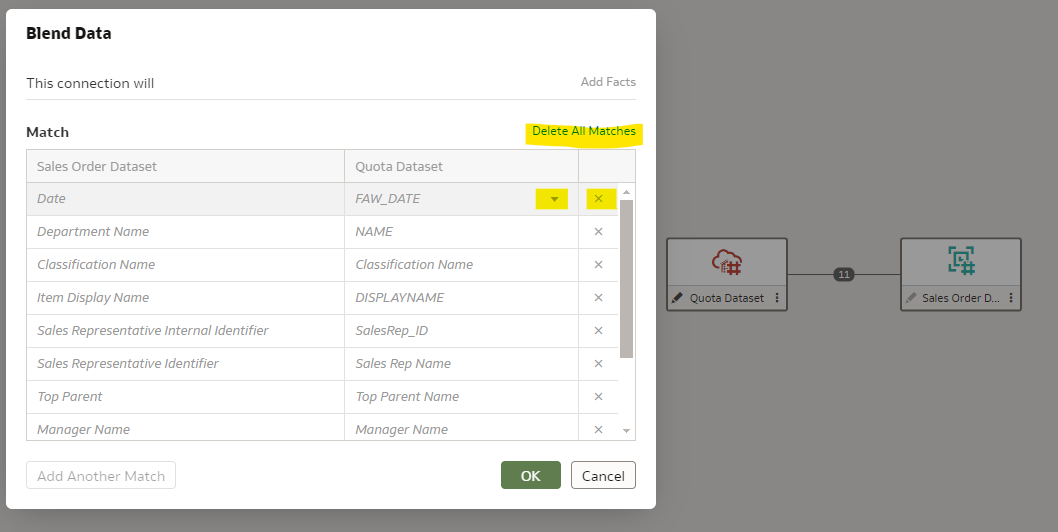
Neither can I click on dropdown nor can I click on "x". When I hit "Delete All Matches" and hit OK, it still remains as is.
I would suspect if it would be because of this:
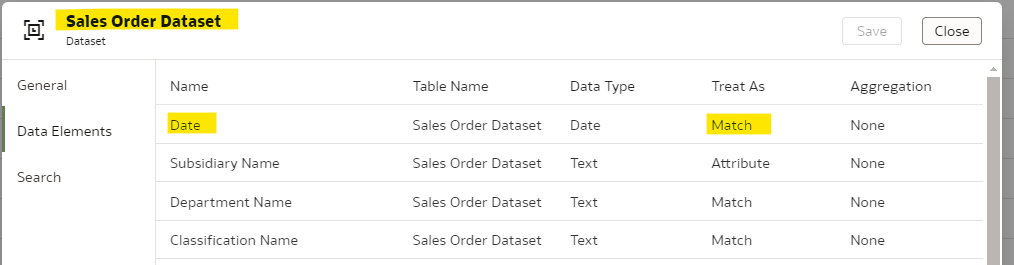
Please let me know if there is any more to the story and your suggestions to remove the join will be highly appreciated.

Best Answer
-
Hi @Vismay Barot ,
You don't have admin privileges on the datasets. That's why all options are greyed out in the Blend Data dialog, and the Access tab is not displayed in the Inspect dialog for the dataset.
0
Answers
-
Not ideal but have you attempted to delete the entire join and recreate it with just the 10 joins that you require?
0 -
Is there any Data Flow mapped to this Dataset if yes try to remove the dataset first from Data Flow and then make your modifications and re-map it again to Data Flow
Or if this Dataset results are saving in ADW could also cause an issue
0 -
@Federico Venturin , you're right. I do not have access rights to this dataset which is why I cannot modify. I replicated this dataset and that did the work.
Thank You @Federico Venturin , @Joel and @Mostafa Morsy-Oracle for your inputs.
0


