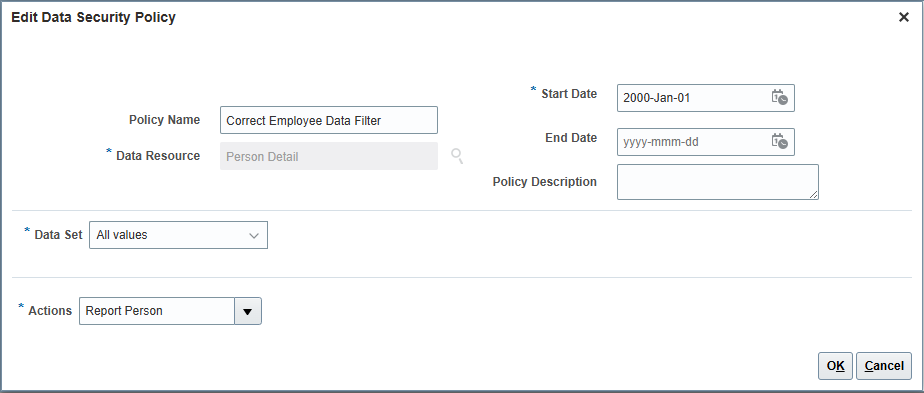
I came across this:
Document 2501076.1
Has anyone been able to apply and have it resolve their issue? I've followed it but my parameter drop downs are still FirstName LastName instead of LastName, FirstName like it needs to be in order.
Hi @Matthew - Town of Aurora,
Welcome to the Oracle Analytics Community.
If you have not already come across, please take a look into the following Oracle note to see if there's any betterment.
https://support.oracle.com/knowledge/Oracle%20Cloud/2463343_1.html
Hope this help.
Thank you.
Hi Bhaskar,
Thanks for replying, but your link is the exact same data security policy changes to the Expense Manager Role I followed in my link. It's odd why Oracle doesn't just fix this as it's an issue in the seeded role. Besides that, are there scheduled processes I need to run after making those changes?
I've tried running:
Import User and Role Application Security Data
However, I am still seeing the parameter return FirstName LastName.
Please check the following 2 processes.
Also please make sure you cleared report cache & browser cache by clearing the cookies and logging out of the browser, closing the browser and doing a fresh login to check. Just to make sure cache is not giving the previous records.
Hi @Bhaskar Konar,
I've gone back and checked my data security policy and don't see any differences:
I've ran those processes and cleared both OTBI report and subject area caches and also the browser caches, but the filters still have not reflected the LastName, First Name format needed.
In fact, just by adding a data policy, wouldn't it also confuse users as the dropdown in theory would contain both FirstName Lastname as well as Lastname, Firstname?
I'm not able to replicate the issue in my instances.
I would recommend to raise an SR with Oracle support and get their valuable suggestions.
Agenda Presentation: What's New in FDI 26.R3 Open Q & A: Ask your questions of implementation and product specialists Replays of past FDI CEAL Guidance Office Hours are available on Oracle VideoHub here. Fusion Data Intelligence - CEAL Guidance Office Hours The FDI Office Hours are hosted by CEAL solution architects who…
I'm building a dashboard for HR to show the responses from our Employee Exit Questionnaire. For the open-ended questions, rather than just a table list of responses, I'd like to show some kind of AI-generated summary. I'm quite new to using FDI. From my research, it seems like it should be possible, but I've not been able…
In FDI, most of the Hierarchy folder wont populating any data. This is one of the most required data from HR. Can anyone assist me how can I get that data in FDI.
We want a better grasp on what is considered custom data so we can plan ahead and scale properly before we get too big. Fortunately we are no where near the 50gb limit as found using the subject area for custom data but it doesn't tell us other than 'System' where the custom data is coming from. I found documentation here:…
Is there a way to refresh our development environments in OAC with production data? There a lot of developments that didn't make the cut into production and/or was only used for testing and we would like to clean up dashboards, datasets, data flows, etc… Possibly similar to how receive environment refreshes in our Oracle…
Hello Oracle Team, Many organizations currently rely on both Oracle Transactional Business Intelligence (OTBI) and Oracle Fusion Data Intelligence (FDI) for reporting and analytics. While FDI continues to expand its subject area coverage, there are still several OTBI subject areas that are not yet available in FDI. Could…