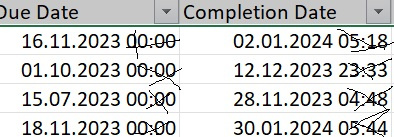
I'm trying to create a report showing learning due date and exact completion date. I would like to remove the hour that only date should be visible in the report. Is there any way to remove hour?
Hi @Agnieszka Brela,
Welcome to the Oracle Analytics Community.
Please define your column as Date and it'll remove the timestamp. You can use syntax like following.
CAST(DUE_DATE as DATE)

DUE_DATE - Is the 'Due Date' Column.
Hope this help.
Thank you.
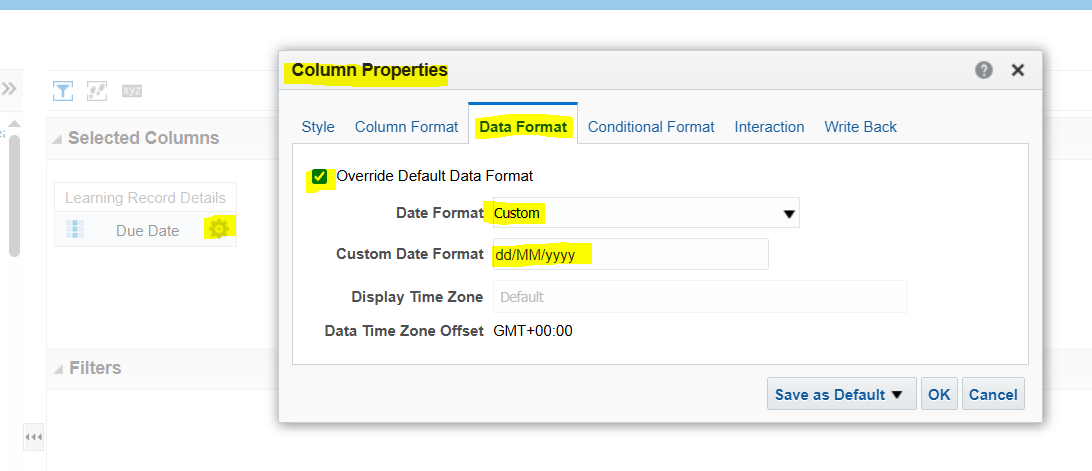
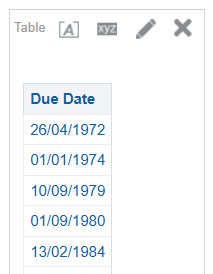
Another way you can achieve it by changing the 'Data Format' of that particular column and define it as per your requirement.
Please find below a screenshot and follow the highlighted in Yellow.
Try the below options:
If you're writing a SQL query, use:
sql SELECT TRUNC(learning_due_date), TRUNC(completion_date) FROM learning_table; This removes the time portion, leaving only the MM/DD/YYYY format.
2. Adjusting the Date Format in OTBI
In Oracle Transactional Business Intelligence (OTBI), you can modify the column properties:
Go to Column Properties → Data Format. Select Date Format and choose a format that excludes time (e.g., MM/DD/YYYY).
3. Using CAST or TO_CHAR for Formatting
you can convert the date to a string format:
sql SELECT TO_CHAR(learning_due_date, 'MM/DD/YYYY') AS Due_Date FROM learning_table;
Is there a log that can be checked on our side that might help with the issue. I've submitted an SR, however it is currently being bounced around between different areas. Could not establish connection. oracle.xdo.delivery.ssh2.SSHMessageException: Error in decrypting message Current thought is that this is an issue with…
Hello, I'm trying my hand at creating some KPI's and Dashboard Visualizations for the Recruiting Activity Center (RAC) per the following documentation: Flexible Reporting in Redwood Dashboards Redwood Experience: Recruiting Dashboard When I add a session variable to my OTBI reports, I correctly see a value of 0 in my…
'Facility Name' exists in the Recruiting - Recruiting Real Time multiple times with varying usage. Job Requistion -> Job Requisition - Additional Details -> Facility Name Job Requistion -> Location -> Facility Name Is there any reason why these two Facility Names would not exist in the Recruiting - Real Time Events subject…
We are encountering issues with our OTBI dashboards where there is no option to export to Excel. This seems to be a new issue after the latest update to 26B. I made a change to the report layout (moved one analysis into its own section), and now I cannot export the page. As you can see in my attached photos, the export…
we have a requirement to fetch Worker Historic information like Current Job Title Previous Job Title Previous Department New Department Previous Manager New Manager Previous Location New Location which subject area stores this information in the OTBI?