Categories
- All Categories
- Oracle Analytics and AI Learning Hub
- 48 Oracle Analytics and AI Sharing Center
- 19 Oracle Analytics and AI Lounge
- 286 Oracle Analytics and AI News
- 57 Oracle Analytics and AI Videos
- 16.3K Oracle Analytics and AI Forums
- 6.4K Oracle Analytics and AI Labs
- Oracle Analytics and AI User Groups
- 110 Oracle Analytics and AI Trainings
- 20 Oracle Analytics and AI Challenge
- Find Partners
- For Partners
Action link not working for Logical SQL Analysis

Hi Experts,
We have created two analysis which will be a master drill down report, both of these analyses are created through logical SQL, the two analyses are summary analysis and detailed analysis, we have created an action link for a column for summary analysis to navigate to detailed analysis. The summary analysis will display graph while the detailed analysis will have the tabular output.
After which I have attached the summary analysis to a dashboard along with a dashboard prompt.
Detailed analysis fields are also set as prompted for filter.
The issue is this action link is not working, while hovering over the bar in graph shows the action link but when we click on it, it doesn’t work. How to resolve this issue?
Answers
-
Hi Aman, I recommend building your action as a separate object. That way you can unit test it. And reuse it on multiple analysis. Select Create, select Action then Navigate to BI Content. When you double click the completed action in the catalog does it go to the target page with your child analysis (but with no context so you get all rows)? Now add the existing action to the column in your parent analysis. Still works?
0 -
Hi Nathan, the "Navigate to BI Content" option is not present while creating the action, even when I was creating action link it was not present and instead, I had to use "ADF Navigate to BI Content"
0 -
Hi, It is ok for me. Not greyed out.
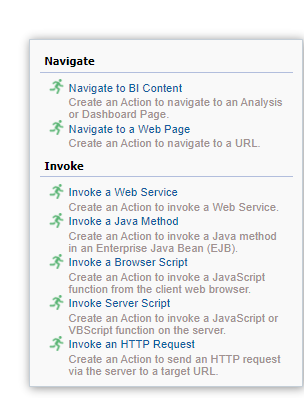
Maybe your privileges? Ask your user with bi administrator role go to page manage privileges /analytics/saw.dll?PrivilegeAdmin to check the privileges granted to your user or a role your users has or inherit?
0 -
Hi, thanks a lot for this, apparently someone had disabled "Create Navigate Actions" for BI Consumer Role, after enabling it, it is now working properly
0
