Categories
- All Categories
- Oracle Analytics and AI Learning Hub
- 54 Oracle Analytics and AI Sharing Center
- 26 Oracle Analytics and AI Lounge
- 313 Oracle Analytics and AI News
- 57 Oracle Analytics and AI Videos
- 16.4K Oracle Analytics and AI Forums
- 6.7K Oracle Analytics and AI Labs
- Oracle Analytics and AI User Groups
- 117 Oracle Analytics and AI Trainings
- 24 Oracle Analytics and AI Challenge
- Find Partners
- For Partners
How to remove duplicate lines of data in OTBI report.

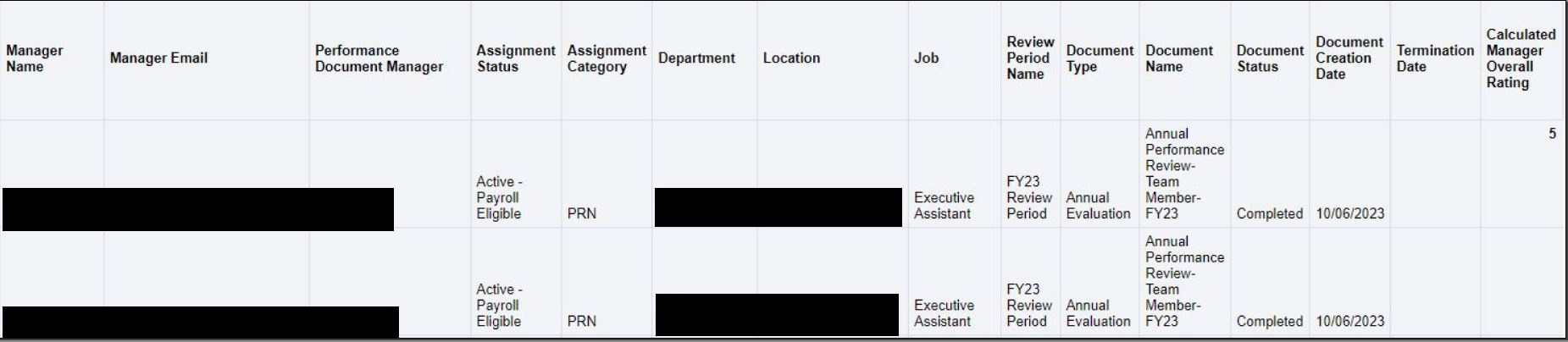
I've written a report in order to provide aggregate data for our performance documents and their rating score. My report produces the correct data, with the exception of it producing an additional line of data for each employee. The only difference in the two lines is the calculated manager overall rating field. On one line it shows the rating score, and on the second line the field is blank. How should I remove the additional line with the blank information in the calculated manager overall rating field. Screenshot below for reference:
Answers
-
Please try the following:
- Save your analysis with a different name (so that you do not overwrite your existing analysis as a precaution)
- Click on the advanced tab of the respective analysis
- Under Advanced SQL Clauses section, you would see a check box for "Distinct"
- Check that check box and click on results
If all goes well, save your analysis (created as part of step 1) as needed.
0 -
Hi @Shankar-Oracle,
Thank you for your response. I tried the above steps and unfortunately it did not help. I'm still getting the same issue within the results tab.
0 -
Please open a new SR, by choosing reporting as your issue and OTBI custom report when further questioned (while filing the SR). Please share the SR number here, so that I can pull it into my queue for further analysis.
0 -
0